Digital Marketing

How to capture UTM parameters in Typeform

Turn Tyepform responses into full attribution records ready for your marketing tools, and see what drives leads, not just form fills.
Start capturing attribution →
Attribution is broken

Why use Madlitics with Tyepform to capture UTM and attribution data

See which channels, campaigns, and content actually drive pipeline and revenue.

Automation icon indicating hands-free marketing attribution and data flow.

Turn attribution into decisions
Move beyond “Direct/Unknown” sources. Capture accurate attribution data to understand what's driving conversions, pipeline, and revenue.

Analytics report icon, indicating data insights and reporting.

Spot top channels
Break down leads by channel such as Organic, Paid Search, Paid Social, and referrals. Identify what is working and shift budget toward top performers.

Impact measurement icon, symbolizing marketing effectiveness.

Find campaigns that convert
Track performance by campaign, source, medium, and landing page. See which efforts generate qualified leads and customers, not just form fills.

Personalization icon, representing customization features.

Persistent attribution tracking
Keep UTM and session data attached to each lead, even if they return later or convert on a different page.

Typeform excels at creating engaging forms, but capturing reliable UTM parameters for attribution is still a persistent challenge for marketers. Typeform can read UTMs from the URL, yet it only sees them when those parameters are present on the exact page where the form is loaded, which means multi-page journeys or embedded forms often drop attribution entirely. In practice, marketers end up seeing UTMs on only a small fraction of responses, while most submissions arrive with blank or partial tracking fields because visitors clicked around the site before converting.

The result is incomplete lead insights and a broken link between campaigns and the Typeform submissions they generate. Madlitics solves this by automatically enriching each Typeform response with persistent, first-touch attribution data—channel, source, campaign, and more—without manual scripts or complex hidden-field workarounds. Instead of wrestling with brittle tracking setups, you get clean, consistent attribution on every submission that’s ready to flow straight into your CRM and reporting stack.

Set up UTM & attribution tracking in Tyepform

Accurate marketing attribution starts with capturing where leads come from. Madlitics works with HubSpot to automatically capture UTM parameters, channel data, and first-touch attribution, then writes it into every form submission for your reporting workflows.

Madlitics multi-channel attribution visualization, showing marketing platforms like TikTok, Instagram, Google, and Facebook. The graphic highlights how different sources contribute to high-performing marketing channels.

Add UTM parameters to traffic sources

Add UTM parameters to every marketing link you use, including paid ads, email, social, and organic search. Madlitics captures UTM parameters and marketing context automatically, then writes that data into every webform submission so HubSpot receives complete lead records.

Use our URL Builder and install Madlitics on your website so attribution data can be captured automatically and attached to every ActiveCampaign form submission.

An example URL with UTMs: yoursite.com/typeform-form?utm_source=google &utm_medium=cpc &utm_campaign=demo-q2 &utm_content=hero-ad


Setup GuideInstall Madlitics on your Website ->

Configure Typeform to capture attribution data

Once your links include UTM parameters, the next step is installing Madlitics on your site and connecting your Typeform form fields for attribution capture. Madlitics automatically collects campaign and session data behind the scenes, then passes it into Typeform fields at submission time so every lead includes complete marketing context.

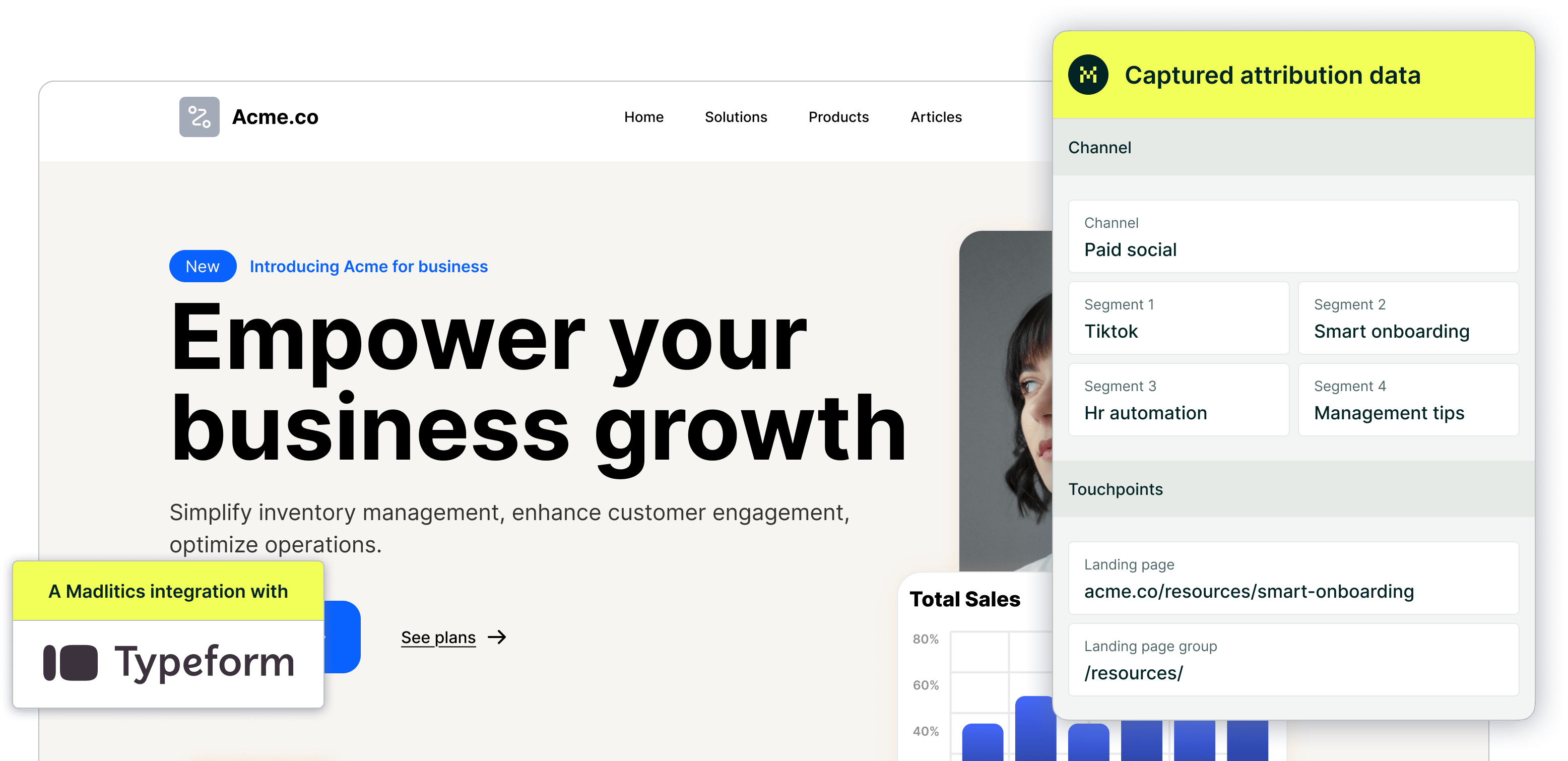
  • Channel (e.g., Paid Search, Organic Social, Direct)
  • Segment(s) 1-4 (Platform, Campaign, Ad Goup, Creative Variation, etc.)
  • Landing page/group (Tracking & first-touch attribution)


Setup Guide
Configure Typeform to collect UTM parameters ->

Screenshot of a form builder interface with a highlighted 'Hidden Input' field. Accompanied by text explaining how to install and set up Madlitics by adding hidden fields to capture marketing attribution data.
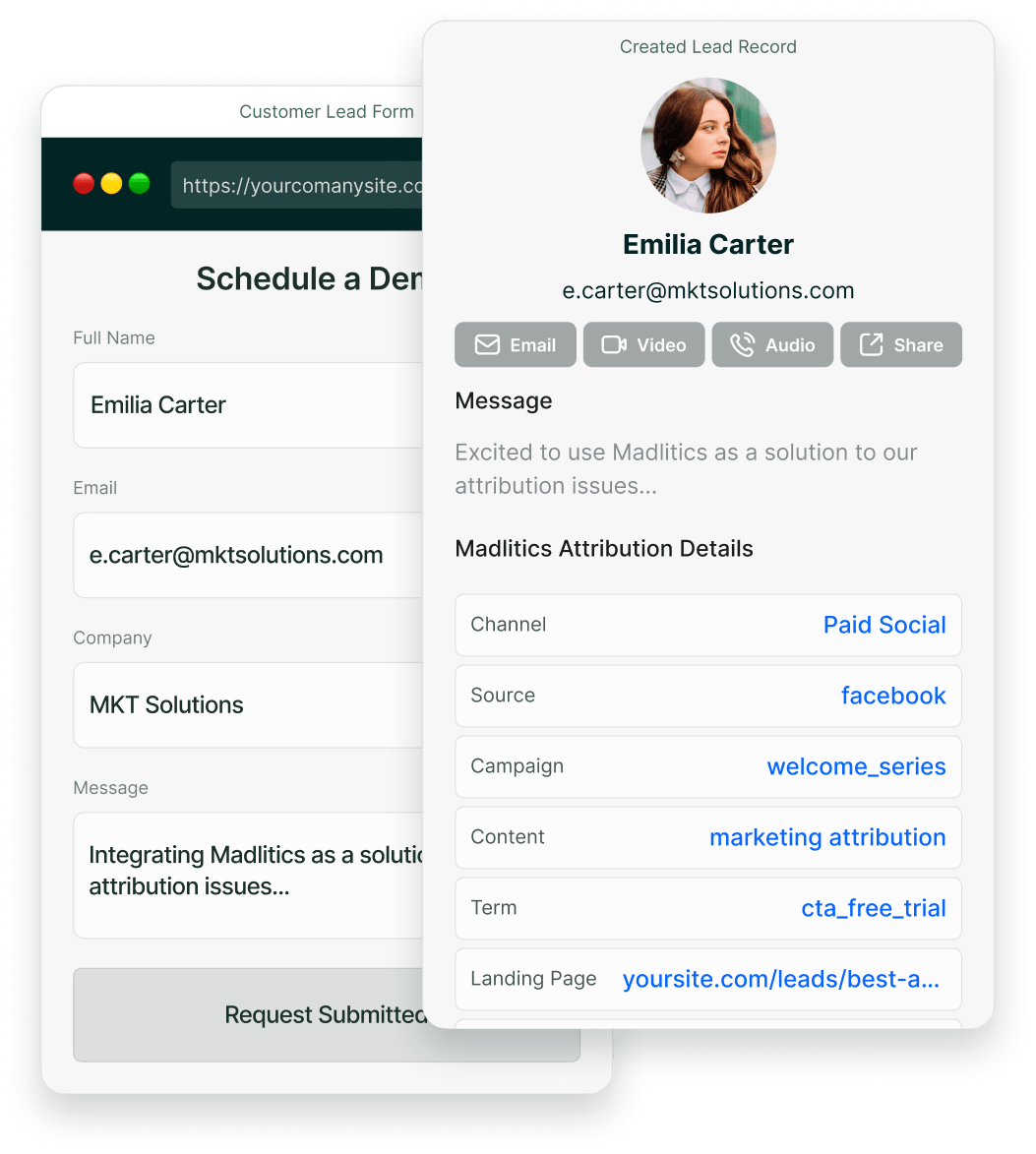
CRM interface showing a detailed view of captured attribution data, including marketing channels, segments, and landing pages. A business profile of a lead is displayed, highlighting how Madlitics enriches lead data for sales and marketing teams.

UTM parameters and attribution data are captured in Typeform

When a visitor submits a Typeform form, Madlitics automatically writes the captured UTM parameters and attribution data into the hidden fields you configured. This turns each submission into a complete record that includes both customer details and the full marketing context in one place.

  • Which channel and campaign generated the lead
  • Which landing page or content converted the visitor
  • Which source and medium drove the submission
  • Which efforts are generating qualified leads and customers, not just clicks

Use your Typeform data in your tools

When a lead completes a submission, Typeform sends customer details plus full UTM and attribution data into your CRM, marketing automation platform, spreadsheets, or BI tools just like any other lead record. With attribution connected directly to submissions, you can finally see which channels, campaigns, and pages are driving real pipeline and revenue.

  • Create reports showing which channels and campaigns generate leads, customers, and revenue
  • Compare performance across channels, offers, and landing pages
  • Give sales teams clear context on how each lead found you
  • Analyze customer acquisition performance inside tools like ActiveCampaign, HubSpot, Zoho, and more
Graph showing new customer growth from TikTok, Instagram, Snapchat, and Google over time, with social media icons surrounding the chart and a callout for social revenue impact.

Use Typeform attribution data in your reports

When Typeform forms send complete UTM and attribution data into your CRM, you can finally report on more than just submission counts. You can analyze which forms, traffic sources, and campaigns drive your best leads and customers, then double down on the workflows and pages that move the needle.

Stacked bar chart showing lead generation by marketing channel over time, comparing sources like Paid Search, Paid Social, Organic Search, Direct, and Email. Helps visualize which channels drive the most traffic.

Leads by channel
Compare lead generation across Paid Search, Paid Social, Organic Search, Email, Referral, and Direct traffic. This makes it easy to see how each channel contributes to pipeline and revenue so you can prioritize the ones that perform best.

Stacked bar chart illustrating lead volume across different marketing campaigns, including Black Friday, Retargeted, Spring Promo, Referral, and SEO. Highlights trends in campaign effectiveness.

Leads by campaign
Track which campaigns generate the highest volume of qualified leads using UTM parameters from your Typeform forms. Campaign-level reporting helps you compare audiences, offers, and messaging across all channels, not just a single ad platform.

Line chart displaying lead-to-customer conversion rates by channel, comparing Google Ads, Facebook Ads, LinkedIn Ads, Organic Search, and Email. Shows how different sources drive qualified leads over time.

Conversion rate by channel
Measure which traffic sources convert leads into customers most effectively using the channel data captured in Typeform submissions. Some channels may drive lots of form fills but low-quality leads, while others consistently produce higher-value customers and stronger revenue.

Line chart showing revenue performance by marketing campaign, comparing Google Ads, Facebook Ads, and LinkedIn Ads. Helps identify top-performing and underperforming campaigns.

Revenue by campaign
Connect Typeform attribution data to customers and revenue to see which campaigns are driving real business impact. This makes it easier to optimize budget, scale the campaigns that perform best, and reduce spend on efforts that fail to turn leads into revenue.

Make Typeform Your Attribution Engine

Typeform is a powerful tool for creating engaging, high-converting forms that capture leads across your site, from demos to content upgrades. Its conversational design and embed flexibility make it a go-to for performance marketers chasing better response rates.

Pairing it with Madlitics unlocks even more potential by turning every submission into a full attribution record—persistent channel, campaign, keyword, click ID, and landing page data that flows straight to your CRM. No more "Direct/Unknown" gaps or manual stitching; you get clean insights on what truly drives pipeline and revenue.

Start today with a 4-step setup that takes minutes, then build reports that shift budgets from guesswork to proven winners. This integration makes Typeform not just a form builder, but a revenue attribution engine for your entire marketing stack.

Register for a free Madlitics trial account, today -> 

Related articles to get you started with Madlitics

Frequently asked questions

Answers to common questions about UTM tracking with Madlitics and Typeform

Everything you need for reliable lead attribution
Accurate, persistent, and automated tracking — so your campaigns perform at their best.
Performance icon symbolizing marketing campaign effectiveness and results tracking.
Outperforms basic UTM tracking
Madlitics captures, categorizes, and persists attribution data across sessions, giving you a complete, structured view of what’s working in your marketing. Say goodbye to losing attribution when users navigate your site, struggling with formatting inconsistencies, and ingored non-UTM traffic.
Capture icon indicating data collection from various marketing channels and sources.
Capture all traffic
Madlitics categorizes all inbound leads — whether they have UTM parameters or not — so every conversion is accounted for, and you won't miss out on Organic Search, Organic Social, and Referral traffic.
Routing icon representing the flow of marketing data and attribution pathways.
Attribution across pages and sessions
A LinkedIn ad click should be attributed correctly—even if the visitor signs up on a different page later. If someone clicks an ad, browses multiple pages, then submits a form later, Madlitics persists attribution data across sessions, ensuring your reports reflect true performance.
List icon representing structured marketing data, reports, or campaign breakdowns.
Cleaner, more reliable data
Duplicate UTMs and inconsistent formatting break reports and mislead teams. Madlitics cleans and organizes attribution data before sending it to your CRM, giving you accurate insights.
Target icon symbolizing precise audience targeting and marketing campaign focus
See which content converts
Attribution isn’t just about where visitors came from—it’s about what convinced them to convert. By capturing landing page data alongside UTM parameters, Madlitics shows you which blog posts, case studies, or pricing pages drive the most revenue, helping you scale content that works.
Action icon representing campaign execution, optimization, and engagement.
Transform form submissions into actionable insights
Madlitics connects marketing touchpoints to lead generation, ensuring every form submission is fully attributed — optimize ad spend by identifying high-ROI channels, refine messaging based on what content drives engagement, make data-driven decisions with clean, structured reports, and more.