
Digital Marketing
How to capture UTM parameters and marketing attribution data in AciveCampaign
Track the source of every form submission, from campaign to keyword, so you can understand which ads are driving leads and customers.
Start a free trial
ActiveCampaign makes it easy to capture leads through embedded forms, landing pages, and on-site experiences, while seamlessly feeding that data into your CRM and automation workflows. When it comes to marketing attribution, ActiveCampaign setups can fall short—UTM parameters are often missing, overwritten by subsequent visits, or inconsistently captured, leading to contacts being labeled as “Direct” or lacking meaningful source data altogether.
Madlitics solves this by capturing attribution data the moment a visitor first arrives and persistently storing it through to conversion. Rather than relying on form submissions alone, it ensures that every new contact in ActiveCampaign is enriched with accurate UTM parameters, source, medium, campaign, and landing page data.
In this guide, you will learn how to use Madlitics with ActiveCampaign to capture complete, reliable attribution data on every form submission and sync it directly into your CRM. With this foundation in place, you can build more precise automations, segment contacts based on true acquisition source, and clearly understand which channels and campaigns are driving leads, pipeline, and revenue.
Accurate marketing attribution starts with capturing where leads come from. Madlitics works with ActiveCampaign to automatically capture UTM parameters, channel data, and first-touch attribution, then writes it into every form submission for your CRM and reporting workflows.
Any marketing link that drives traffic (paid ad, email, social post, partner link, etc.) should include UTM parameters to see where visitors come from, which efforts drive conversions, and how each channel performs across your funnel.
Tag your URLs with standard UTMs such as utm_source, utm_medium, and utm_campaign to capture where traffic comes from and how it’s classified. Madlitics recommends, by default, using utm_term, utm_content, and click IDs wherever they’re supported. Quickly add UTMs and keep links consistent, with the Madlitics URL builder.
Ex. URL with UTMs: https://yoursite.com/demo?utm_source=google &utm_medium=cpc l&utm_campaign=demand_gen_q1 &utm_content=crm+software

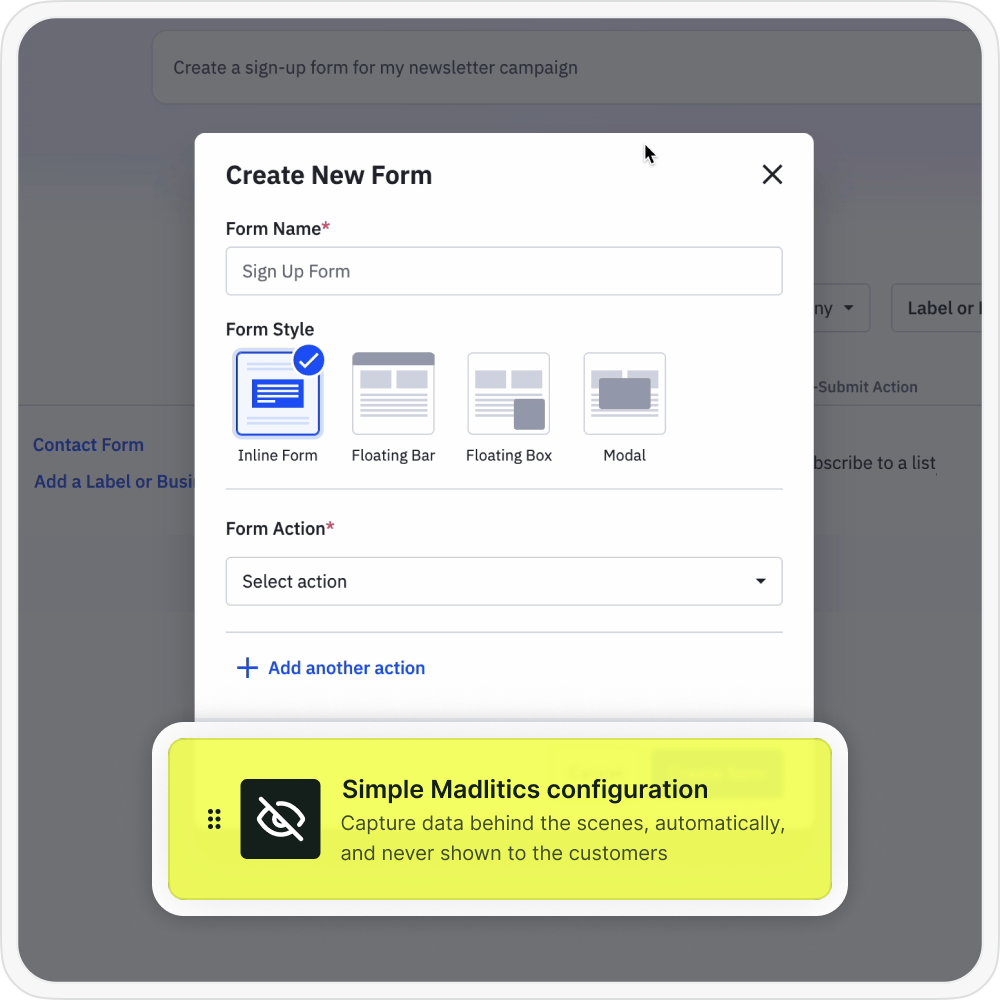
Once UTM tracking is added to inbound links, the next step is configuring ActiveCampaign to collect attribution data automatically. Madlitics writes attribution values into dedicated fields behind the scenes, so every lead includes associated marketing context without those details being visible to customers.
When a visitor submits a ActiveCampaign webform, Madlitics automatically writes the captured UTM parameters and attribution data into the hidden fields you configured. This turns each submission into a complete record that includes both customer details and the full marketing context in one place.
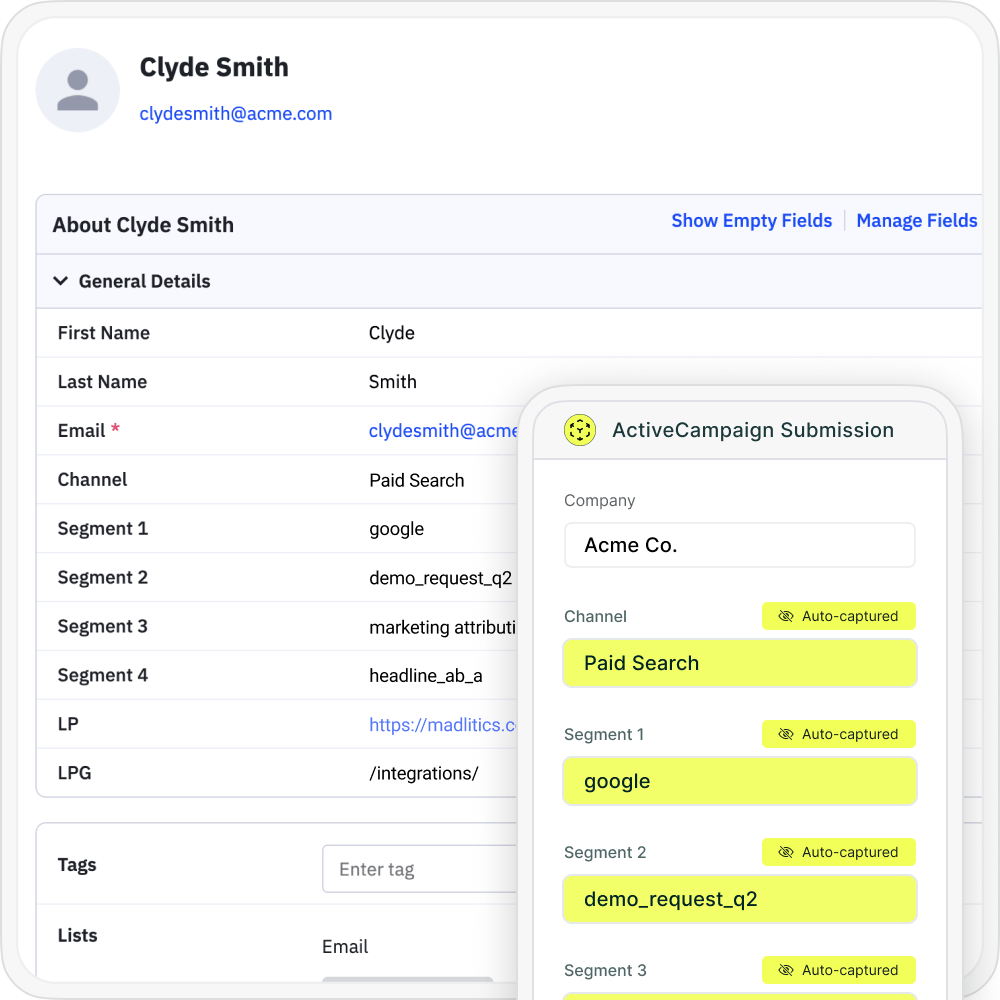

When a lead completes a submission, ActiveCampaign recieves full UTM and attribution data for reporting, marketing automation platform, spreadsheets, or BI tools just like any other lead record. With attribution connected directly to submissions, you can finally see which channels, campaigns, and pages are driving real pipeline and revenue.
When ActiveCampaign forms send complete UTM and attribution data into your CRM, you can finally report on more than just submission counts. You can analyze which forms, traffic sources, and campaigns drive your best leads and customers, then double down on the workflows and pages that move the needle.

Leads by channel
Compare lead generation across Paid Search, Paid Social, Organic Search, Email, Referral, and Direct traffic. This makes it easy to see how each channel contributes to pipeline and revenue so you can prioritize the ones that perform best.

Conversion rate by channel
Measure which traffic sources convert leads into customers most effectively using the channel data captured in ActiveCampaign submissions. Some channels may drive lots of form fills but low-quality leads, while others consistently produce higher-value customers and stronger revenue.

Revenue by campaign
Connect ActiveCampaign attribution data to customers and revenue to see which campaigns are driving real business impact. This makes it easier to optimize budget, scale the campaigns that perform best, and reduce spend on efforts that fail to turn leads into revenue.
ActiveCampaign is a fast, flexible way to capture leads across your site, from demo requests to content downloads and surveys. It fits naturally into a modern marketing stack where teams ship new forms quickly and optimize for completion rates, not just pageviews.
Madlitics adds the missing attribution layer by turning every ActiveCampaign submission into a complete record with UTM parameters, channel, campaign, and landing page data tied to each lead. Instead of guessing which forms and traffic sources are working, you get clear insight into what actually drives pipeline and revenue inside your CRM and reporting tools.
Start today by connecting Madlitics to your site and ActiveCampaign forms, then use your new attribution data to build reports, refine campaigns, and invest more confidently in what works. Sign up for a free Madlitics trial and make your ActiveCampaign forms a reliable source of marketing attribution.
See which channels, campaigns, and content actually drive pipeline and revenue.
Turn attribution into decisions
Move beyond “Direct/Unknown” sources. Capture accurate attribution data to understand what's driving conversions, pipeline, and revenue.
Spot top channels
Break down leads by channel such as Organic, Paid Search, Paid Social, and referrals. Identify what is working and shift budget toward top performers.
Find campaigns that convert
Track performance by campaign, source, medium, and landing page. See which efforts generate qualified leads and customers, not just form fills.
Persistent attribution tracking
Keep UTM and session data attached to each lead, even if they return later or convert on a different page.
Answers to common questions about UTM tracking with Madlitics and ActiveCampaign















