
Digital Marketing
How to Capture LinkedIn Ads Data in Jotform
Track the source of every form submission, from campaign to keyword, so you can understand which ads are driving leads and customers.
Start a free trial
LinkedIn Ads is one of the most effective ways to reach professional, B2B, and account-based audiences, whether you are running lead generation, retargeting, awareness, or conversion-focused campaigns. LinkedIn often sits at the center of B2B demand generation, helping move targeted prospects from first impression to form submission.
This guide shows you how to use Madlitics to capture LinkedIn Ads attribution data directly in Jotform and then send that data into your CRM, marketing tools, or analytics platform. With attribution attached to every submission, you can see which LinkedIn campaigns generate qualified leads, customers, and revenue, giving you a much clearer view of performance and the true impact of your ad spend.
It’s important to understand LinkedIn Ads performance because traffic alone does not show which campaigns are actually generating business growth. Visitor counts, clicks, and sessions help measure activity, but they do not explain which campaigns are producing qualified leads, creating customers, or generating revenue.
For example, one campaign may generate a large amount of traffic while contributing very little pipeline or revenue, while another campaign with lower traffic volume may consistently generate higher-value customers and stronger business outcomes. Here’s how the same campaigns look when you compare traffic metrics versus business outcomes.
LinkedIn Ads Campaign Performance Based on Traffic Metrics
Looking only at traffic metrics, the Sponsored Content campaign appears to be the strongest performer because it generates the highest visitor volume at the lowest cost per visit. The ABM campaign appears less efficient because traffic volume is lower and cost per visitor is higher.
LinkedIn Ads Campaign Performance Connected to Leads, Customers, and Revenue
Tracking LinkedIn Ads campaign effectiveness at the customer and revenue level reveals insights that traffic metrics alone cannot provide. While the ABM campaign generated significantly less traffic than the Demo campaign, it produced nearly the same number of customers and substantially more revenue. The campaign also generated far stronger revenue efficiency relative to ad spend, demonstrating how highly targeted LinkedIn campaigns can outperform broader traffic-focused campaigns.
The data also highlights how lead volume alone can be misleading.
By connecting LinkedIn Ads data to actual leads, customers, and revenue, marketing teams can better understand which campaigns are generating qualified pipeline and high-value customers. Madlitics automatically captures attribution data and sends it directly into your forms, CRM, and reporting workflows so campaign decisions can be based on measurable business outcomes instead of traffic metrics alone.
Understanding LinkedIn Ads performance all the way through to customers and revenue starts with preserving attribution data from the first click through the final conversion. Madlitics works alongside Jotform to capture paid and organic attribution data, write it into form submissions automatically, and pass it into your existing marketing and sales workflows.
See which campaigns and links drive [Jotform] submissions by adding UTM parameters to all traffic-driving sources — paid ad, email, social post, partner link, etc. Quickly add UTMs and keep links consistent, with the Madlitics URL builder.

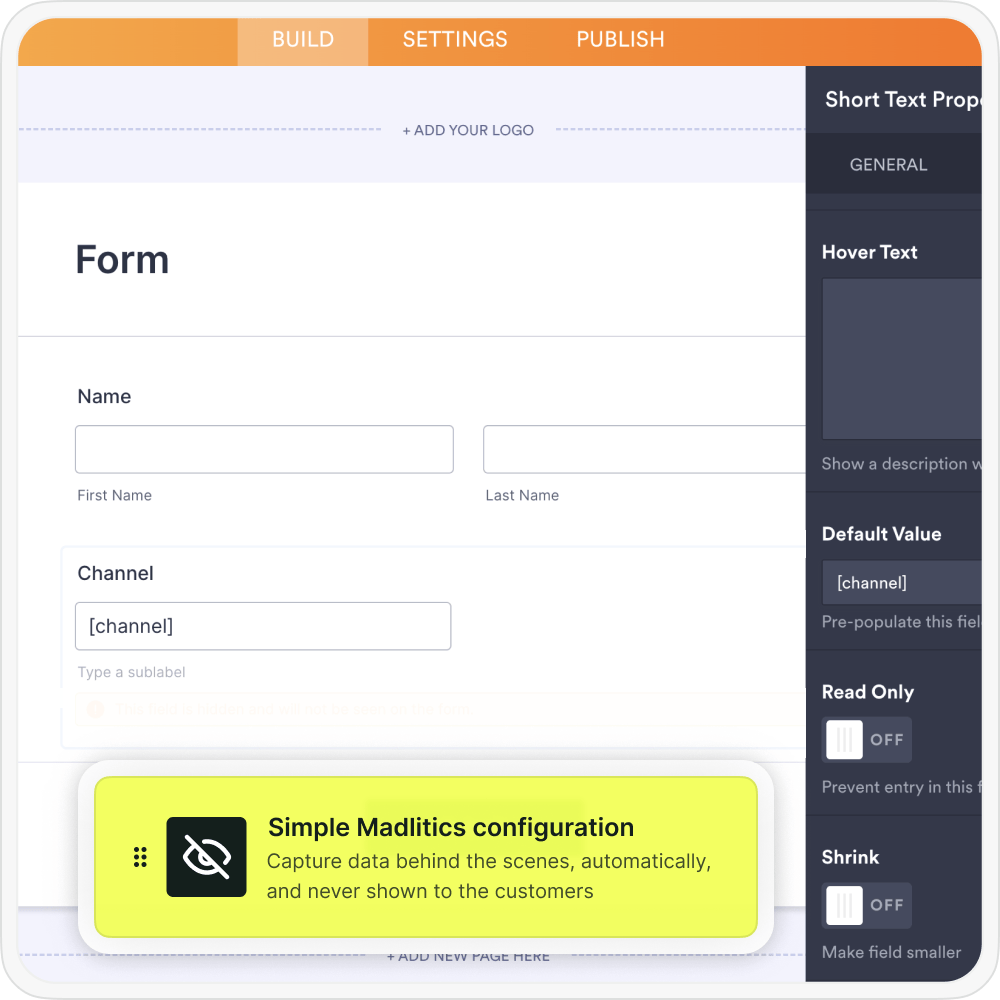
Once UTM tracking is added to inbound links, the next step is configuring your Jotform to collect attribution data automatically. Madlitics writes attribution values into dedicated fields behind the scenes, so every lead includes associated marketing context without those details being visible to customers.
When a visitor submits a Tally form, Madlitics automatically writes the attribution data into the configured fields before submission. This allows the form entry to include both the customer’s information and the full LinkedIn Ads attribution context in a single record, creating a clearer connection between marketing activity and customer acquisition performance.
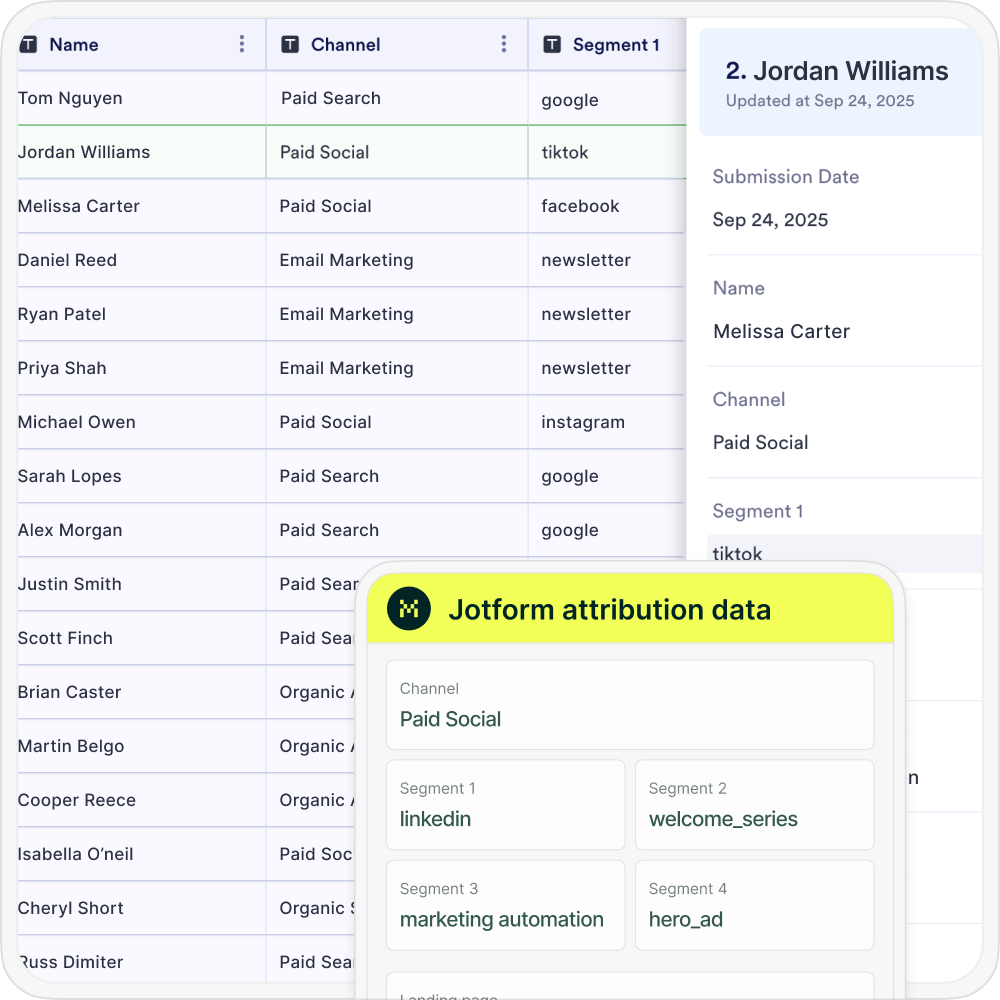

Once the form submits, Jotform receives the customer’s details alongside full LinkedIn Ads attribution data. The submission can then flow into your CRM, marketing automation platform, spreadsheets, BI tools, or reporting workflows just like any other lead record. With attribution data connected directly to form submissions, marketing teams can clearly see which Microsoft Ads campaigns are generating leads, customers, and revenue for the business.
Once LinkedIn Ads attribution data is connected to your leads and customers, reporting becomes significantly more actionable. Instead of only measuring clicks, sessions, or form submissions, marketing teams can analyze which campaigns, landing pages, and channels are actually generating qualified leads, customers, and revenue.
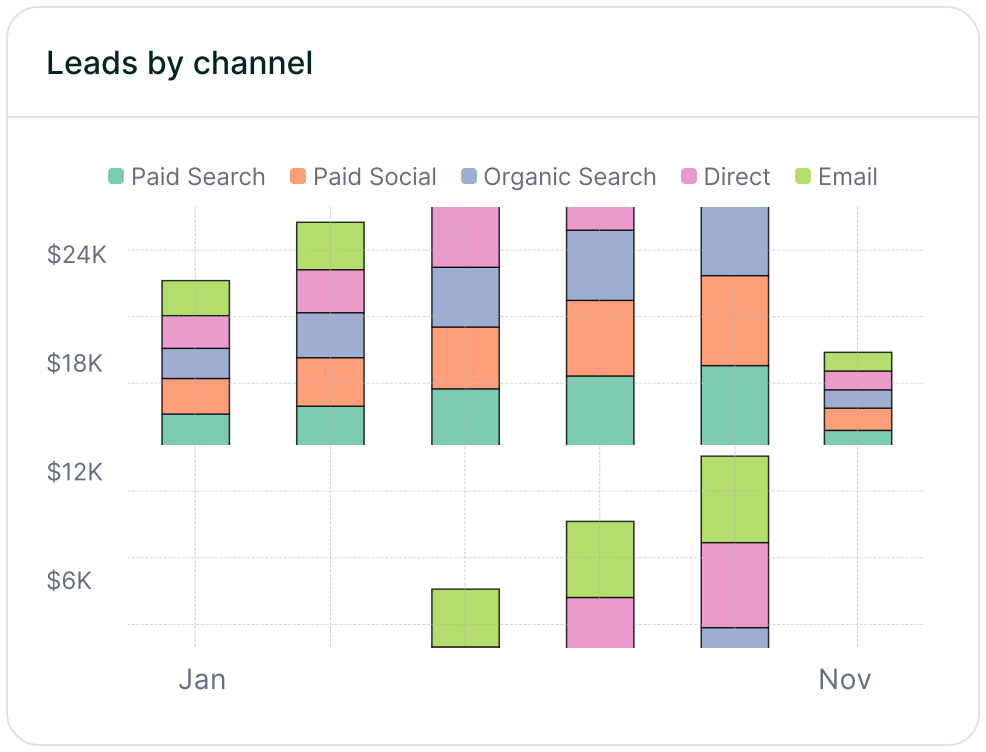
Leads by channel
Compare lead generation across Paid Search, Paid Social, Organic Search, Email, Referral, and Direct traffic. This makes it easier to understand how Microsoft Ads contributes to overall pipeline generation alongside other marketing channels.
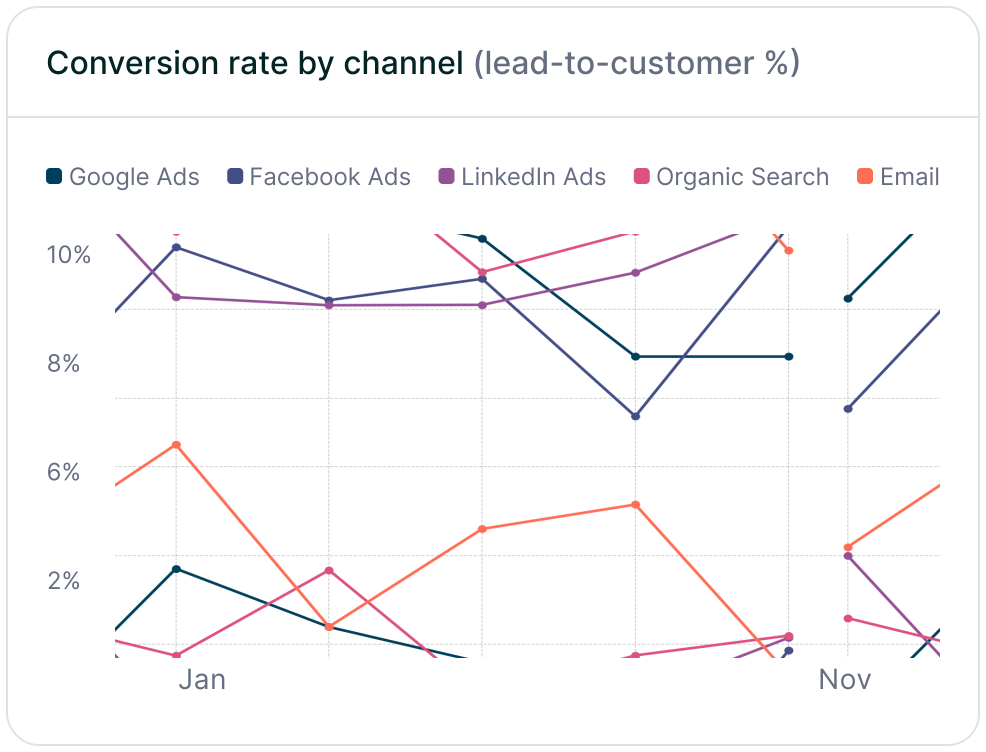
Conversion rate by channel
Measure which traffic sources convert leads into paying customers most effectively. Some channels may generate high lead volume but low conversion quality, while others consistently produce higher-value customers and stronger revenue performance.
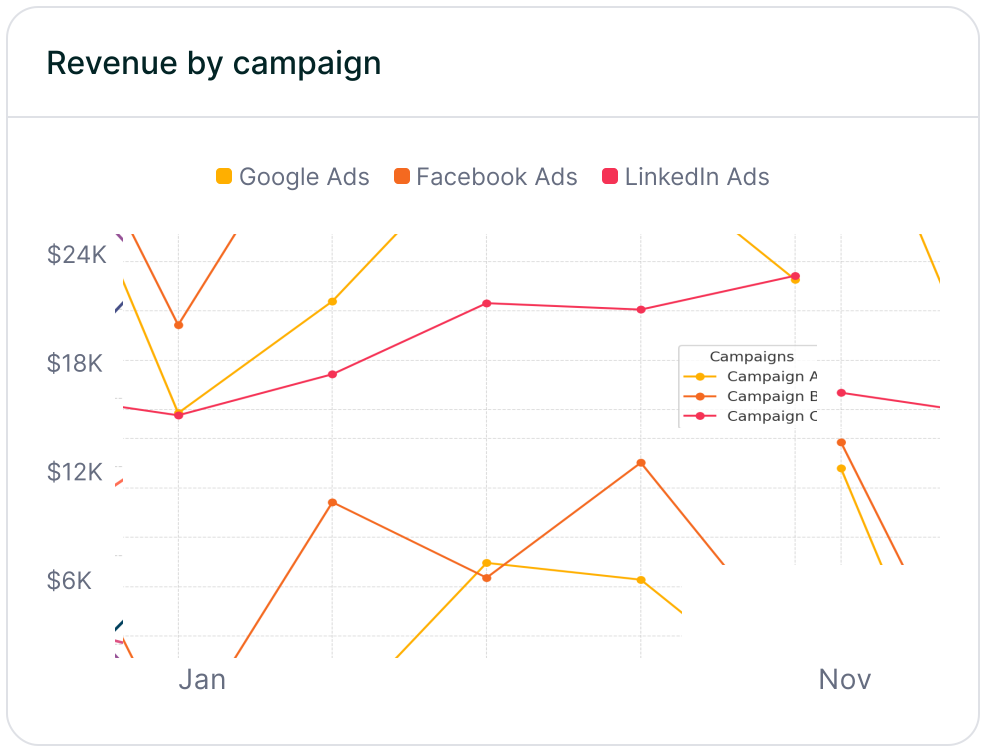
Revenue by campaign
Connect attribution data to customer and revenue outcomes to identify which LinkedIn Ads campaigns are driving actual business growth, making it easier to optimize budget, scale high-performing campaigns, and identify underperforming spend before it impacts revenue.
For teams relying on LinkedIn Ads to reach high‑value, professional audiences, Madlitics makes it easy to see which campaigns are actually turning clicks into qualified leads, opportunities, and customers. By connecting LinkedIn Ads attribution directly to your Jotform submissions, you can move beyond surface‑level metrics and understand how your targeting and creative perform down the funnel.
Madlitics keeps LinkedIn Ads attribution intact from first impression through form submission and closed‑won, attaching campaign, audience, ad, landing page, channel, and click ID data to every lead. As this data syncs into your CRM and reporting tools, you can evaluate lead quality by audience segment, compare performance across campaigns and offers, and confidently double down on the LinkedIn programs that drive real revenue. Madlitics shows you which LinkedIn Ads campaigns pay off, so you can invest more effectively in the audiences that matter most.
See which campaigns drive real business results.
Revenue-focused reporting
Create reports showing which campaigns generate leads, customers, and revenue beyond traffic metrics.
Send data to your tools
Pass campaign and landing page data into ActiveCampaign, HubSpot, Zoho and existing workflows automatically.
Landing page conversion
Identify which landing pages, offers, and content generate the highest-quality leads and customers.
Persistent session data
Keep attribution attached to the lead even when visitors browse multiple pages or convert later.
Answers to common questions about LinkedIn Ads tracking with Madlitics and Jotform