
Digital Marketing
How to Capture Microsoft Ads Data in Tally
Track the source of every form submission, from campaign to keyword, so you can understand which ads are driving leads and customers.
Start a free trial
Microsoft Ads gives businesses a powerful way to reach high-intent audiences across Bing, Microsoft Edge, Outlook, MSN, and partner search networks. For companies using Tally forms to capture leads, demo requests, signups, and inbound inquiries, Microsoft Ads can become a highly efficient channel for driving qualified traffic and generating consistent conversions. The challenge is understanding which campaigns, keywords, and landing pages are actually producing leads and revenue after someone submits a form.
This article walks through how to use Madlitics to capture Microsoft Ads attribution data inside Tally forms and send that data into your CRM, analytics tools, or reporting stack. With attribution connected to every submission, you can accurately measure campaign performance, identify which Microsoft Ads campaigns drive real business results, and make more informed decisions about where to scale your ad spend.
See which campaigns drive real business results.
Revenue-focused reporting
Create reports showing which campaigns generate leads, customers, and revenue beyond traffic metrics.
Send data to your tools
Pass campaign and landing page data into ActiveCampaign, HubSpot, Zoho and existing workflows automatically.
Landing page conversion
Identify which landing pages, offers, and content generate the highest-quality leads and customers.
Persistent session data
Keep attribution attached to the lead even when visitors browse multiple pages or convert later.
It’s important to understand Microsoft Ads performance because traffic alone does not show which campaigns are actually generating business growth. Visitor counts, clicks, and sessions help measure activity, but they do not explain which campaigns are producing qualified leads, creating customers, or generating revenue.
For example, one campaign may generate a large amount of traffic while contributing very little pipeline or revenue, while another campaign with lower traffic volume may consistently generate higher-value customers and stronger business outcomes. Here’s how the same campaigns look when you compare traffic metrics versus business outcomes.
Microsoft Ads Campaign Performance Based on Traffic Metrics
Looking only at traffic metrics, the Search Retargeting campaign appears to be the strongest performer because it generates the most traffic at the lowest cost per visitor. The Demo Requests campaign appears less efficient because visitor volume is lower and acquisition costs are higher.
Microsoft Ads Campaign Performance Connected to Leads, Customers, and Revenue
Tracking Microsoft Ads campaign effectiveness at the customer and revenue level reveals insights that traffic metrics alone cannot provide. While the Demo Requests campaign generated significantly less traffic than the CRM Software campaign, it produced more customers and nearly 3x the revenue. The campaign also generated substantially higher revenue relative to ad spend, showing that campaign quality and buyer intent often matter more than traffic volume alone.
The data also highlights how lead volume alone can be misleading.
By connecting Microsoft Ads data to actual leads, customers, and revenue, it becomes much easier to identify which campaigns are truly driving pipeline and business growth. Madlitics sends attribution data directly into your forms, CRM, and reporting workflows so marketing teams can optimize campaigns using real revenue outcomes instead of surface-level traffic metrics.
Understanding Microsoft Ads performance all the way through to customers and revenue starts with preserving attribution data from the first click through the final conversion. Madlitics works alongside Tally to capture paid and organic attribution data, write it into form submissions automatically, and pass it into your existing marketing and sales workflows.
See which campaigns and links drive Tally submissions by adding UTM parameters to all traffic-driving sources — paid ad, email, social post, partner link, etc. Quickly add UTMs and keep links consistent, with the Madlitics URL builder.

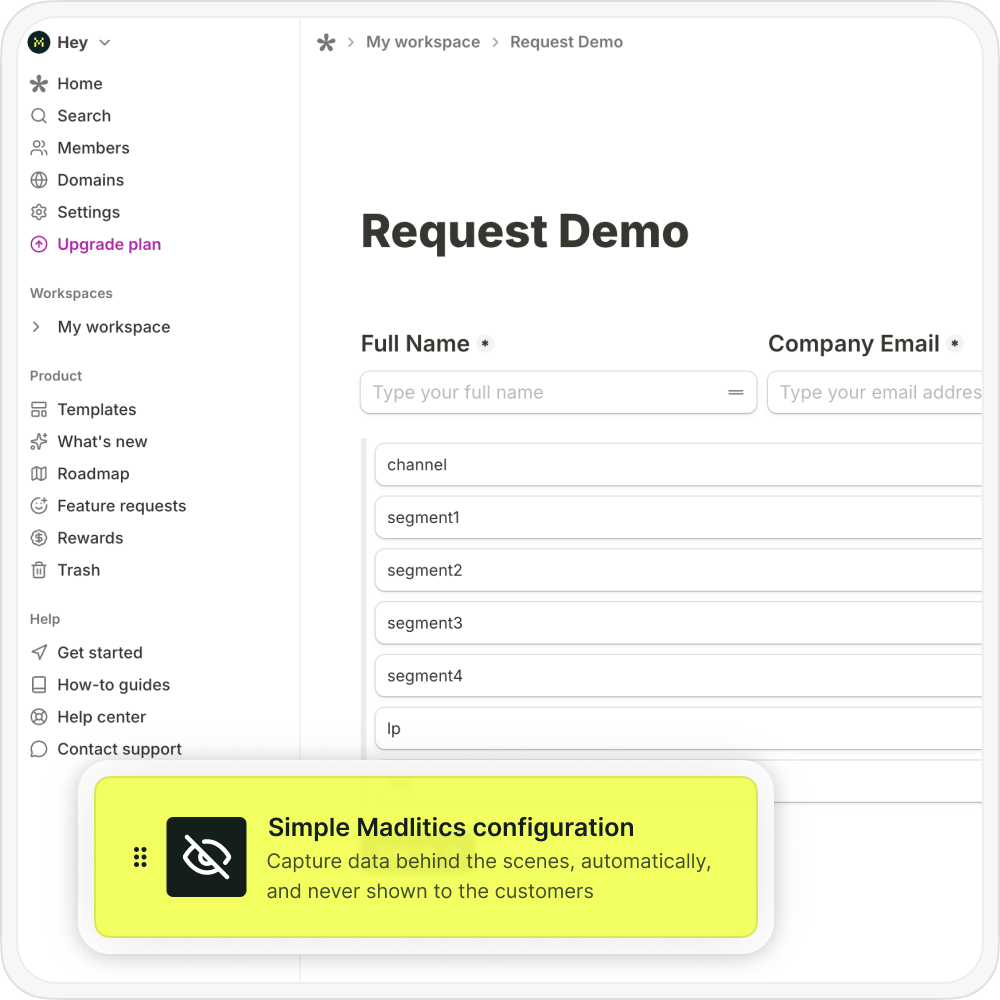
Once UTM tracking is added to inbound links, the next step is configuring your Tally to collect attribution data automatically. Madlitics writes attribution values into dedicated fields behind the scenes, so every lead includes associated marketing context without those details being visible to customers.
When a visitor submits a Tally form, Madlitics automatically writes the attribution data into the configured fields before submission. This allows the form entry to include both the customer’s information and the full Microsoft Ads attribution context in a single record, creating a clearer connection between marketing activity and customer acquisition performance.
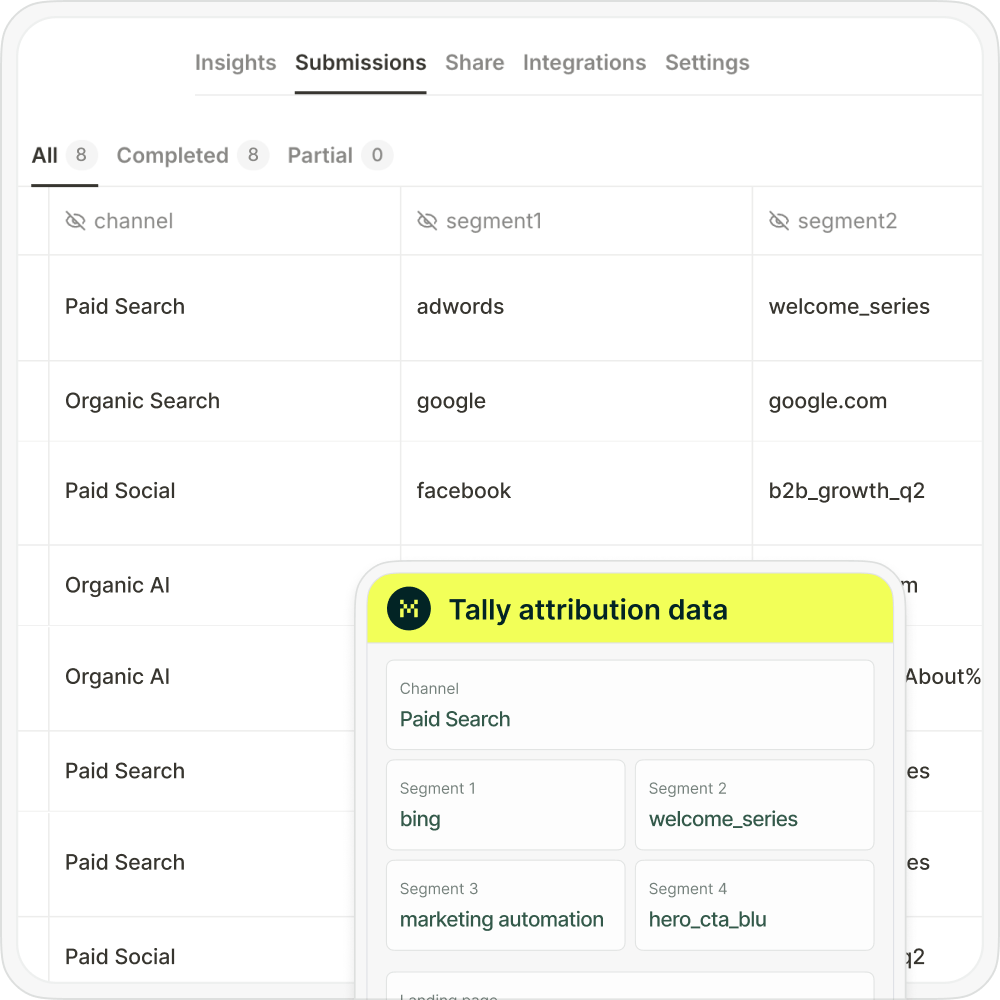

Once the form submits, Tally receives the customer’s details alongside full Microsoft Ads attribution data. With attribution data connected directly to form submissions, marketing teams can clearly see which Microsoft Ads campaigns are generating leads, customers, and revenue for the business.
Once Microsoft Ads attribution data is connected to your leads and customers, reporting becomes significantly more actionable. Instead of only measuring clicks, sessions, or form submissions, marketing teams can analyze which campaigns, landing pages, and channels are actually generating qualified leads, customers, and revenue.

Leads by channel
Compare lead generation across Paid Search, Paid Social, Organic Search, Email, Referral, and Direct traffic. This makes it easier to understand how Microsoft Ads contributes to overall pipeline generation alongside other marketing channels.
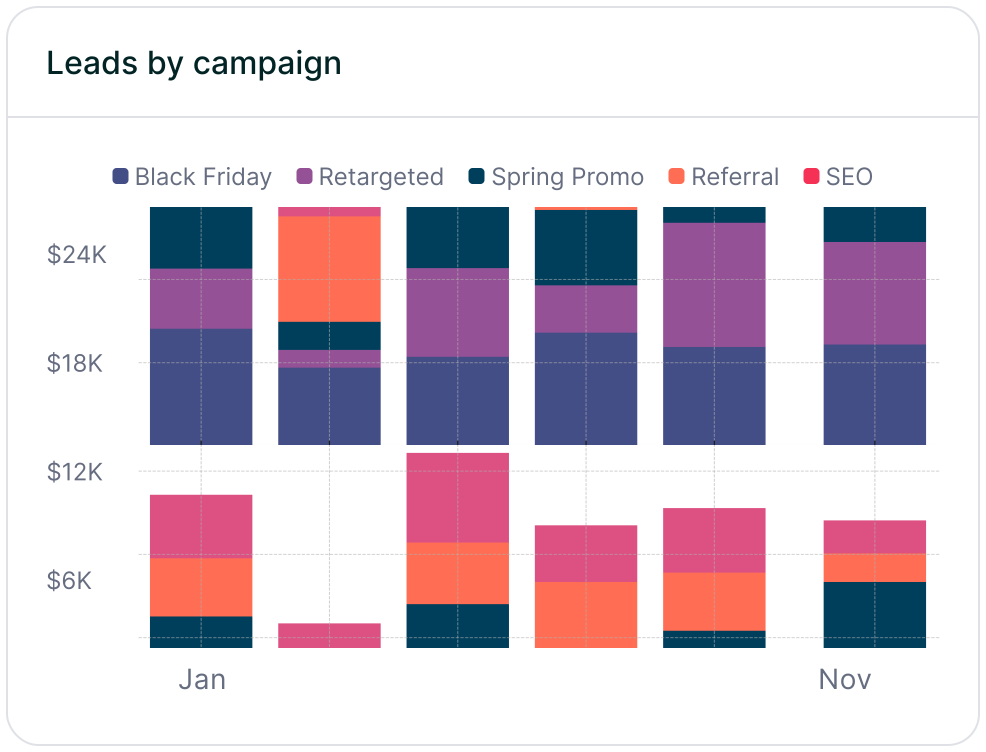
Leads by campaign
Track which Meta Ads campaigns generate the highest volume of qualified leads. Campaign-level reporting helps marketers compare targeting strategies, offers, ad groups, and messaging performance across campaigns.

Conversion rate by channel
Measure which traffic sources convert leads into paying customers most effectively. Some channels may generate high lead volume but low conversion quality, while others consistently produce higher-value customers and stronger revenue performance.

Revenue by campaign
Connect attribution data to customer and revenue outcomes to identify which Microsoft Ads campaigns are driving actual business growth, making it easier to optimize budget, scale high-performing campaigns, and identify underperforming spend before it impacts revenue.
Looking for a better way to understand which Microsoft Ads campaigns are generating leads, customers, and revenue? Madlitics helps marketing teams capture attribution data directly inside Tally submissions so campaign performance can be measured far beyond clicks and traffic alone.
Instead of relying on disconnected reporting or incomplete attribution data, Madlitics preserves Microsoft Ads attribution from the first click through the final conversion. Campaign, keyword, landing page, channel, and click ID data stay attached to the lead, making it much easier to understand which campaigns are actually driving qualified customers and business growth. With attribution data flowing directly into your CRM, reporting tools, and downstream workflows, teams can build clearer reports, optimize campaigns more confidently, improve lead quality analysis, and connect Microsoft Ads spend to actual revenue outcomes.
Madlitics helps you understand which Micorsoft Ads campaigns drive real conversions so you can invest more confidently in what works.
Answers to common questions about Microsoft Ads tracking with Madlitics and Tally















