Digital Marketing

How to Capture Meta Ads Data in Jotform

Track the source of every form submission, from campaign to keyword, so you can understand which ads are driving leads and customers.
Start capturing attribution →
Attribution is broken

Why use Madlitics with Jotform to capture Meta Ads data

See which campaigns drive real business results.

Automation icon indicating hands-free marketing attribution and data flow.

Attribute every Jotform submission
See exactly which Meta campaigns, ad sets, and ads drive each new lead or customer in Jotform.

Analytics report icon, indicating data insights and reporting.

Optimize ads with real outcomes
Use Jotform and Madlitics data to find the campaigns that create pipeline and revenue, not just clicks and form fills.

Impact measurement icon, symbolizing marketing effectiveness.

Send clean data to your stack
Sync Meta data from Jotform into your CRM and marketing tools, match revenue reports with your funnel.

Personalization icon, representing customization features.

Persistent session data
Preserve Meta attribution, even when visitors click around your site or come back later before submission.

Meta Ads is one of the most effective ways to reach targeted audiences across Facebook and Instagram, whether you are running lead generation, retargeting, awareness, or conversion campaigns. It often sits at the center of demand generation and engagement, helping move prospects from first click to form submission and beyond.

This guide shows you how to use Madlitics to capture Meta Ads attribution data directly in Jotform and send that data into your CRM, marketing tools, or analytics platform. With attribution attached to every submission, you can identify which Meta campaigns and audiences are driving form fills, qualified leads, and revenue, giving you a much clearer view of performance and the true impact of your ad spend.

Why Meta Ads Campaign Performance Matters

It’s important to understand Meta Ads performance because traffic alone does not show which campaigns are actually generating business growth. Visitor counts, clicks, and sessions help measure activity, but they do not explain which campaigns are producing qualified leads, creating customers, or generating revenue.

For example, one campaign may generate a large amount of traffic while contributing very little pipeline or revenue, while another campaign with lower traffic volume may consistently generate higher-value customers and stronger business outcomes. Here’s how the same campaigns look when you compare traffic metrics versus business outcomes.

Meta Ads Campaign Performance Based on Traffic Metrics

Campaign

Ad Spend

Visitors

Cost per Visitor

Meta Ads, Lead Gen

$4,800

5,200

$0.92

Meta Ads, Retargeting

$2,600

2,100

$1.24

Meta Ads, Awareness

$3,900

8,900

$0.44

Campaign
Meta Ads, Lead Generation

Ad Spend
$4,800

Visitors
5,200

Cost per Visitor
$0.92

Campaign
Meta Ads, Retargeting Campaign

Ad Spend
$2,600

Visitors
2,100

Cost per Visitor
$1.24

Campaign
Meta Ads, Awareness Campaign

Ad Spend
$3,900

Visitors
8,900

Cost per Visitor
$0.44

Looking only at traffic metrics, the Awareness campaign appears to be the strongest performer because it generates the highest visitor volume at the lowest cost per visit. The Retargeting campaign appears less efficient because traffic volume is significantly lower and cost per visitor is higher.

Meta Ads Campaign Performance Connected to Leads, Customers, and Revenue

Campaign

Ad Spend

Visitors

Leads

Customers

Revenue

Meta Ads, Lead Gen

$4,800

5,200

148

9

$38,000

Meta Ads, Retargeting

$2,600

2,100

121

17

$126,000

Meta Ads, Awareness

$3,900

8,900

201

3

$11,000

Campaign
Meta Ads, Lead Generation

Ad Spend
$4,800

Visitors
5,200

Leads
148

Customers
9

Revenue
$38,000

Campaign
Meta Ads, Retargeting Campaign

Ad Spend
$2,600

Visitors
2,100

Leads
121

Customers
17

Revenue
$126,000

Campaign
Meta Ads, Awareness Campaign

Ad Spend
$3,900

Visitors
8,900

Leads
201

Customers
3

Revenue
$11,000

Tracking Meta Ads campaign effectiveness at the customer and revenue level reveals insights that traffic metrics alone cannot provide. While the Retargeting campaign generated significantly less traffic than the Lead Generation campaign, it produced nearly 2x as many customers and more than 3x the revenue. The campaign also generated substantially higher revenue relative to ad spend, showing that lower traffic volume does not necessarily mean lower business impact.

The data also highlights how lead volume alone can be misleading.

  • The Awareness campaign generated the highest visitor count (8,900) and the most leads (201), yet produced the fewest customers (3).
  • The Retargeting campaign converted leads into customers at a much higher rate, achieving a 14.0% lead-to-customer conversion rate compared to just 1.5% for the Awareness campaign.
  • Customer Acquisition Cost (CAC) varied significantly between campaigns, with the Retargeting campaign acquiring customers at roughly $153 per customer versus approximately $1,300 for the Awareness campaign.
  • Return on Ad Spend (ROAS) also revealed a completely different picture of performance, with the Retargeting campaign generating 48.5x ROAS compared to 7.9x for the Lead Generation campaign and 2.8x for the Awareness campaign.
  • Average Customer Value was highest for the Retargeting campaign at roughly $7,412 per customer, compared to approximately $4,222 for the Lead Generation campaign and $3,667 for the Awareness campaign.

By connecting Meta Ads data to actual leads, customers, and revenue, it becomes much easier to understand which campaigns are truly driving growth. Madlitics sends attribution data directly into your forms, CRM, and reporting workflows so marketing decisions can be based on real business outcomes instead of traffic metrics alone.

Set up Meta Ads tracking in Jotform

Understanding Meta Ads performance all the way through to customers and revenue starts with preserving attribution data from the first click through the final conversion. Madlitics works alongside Jotform to capture paid and organic attribution data, write it into form submissions automatically, and pass it into your existing marketing and sales workflows.

Madlitics multi-channel attribution visualization, showing marketing platforms like TikTok, Instagram, Google, and Facebook. The graphic highlights how different sources contribute to high-performing marketing channels.

Add UTM parameters to your Meta Ads

See which campaigns and links drive Jotform submissions by adding UTM parameters to all traffic-driving sources (paid ads, email, organic social, etc.). Create consistent UTM campaign parameters for your Meta Ads using the Madlitics URL builder so every click sends clean attribution data into your Jotform.

An example of a Meta Ads URL with UTMs:
acme.com/demo?utm_source=facebook &utm_medium=paid_socia l&utm_campaign=lead_gen_q1 &utm_content=video_ad_1 .

Follow the setup guide to install Madlitics on your website to capture and write data, into each Jotform submission.

Setup GuideInstall Madlitics on your Website ->

Configure Jotform to capture Meta Ads data

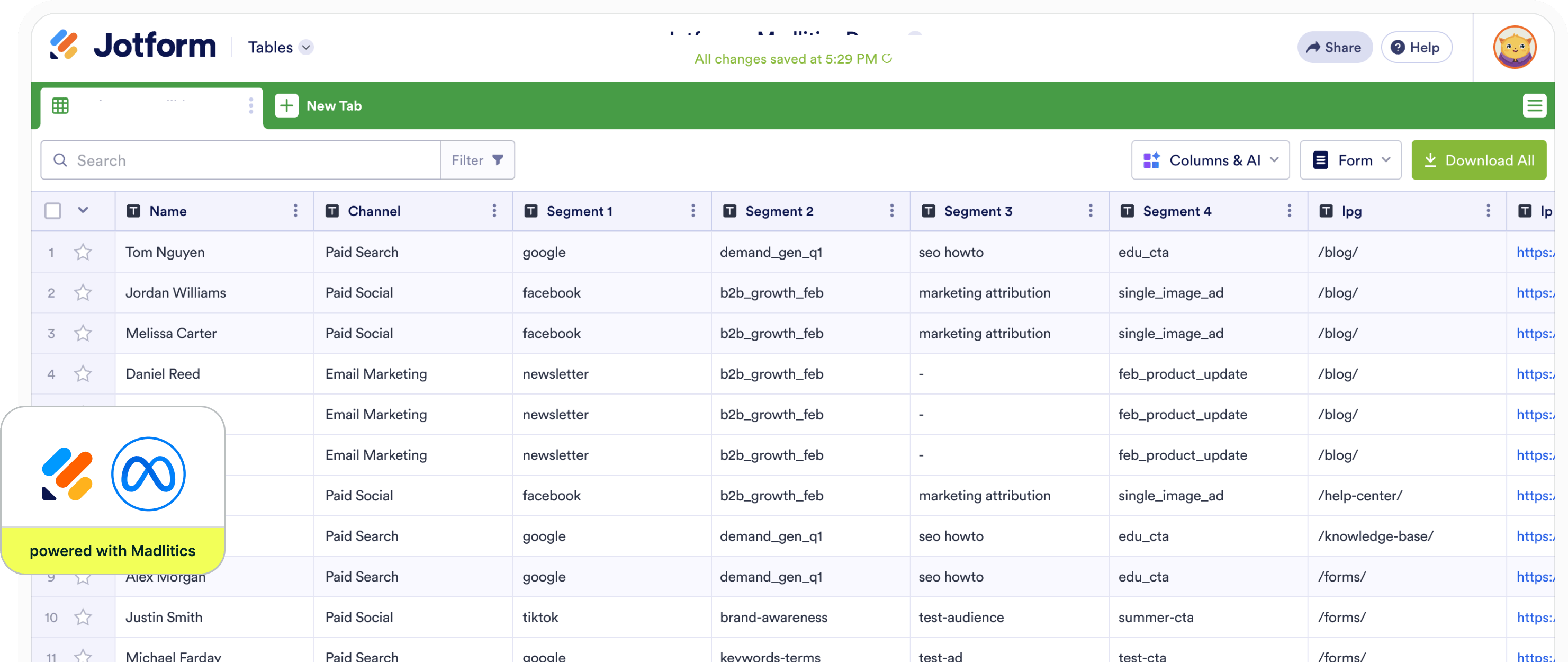
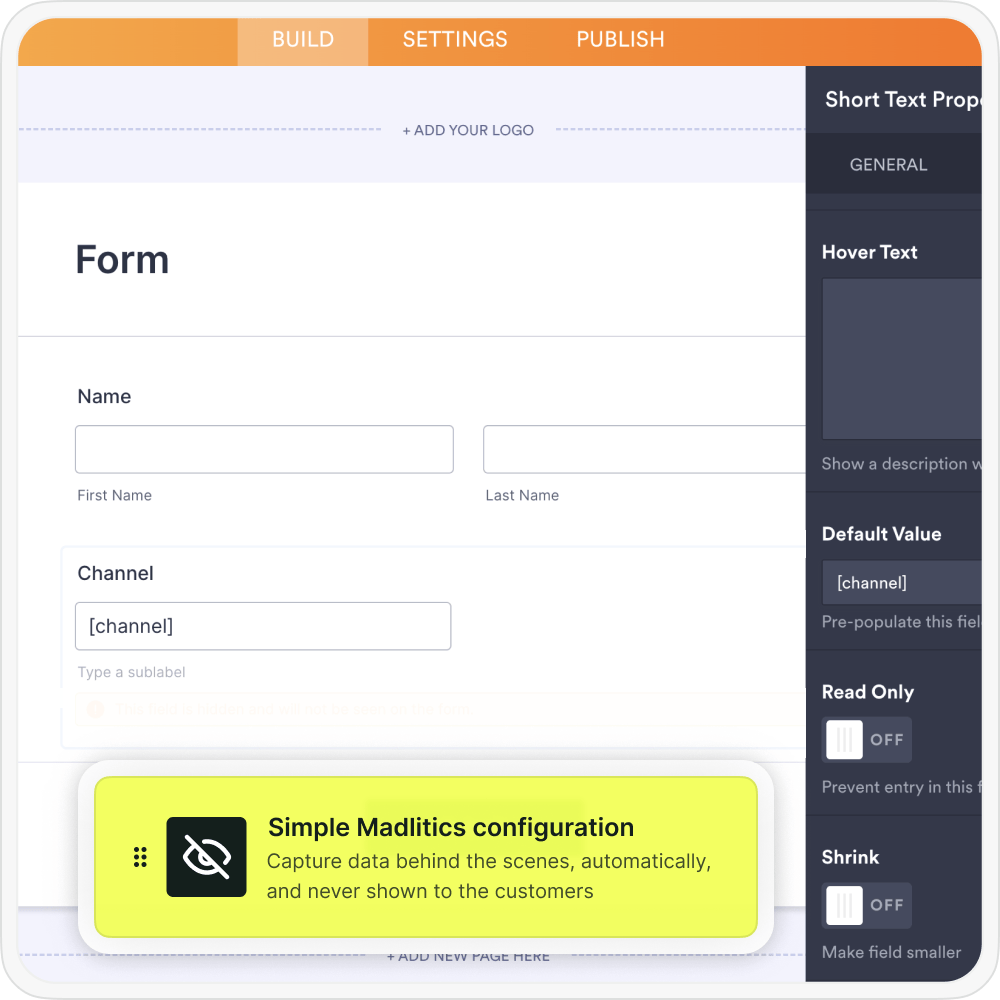
Madlitics writes attribution values into dedicated form fields at submission so every lead includes its associated marketing context, while staying hidden from customers. Madlitics fields allow channel, campaign, and landing page data to travel alongside the lead into your CRM and downstream tools, and include:

  • Channel: High‑level source (for example, Paid Social, Paid Search, Organic Social, Direct)
  • Segments 1–4: Flexible drilldowns you can map to campaign, ad set, ad, audience, or creative variation
  • Landing page / group: Full landing URL and grouped variant for first‑touch attribution
  • FBCLID: Meta / Facebook click ID that Madlitics will capture when available

Setup GuideConfigure Jotform to collect Meta Ads data ->

Madlitics writes attribution data into the form submission

Each Jotform submission combines contact details with full Meta Ads context, so every lead includes the when, where, and how behind the conversion

Instead of only seeing a name, email, or company, marketing and sales teams can also see which Meta Ads campaign generated the lead, which landing page converted the visitor, which keyword, ad set, or creative drove the submission, which channels are generating qualified leads and customers, and more.

Jotform captures Meta Ads data for your tools

Jotform submissions can flow into your CRM, marketing automation platform, spreadsheets, BI tools, or reporting workflows just like any other lead record. With attribution data connected directly to form submissions, marketing teams can clearly see which Meta Ads campaigns are generating leads, customers, and revenue for the business.

  • Create reports showing which Meta Ads campaigns generate leads, customers, and revenue
  • Compare campaign performance across channels, offers, and landing pages
  • Give sales teams additional context on how each lead found the business
  • Analyze customer acquisition performance inside tools like ActiveCampaign, HubSpot, Zoho, and more.
Graph showing new customer growth from TikTok, Instagram, Snapchat, and Google over time, with social media icons surrounding the chart and a callout for social revenue impact.

Visualizing your marketing impact

Once Meta Ads attribution data is connected to your leads and customers, reporting becomes significantly more actionable. Instead of only measuring clicks, sessions, or form submissions, marketing teams can analyze which campaigns, landing pages, and channels are actually generating qualified leads, customers, and revenue.

Stacked bar chart showing lead generation by marketing channel over time, comparing sources like Paid Search, Paid Social, Organic Search, Direct, and Email. Helps visualize which channels drive the most traffic.

Leads by channel
Compare lead generation across Paid Social (Meta), Paid Search, Organic Search, Email, Referral, and Direct traffic to see how Meta Ads contributes to overall pipeline alongside your other channels.
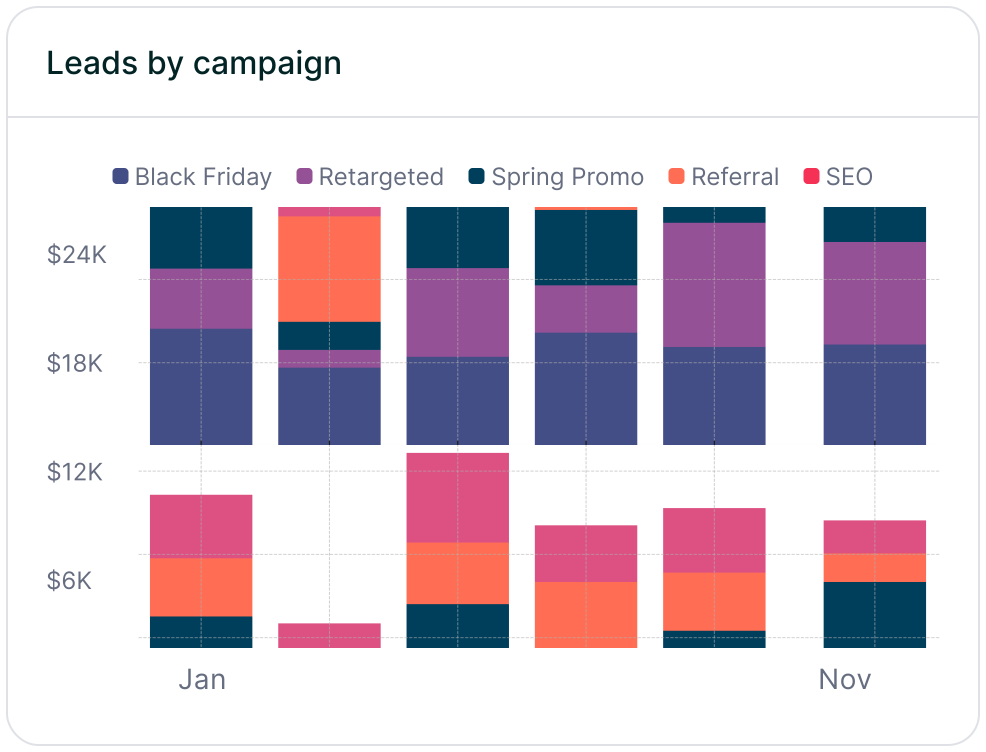
Stacked bar chart illustrating lead volume across different marketing campaigns, including Black Friday, Retargeted, Spring Promo, Referral, and SEO. Highlights trends in campaign effectiveness.

Leads by campaign
See which Meta Ads campaigns generate the highest volume of qualified Jotform leads, so you can compare audiences, offers, and creative themes and scale what is working.

Line chart displaying lead-to-customer conversion rates by channel, comparing Google Ads, Facebook Ads, LinkedIn Ads, Organic Search, and Email. Shows how different sources drive qualified leads over time.

Conversion rate by channel
Measure how effectively Meta Ads traffic converts into customers versus other sources, helping you spot channels that drive volume but weak conversion quality versus those that reliably create high-value customers

Line chart showing revenue performance by marketing campaign, comparing Google Ads, Facebook Ads, and LinkedIn Ads. Helps identify top-performing and underperforming campaigns.

Revenue by campaign
Tie Meta Ads campaigns to closed-won revenue to identify which initiatives are actually driving business growth, then reallocate budget toward high-ROAS campaigns and away from underperforming spend.

Get started with Meta Ads attribution in Jotform

If you want to see which Meta Ads campaigns are actually generating leads, customers, and revenue, Madlitics connects that attribution data directly to your Jotform submissions. Instead of relying on disconnected reports or shallow click metrics, Madlitics preserves Meta attribution from the first click through the final conversion, so every submission carries its source, campaign details, landing page, channel, and click ID.

With this data flowing automatically into your CRM, reporting tools, and downstream workflows, you can build clearer reports, analyze lead quality by campaign, and confidently double down on the Meta Ads that drive real pipeline and revenue. Madlitics shows you which Meta Ads campaigns are working, so you can invest more in what performs and cut what does not.

Register for a free Madlitics trial account, today -> 

Related articles to get you started with Madlitics

Frequently asked questions

Answers to your top questions about our UTM parameters
Everything you need for reliable lead attribution
Accurate, persistent, and automated tracking — so your campaigns perform at their best.
Performance icon symbolizing marketing campaign effectiveness and results tracking.
Outperforms basic UTM tracking
Madlitics captures, categorizes, and persists attribution data across sessions, giving you a complete, structured view of what’s working in your marketing. Say goodbye to losing attribution when users navigate your site, struggling with formatting inconsistencies, and ingored non-UTM traffic.
Capture icon indicating data collection from various marketing channels and sources.
Capture all traffic
Madlitics categorizes all inbound leads — whether they have UTM parameters or not — so every conversion is accounted for, and you won't miss out on Organic Search, Organic Social, and Referral traffic.
Routing icon representing the flow of marketing data and attribution pathways.
Attribution across pages and sessions
A LinkedIn ad click should be attributed correctly—even if the visitor signs up on a different page later. If someone clicks an ad, browses multiple pages, then submits a form later, Madlitics persists attribution data across sessions, ensuring your reports reflect true performance.
List icon representing structured marketing data, reports, or campaign breakdowns.
Cleaner, more reliable data
Duplicate UTMs and inconsistent formatting break reports and mislead teams. Madlitics cleans and organizes attribution data before sending it to your CRM, giving you accurate insights.
Target icon symbolizing precise audience targeting and marketing campaign focus
See which content converts
Attribution isn’t just about where visitors came from—it’s about what convinced them to convert. By capturing landing page data alongside UTM parameters, Madlitics shows you which blog posts, case studies, or pricing pages drive the most revenue, helping you scale content that works.
Action icon representing campaign execution, optimization, and engagement.
Transform form submissions into actionable insights
Madlitics connects marketing touchpoints to lead generation, ensuring every form submission is fully attributed — optimize ad spend by identifying high-ROI channels, refine messaging based on what content drives engagement, make data-driven decisions with clean, structured reports, and more.