
Digital Marketing
Organic vs paid traffic: complete lead attribution guide
Fixing 'Direct/None' misattribution with multi-session journeys, UTM best practices, revenue-by-channel with Madlitics
Start a free trial
Want to know where your leads are really coming from? Understanding the difference between organic and paid traffic - and accurately attributing leads - is crucial for smarter marketing decisions. Here’s the problem: without proper tracking, you risk misallocating your budget and undervaluing key channels. For example, organic traffic often converts at higher rates (2.0% vs. 0.1% for paid traffic in one case), but tools can misattribute conversions, leaving you in the dark.
By combining accurate tracking with attribution tools, you can connect revenue to specific channels, improve ROI, and make informed marketing decisions. Let’s break it down.
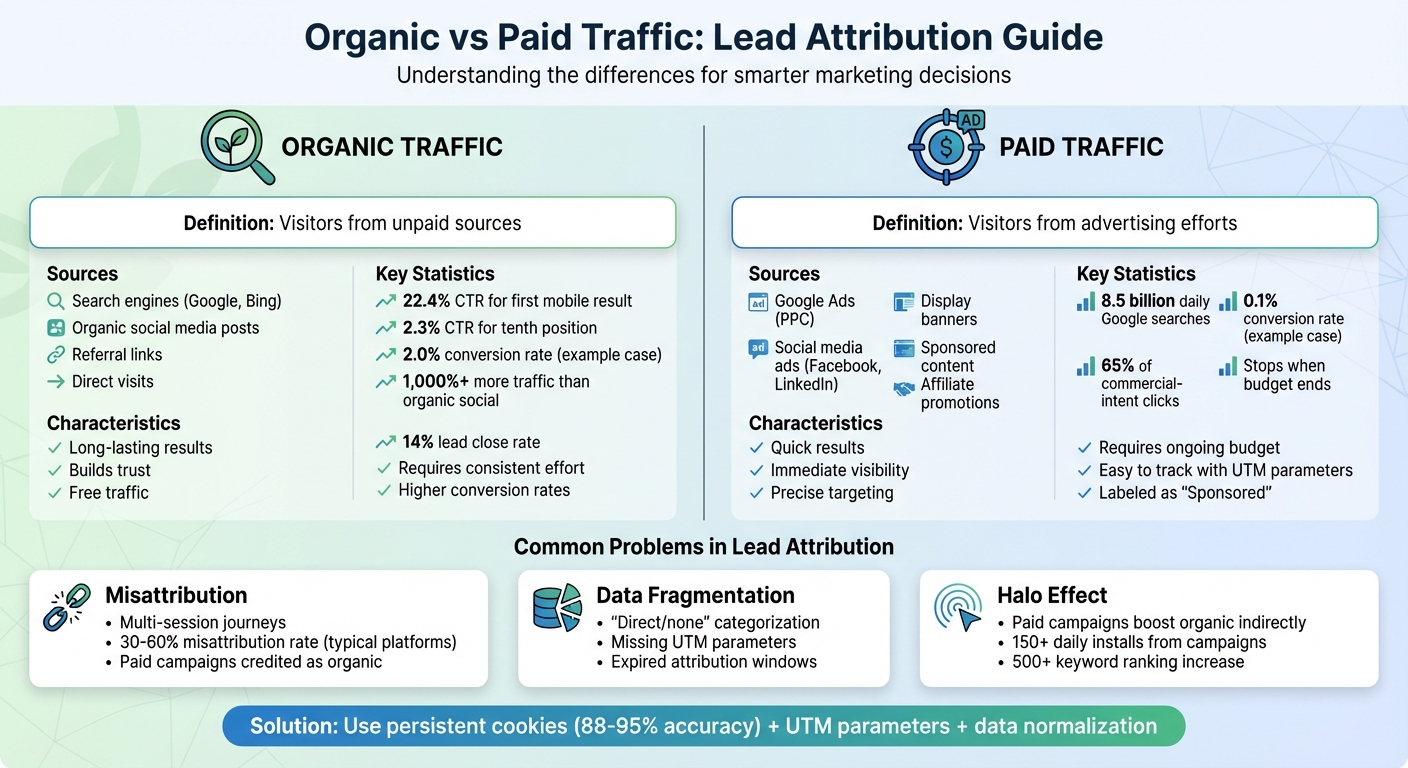
Organic traffic refers to visitors who land on your website through non-paid channels like search engine results (Google, Bing), organic social media posts, referral links from other websites, or direct visits. Essentially, these users find you naturally - whether through a search query, a shared post, or by typing your URL directly into their browser.
Paid traffic, on the other hand, comes from advertising efforts where you pay for visibility. This includes Google Ads (pay-per-click), social media ads on platforms like Facebook and LinkedIn, display banners, sponsored content, and affiliate promotions. You’ll often notice a "Sponsored" label on paid search results, making them easy to spot. Unlike organic traffic, paid traffic stops the moment your ad budget is exhausted.
The distinction between these two traffic types is essential for setting up effective tracking strategies. Each behaves differently: organic traffic tends to have higher click-through and conversion rates, while paid traffic captures a larger share of clicks for commercial-intent searches. For example, Google handles around 8.5 billion searches daily, and the first organic result on mobile devices garners a 22.4% click-through rate compared to only 2.3% for the tenth position. On the flip side, 65% of clicks on commercial-intent keywords go to paid results, leaving organic results with about 35% of those clicks. Additionally, SEO generates over 1,000% more traffic than organic social media, and leads from SEO efforts boast a 14% close rate.
"Organic traffic is still the most valuable traffic you can generate. It's free, it builds trust with your audience, and if done right, it will continue to bring in leads for years to come." - Molly Jones, Writer, BitterRoot
When it comes to tracking, paid traffic is typically monitored using UTM parameters and campaign-specific metrics, while organic traffic relies on search engine data, referrer headers, and content performance analytics. Missteps in tagging can lead to inaccuracies, such as paid social promotions being incorrectly categorized as organic traffic. To gain genuine insights into performance, accurate and upfront tracking is absolutely necessary.
Managing both organic and paid campaigns can make attribution a tangled web. Users don’t always take a direct path from clicking an ad to completing a conversion. They might see your ad, ignore it, and later search for your brand on their own before converting. This often results in the lead being credited as "organic", even though the paid campaign played a role. Such mixed-touch journeys across various channels and sessions make accurate attribution tricky.
"Users see content, remember your app name, then search for it directly in the app store - creating a measurement nightmare for marketing teams" - Jason Louro
Another big issue? Data fragmentation. Many tracking systems fail to connect the dots, leaving leads categorized as "direct/none" or "unknown". This happens when UTM parameters are missing, users don’t click on direct links, or attribution windows expire before a conversion occurs. One marketing team discovered that fixing these gaps increased their qualified lead rate for paid search by 49% and boosted ROAS from 3× to 11×.
There's also the challenge of the "halo effect", where paid campaigns indirectly boost organic performance in ways traditional tools can’t measure. For example, in November 2024, a subscription app launched Meta campaigns in Australia and Canada under the leadership of David Vargas. The app went from no presence to over 150 installs per day in each country. Paid campaigns also caused keyword rankings to skyrocket from zero to over 500. But when the campaigns stopped in the UAE, the organic growth plummeted. As Vargas observed, "The days where we got more keywords positioned were the days where our spend was the highest!"
These challenges highlight the importance of dependable attribution methods, which are explored further in the next sections.
One of the first steps in addressing these attribution challenges is fixing incomplete data. When leads are miscategorized as "direct/none", it distorts performance metrics and leads to budget decisions based on guesswork.
The issue becomes even more critical when revenue can’t be traced back to specific sources. Without comprehensive tracking across all traffic types - organic search, social, referrals, and direct - you’re left guessing which campaigns are worth further investment. Standard attribution tools often fail here, while specialized software focuses on capturing 100% of leads. For WordPress users, this often requires specific configurations to capture UTMs in Gravity Forms or other form builders. A solid solution involves persistent attribution, which keeps marketing context intact as users navigate multiple sessions. Coupled with automated data normalization, this ensures that channels and campaigns remain consistently classified.
Gone are the days of one-and-done conversions. Today, users rarely convert during a single visit. B2B buyers, for instance, engage with over 27 touchpoints during long sales cycles. Even B2C customers often interact with your brand several times before completing a form. This complexity creates challenges for both organic and paid campaigns. Attribution data can break down when a user visits your site via a paid ad on Monday, returns through organic search on Wednesday, and finally converts on Friday by navigating directly.
Take the example of Amy Cameron, Head of Marketing at Sylvi AI. In June 2025, a TikTok post on her personal account about French butter - without mentioning the app - led to one of the highest subscriber spikes for the Sylvi app. This demonstrates how content can drive conversions through indirect paths, which traditional analytics tools struggle to track.
The key is tracking that retains the full marketing context across sessions. This means capturing the original source when a user first arrives, keeping that data as they explore your site, and tying it to the final form submission - no matter how many days or sessions pass in between. Without this persistent tracking, top-of-funnel channels that introduce your brand risk being undervalued, while bottom-of-funnel touchpoints that seal the deal may receive undue credit.
Once you've tackled tracking issues, the next step is deciding how to assign credit for conversions. This is where attribution models come into play. They help determine which points in the customer journey deserve credit for a conversion. The choice of model can significantly influence how you assess the performance of organic and paid traffic.
Common models like last-touch, linear, and position-based each have their own pros and cons. Understanding these differences can prevent you from misallocating resources based on incomplete insights.
Last-touch attribution gives 100% of the credit to the final interaction before a conversion. It’s a popular default model, but it often creates blind spots. This approach tends to overvalue channels closer to the bottom of the funnel, such as branded organic search, retargeting ads, and email campaigns. As Michael Torres, Head of Analytics at PxlPeak, explains:
"The channels that often look best in last-click attribution (branded search, retargeting, email) are typically capturing demand created elsewhere. The channels that often look worst (awareness, prospecting) are typically creating the demand that other channels capture."
Here’s an example: A user might first encounter your brand through a paid social ad, then search for your company a week later and convert via organic search. Last-touch attribution would give all the credit to the final interaction, ignoring the role of the paid ad in initiating the journey. This can lead to underfunding awareness campaigns that are essential for generating future demand.
Linear attribution splits credit equally across all touchpoints. For instance, if a user interacts with five channels before converting, each gets 20% of the credit. While this approach ensures every interaction is acknowledged, it assumes all touchpoints contribute equally. In reality, a high-intent ad may have far more influence than a casual glance at a social media post. By treating all interactions the same, linear attribution risks over-crediting minor touches and downplaying moments that directly drive conversions. Still, it’s useful for gaining a broader view of the customer journey, especially in campaigns focused on building brand awareness through multiple interactions.
Position-based attribution, also known as U-shaped attribution, strikes a balance between acquisition and conversion. Typically, it assigns 40% of the credit to the first touch, 40% to the final touch, and splits the remaining 20% among the middle interactions. This model recognizes the importance of both initial discovery and final conversion. It’s particularly helpful when you want to value both demand generation (often fueled by top-funnel paid ads) and demand capture (like organic search or direct visits). However, the standard 40/20/40 split is somewhat arbitrary and may not align perfectly with every sales cycle.
For businesses with longer sales cycles, like B2B companies, a W-shaped model might be more appropriate. This approach gives significant credit to the first interaction, lead creation, and final conversion. While more complex to implement, it offers a clearer view of key stages in the funnel.
Choosing the right model depends on factors like your business type, sales cycle, and marketing goals. For example, e-commerce campaigns might benefit from position-based attribution, while B2B companies often need a more tailored approach. Many marketers use multiple models to get a more complete picture rather than relying on a single method. In the next section, we’ll dive into how UTM parameters can help ensure accurate tracking to support these attribution models.
UTM parameters are small text tags added to URLs that help your analytics tools understand where your website traffic is coming from. When someone clicks on a link with UTM parameters, these tags are sent to your tracking platform as the page loads. This allows you to trace actions - like purchases or form submissions - back to specific sources, campaigns, or even ad variations.
There are five main UTM parameters that give you detailed insights:
The first three parameters are essential for accurate tracking, while the last two provide deeper insights, especially for A/B testing and keyword performance.
UTM parameters are particularly important for categorizing traffic from sources like emails, social media posts, or guest blogs. Without them, this traffic might incorrectly appear as "Direct" or "Referral." For paid campaigns, these tags help identify which ad, keyword, or audience segment is delivering the best results, making it easier to allocate your budget effectively.
To avoid data issues, always use lowercase letters for your parameters - analytics platforms see "Facebook" and "facebook" as two different sources, which can lead to fragmented data. Stick to dashes or underscores instead of spaces, and never use UTM parameters on internal links. This ensures the original traffic source remains intact. To keep everyone on the same page, maintain a shared UTM library or spreadsheet with consistent naming conventions.
Before launching, test your tagged links in an incognito browser to confirm the parameters show up correctly. If you’re using link shorteners or redirects, double-check that they don’t strip away the UTM tags during the process. Tools like Madlitics can store UTM parameters in a visitor’s browser, ensuring the original source data stays attached even if the user navigates multiple pages before converting. This approach keeps your attribution accurate throughout the customer journey, giving you reliable data for measuring marketing ROI.
Imagine this: a visitor clicks on a paid ad, explores your site, leaves, and later returns via organic search before finally converting. Without proper tracking, your reports will only show that final organic visit - leaving out the paid campaign that originally sparked their interest. That's where persistent cookies come into play.
Persistent cookies store the original traffic source data in a visitor's browser. These first-party cookies typically last between 6 and 13 months, allowing your system to remember the initial source of traffic. When the visitor eventually converts, the original attribution data is still intact and can be passed into your CRM using hidden form fields.
Another powerful tool is data stitching, which links anonymous browsing sessions to a lead's profile. Once a visitor fills out a form, their earlier session history is tied to their contact record, preserving the first touchpoint all the way through to conversion. In fact, industry research shows that 41% of marketing organizations now use attribution modeling to gauge ROI. Those with strong tracking systems report a 15–30% boost in marketing efficiency.
To ensure accurate attribution, setting a lookback window is crucial. This defines how far back you credit earlier touchpoints - typically within a 30- to 90-day period. Without it, a visitor who first discovered your brand through a paid campaign two months ago might only be credited to the organic search that brought them back just before converting. Capturing the entire journey across multiple touchpoints is key to understanding what truly drives conversions.
Tools like Madlitics simplify this process by automating multi-session attribution. They keep the original source, landing page, and campaign data linked to a visitor's profile until they submit a form. At that point, all the data transfers seamlessly into your CRM. This eliminates guesswork and ensures every lead is credited to the right channel, giving you a complete picture of your marketing efforts.
Marketing data in its raw form can be messy and inconsistent. For example, a visitor from Google might appear in your reports as "google.com", "google", or even "Google Search", depending on how your systems capture the referrer. Without a process to clean and standardize this data, you end up with fragmented reports that fail to show the full picture of your marketing efforts.
Data normalization solves this by standardizing these variations and applying a set of priority-based rules to classify channels consistently. This ensures your ROI calculations are accurate and eliminates the need for manual spreadsheet cleanups. It also helps you clearly differentiate between traffic sources like paid search and organic search - essential for precise ROI tracking.
The cornerstone of effective normalization is the use of priority-based classification rules. These rules decide which channel gets credit when a visitor interacts with multiple sources during their journey. For instance, if someone clicks on a paid ad and later returns via organic search before converting, the system needs clear logic to determine which source receives attribution. Typically, systems prioritize tracked clicks - like those from paid media or email - over organic clicks within the same attribution window. This prevents organic search from being over-credited at the expense of paid campaigns.
These rules ensure every lead is attributed correctly, creating a clear and reliable framework for analyzing marketing performance.
Another important aspect is maintaining an Organic Domain List. This list includes all the domains you own, which prevents your system from misclassifying internal navigation as referral traffic. Without this safeguard, your reports could falsely suggest that external sites are driving more conversions than they actually are.
Madlitics simplifies this entire process by automatically cleaning and classifying your data. This means channels and campaigns are consistently recognized, even when UTM tags are missing. When a lead converts, all the attribution data - cleaned and properly classified - flows directly into your CRM. This gives you a complete and accurate view of your marketing efforts, free from guesswork. With normalized data in place, you’re ready to dive into landing page insights and how they tie into lead context.
Landing page data helps you understand which pages drive conversions - not just the traffic sources. For example, if someone fills out a form, knowing they arrived via paid search tells you the channel. But the specific landing page - like a detailed pricing page - offers insight into why they converted, which can differ greatly from a generic informational page.
Different landing pages attract leads with varying intent. For instance, someone landing on a case study about reducing customer acquisition costs likely has different goals than a visitor on a general overview page. By tracking landing page data for every form submission, you can identify which content, ads, or campaigns are turning clicks into leads. This level of detail helps you maintain a complete view of the user's journey.
Using persistent attribution ensures the original landing page remains connected to the lead, even if they browse other pages before converting. Imagine someone clicks on a paid ad, lands on a product page, explores a few blog posts, and then submits a contact form. Persistent tracking keeps the initial landing page data intact, giving you the full marketing context without losing critical details.
When paired with strong attribution models, landing page data connects revenue directly to the content that converts. By integrating this data into your CRM, you can identify which pages attract high-value leads. As Elizabeth Lowman, Head of Marketing at IOU Financial, shares:
"With LeadSources, our qualified lead rate for paid search increased by 49%, and our ROAS increased from 3x to 11x, allowing us to invest more strategically in campaigns that actually drive revenue."
Stop relying on guesswork - focus on what works. Automated detection of landing page and channel data captures insights for both organic and paid traffic, even when UTM parameters are missing. This ensures every lead comes with the full story of how they discovered you and what ultimately convinced them to take action.
Madlitics tracks all visitor traffic, from organic search and social media to referrals and direct visits, ensuring that every conversion is properly attributed. This approach supports a marketing strategy grounded in reliable data. Even when UTM parameters are incomplete or missing, the platform identifies specific platforms and sources, capturing value that might otherwise slip through the cracks.
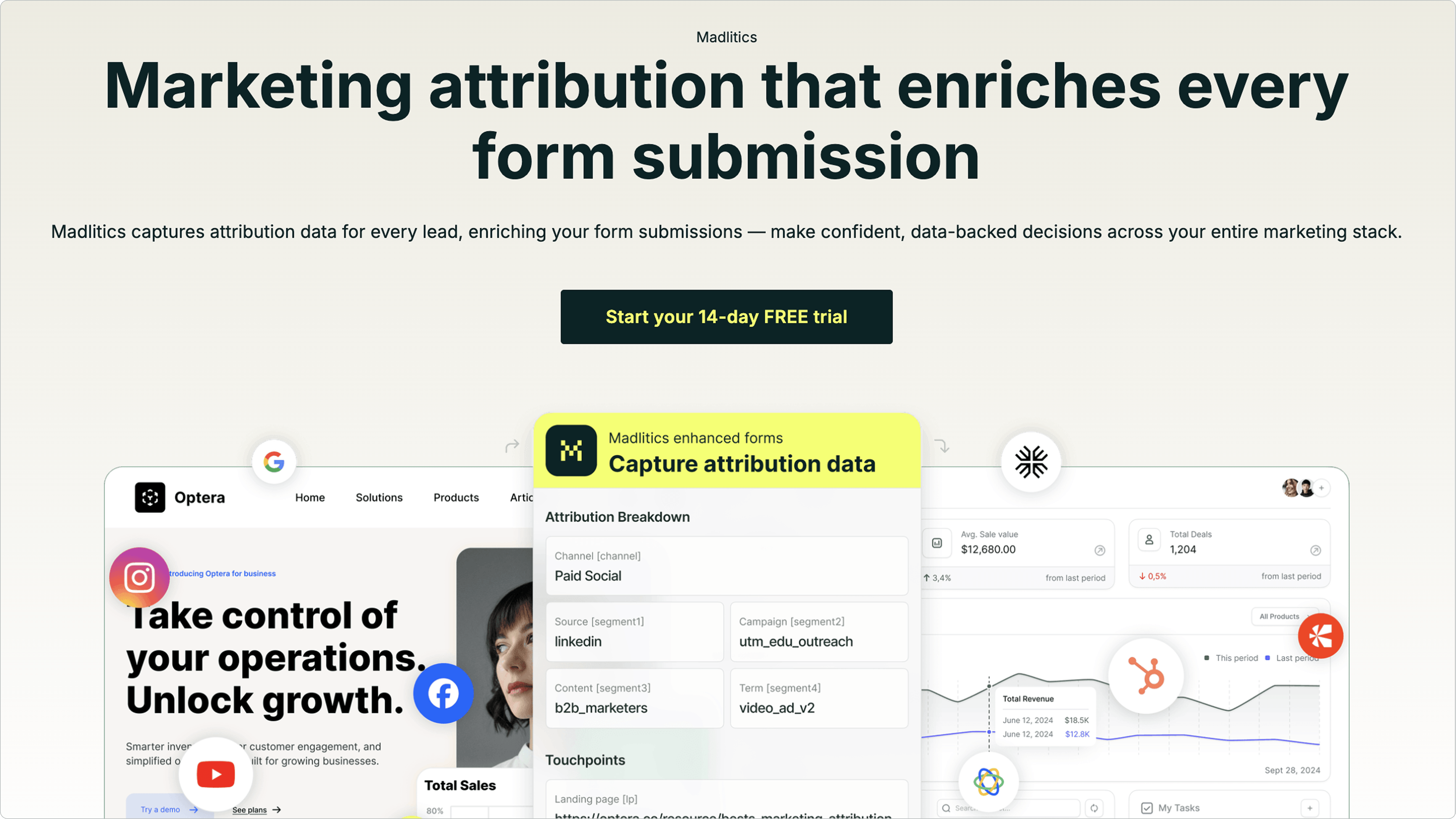
Persistent attribution ensures the original marketing context remains intact across multiple browsing sessions. For example, Madlitics retains the original paid source throughout a user’s journey, preventing conversions from being misclassified as "Direct" traffic. Other platforms often misattribute traffic by as much as 30-60%. By using first-party cookies, Madlitics achieves an 88-95% attribution accuracy, compared to the 0% accuracy of session-only tracking. This precision directly addresses the multi-session tracking challenges, ensuring that top-of-funnel channels get the credit they deserve.
The platform also normalizes and organizes marketing data automatically. This eliminates inconsistencies in channel reporting across all form submissions, ensuring campaigns are categorized correctly. For businesses spending $200,000 monthly on ads, switching from session-only tracking to persistent attribution can save $60,000 to $100,000 per month in wasted budget. Unlike manual processes, Madlitics handles this normalization seamlessly, preventing fragmented data from skewing your reports.
Additionally, every form submission includes landing page insights, revealing which specific pages led to conversions. This enriched data integrates directly into your CRM through tools like Salesforce and WordPress. Setup is straightforward: simply add a code snippet and configure your forms to capture attribution data automatically.
These features provide the tools you need to measure ROI accurately and refine your marketing efforts as you continue optimizing your strategy.
To measure ROI effectively, you need to connect revenue directly to the marketing channel that brought in each lead - whether it’s organic search, paid ads, referrals, or direct traffic. By integrating attribution data into your CRM, you can follow a lead’s journey from their first interaction (like submitting a form) all the way to becoming a closed deal. This approach doesn’t just show which channels are driving clicks - it reveals which ones are actually contributing to revenue. Here are some examples that highlight how combining data from multiple channels can give you sharper insights into ROI.
In 2024, Elizabeth Lowman, Head of Marketing at IOU Financial, applied channel attribution to trace every lead back to its specific source. This strategy allowed the company to link revenue directly to its marketing efforts. As a result, they achieved a 49% increase in qualified leads from paid search and boosted their Return on Ad Spend (ROAS) from 3x to an impressive 11x.
Unified data also helps uncover the hidden value of channels that might otherwise seem underwhelming. For example, in September 2024, Eryn Lueders, Head of Marketing at Basis Theory, utilized a robust analytics stack - including first-party cookies, GA4, HubSpot, and Hotjar - to analyze the impact of display ads. The findings showed that display ads influenced about 9% of the company’s inbound Sales Qualified Leads (SQLs). Without combining data across platforms, the team might have dismissed display ads as ineffective when relying solely on GA4 data.
Organic strategies benefit from the same level of detailed analysis. For example, you can calculate Return on Content Spend (ROCS) by subtracting the cost of content creation (like salaries and tools) from the total value of leads generated. Comparing ROCS to paid ROAS helps you pinpoint where your marketing dollars are working hardest. By focusing on meaningful metrics like leads generated and attributed revenue, rather than vanity stats like pageviews, you gain a clearer understanding of performance. This integrated approach underscores a critical takeaway: accurate attribution across every touchpoint leads to smarter, more effective marketing strategies.
When you connect revenue to specific marketing channels, attribution data becomes a powerful tool for refining your strategy. It helps you pinpoint which campaigns are driving meaningful growth and which ones are wasting resources. This allows you to concentrate on the channels that effectively turn visitors into paying customers, making budget shifts and content adjustments more precise.
For example, if your attribution reports reveal that a paid social campaign is pulling in lots of traffic but no qualified leads, it’s time to rethink that spend. Redirecting that budget to channels with better performance ensures your resources are working harder for you.
Landing page insights are another goldmine. They show which pages or blog posts are bringing in high-value leads. This means you can amplify the impact of top-performing content while tweaking - or even retiring - pages that aren’t pulling their weight. Manuel Segnana, Co-founder of DressCode Agency, shared how this clarity transformed his approach:
"I can now double down on the sources that truly bring results"
Take it a step further by integrating attribution data with your CRM. This gives your sales team valuable marketing context for every lead, helping them close deals more effectively. Plus, it allows you to focus on metrics that matter - like qualified lead rate and revenue per channel - instead of just chasing traffic numbers.



Pinpointing accurate lead attribution takes the guesswork out of marketing and replaces it with actionable insights. By connecting every lead to its true source, businesses can avoid wasting money on campaigns that might appear effective but fail to deliver real results. Shifting the focus from tracking clicks to measuring revenue turns marketing into a true driver of growth.
To overcome the attribution challenges discussed earlier, adopting practices like persistent tracking, data normalization, precise UTM parameters, and preserving landing page data is key. These strategies solve issues like "direct/none" attributions and provide full visibility into the funnel for both organic and paid channels. A great example? Elizabeth Lowman, Head of Marketing at IOU Financial, shared how her team boosted their qualified lead rate for paid search by 49% and increased ROAS from 3x to 11x by leveraging attribution data to make smarter investments.
Madlitics makes this process seamless by enriching every lead with detailed marketing context at the moment of form submission. With comprehensive channel tracking and auto-cleaned, persistent data, Madlitics provides a clear picture of which channels truly drive leads - without the hassle of manual data entry.
Getting started is simple: just install a code snippet and add invisible fields to your forms. Try a 14-day free trial (no credit card required) to discover which channels fuel growth and where to focus your efforts. When you know what works, every marketing dollar counts more.
Answers to your top questions















