UTM Guide

How to capture UTM Parameters in Contact Form 7

Turn Contact Form 7 responses into full attribution records ready for your marketing tools, and see what drives leads, not just form fills.
Attribution is broken

Contact Form 7 makes it easy to build flexible WordPress forms, but capturing reliable UTM parameters for attribution is still a persistent challenge for marketers. Contact Form 7 can read UTMs from the URL, but it only sees what’s present when the page (and form) loads—so if a visitor clicks around your site first, lands on a different page, or returns later to submit, attribution often disappears. In practice, UTMs show up on only a small fraction of submissions, while most entries come through with blank or incomplete tracking fields, making it hard to see which campaigns are actually driving results.

The result is incomplete lead insights and a broken link between campaigns and the Contact Form 7 submissions they generate. Madlitics solves this by automatically enriching each Contact Form 7 response with persistent, first-touch attribution data — channel, source, campaign, and more—without manual scripts or complex hidden-field workarounds. Instead of wrestling with brittle tracking setups, you get clean, consistent attribution on every submission that’s ready to flow straight into your CRM and reporting stack.

Issues with using Contact Form 7 for marketing attribution and UTM tracking

Contact Form 7 is a lightweight way to add forms to WordPress, but it was never designed to be a marketing attribution layer. It collects submissions — it doesn’t persist visitor context across pages, sessions, or channels, which is where attribution usually breaks.

Inconsistent attribution across sessions
UTM parameters live in the URL. If a visitor lands on a tagged page, clicks around your site, and submits later on a different page (or returns another day), the original UTMs are usually gone unless you store them. This “submit happens later” pattern is extremely common—and it’s why CF7 submissions often arrive without the campaign context you expected.

No built-in attribution pattern
With Contact Form 7, you typically have to decide which attribution fields you want, create the hidden inputs yourself, and ensure they’re filled correctly at submit time. If those inputs aren’t present (or the field names don’t match what your workflow expects), attribution data silently fails—so submissions look normal, but the source context is missing.

Incomplete channel attribution
Even when UTMs work, they only tell part of the story. Contact Form 7 doesn’t classify or normalize untagged traffic, so Organic Search, Organic Social, referrals, and direct visits are easy to undercount or mislabel. Madlitics automatically detects and standardizes these sources—so every submission carries full context, not just those from perfectly tagged campaigns.

Unbiased source of truth
Ad platforms are optimized to claim credit, not to give you a neutral view of reality. Madlitics creates an independent, first-party view of how visitors arrived before submitting a Contact Form 7 form, using consistent channel definitions across all sources. That gives you a single, trustworthy source of truth for comparing performance and making budget decisions with confidence.

How Madlitics fixes attribution for Contact Form 7

Madlitics adds a persistent attribution layer in front of your Contact Form 7 forms so that every submission inherits clean, consistent tracking data—regardless of which page the user converts on.

When a visitor lands on your site, Madlitics captures first-touch information such as channel, source, campaign, medium, keyword or ad content (if available), and landing page details. That data is stored client-side and associated with the visitor’s session and subsequent sessions, so if they move from a campaign landing page to a blog article and then finally to a “Request Demo” Contact Form 7 form, the original context is still available.

At submit time, Madlitics injects this normalized attribution data into hidden fields on your Contact Form 7, turning each response into a complete record you can send to your CRM, marketing automation platform, or data warehouse. This means Contact Form 7 becomes a reliable capture mechanism instead of a dead end for attribution.

Getting started with Madlitics and Contact Form 7

Follow these 4 steps to capture full attribution on every Contact Form 7 submission in under 10 minutes.

  1. Tag your campaigns consistently
    Add UTM parameters (source, medium, campaign, term, content) to every link across ads, emails, social posts, and collateral. This gives Madlitics clean data to work with from the first pageview.

    Example:
    ?utm_source=google&utm_medium=cpc&utm_campaign=cf7_guide&utm_term=utm+tracking&utm_content=ad_variation_a  
  2. Integrate Madlitics
    Sign up for a Madlitics account, grab your unique code snippet, and paste it into your site’s <head> (or deploy via GTM). Then add the Madlitics fields to your Contact Form 7 forms. Once those fields exist, Madlitics automatically fills them on every submission — site-wide — so you capture reliable attribution even when visitors browse around or return later.

    Installing Madlitics on a website
    Integrating Madlitics with Contact Form 7
  3. Capture attribution on every visit
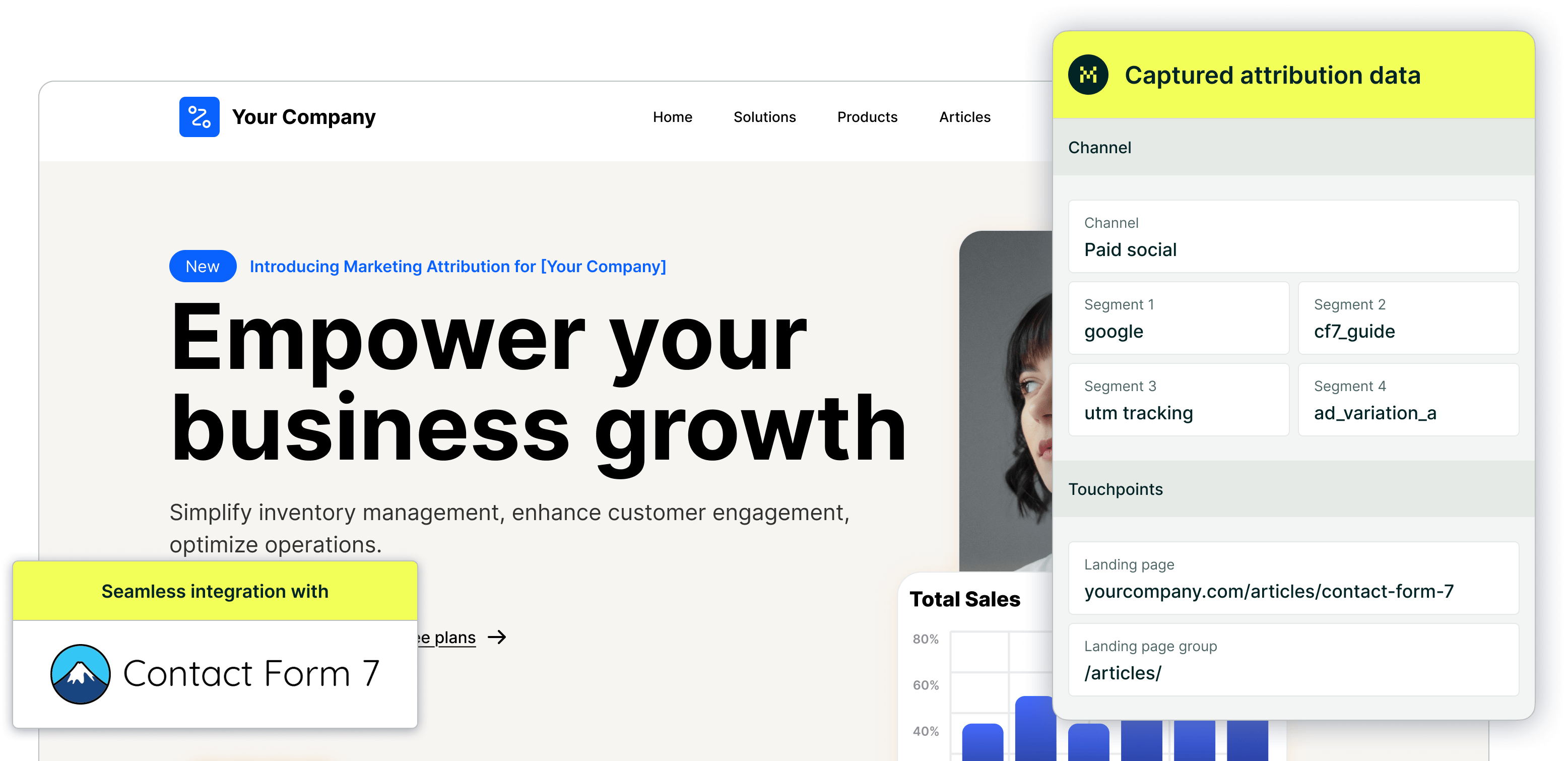
    Madlitics instantly grabs UTMs, click IDs (gclid, fbclid, msclkid), channels, and landing pages from the first pageview, then stores them persistently in cookies across all navigation, pageviews, and sessions.Here's what gets captured (example from a Google ad → Contact Form 7 guide):

    Channel: Paid Search
    Segment 1
    : google
    Segment 2
    : cf7_guide
    Segment 3
    : utm tracking
    Segment 4: ad_variation_ a
    Gclid
    : CAAAAABq8ybUF7...
    Landing Page
    : www.acme.com/articles/contact-form-7
    Landing Directory
    : /articles/  
  4. Submit enriched leads via Contact Form 7
    When users hit submit, Contact Form 7 captures their details (name, email, phone) plus Madlitics' full attribution profile in hidden fields — no data loss even from multi-page journeys or embeds.

    Send everything directly via Contact Form 7's native integrations to HubSpot, Salesforce, Pipedrive, or any CRM, or use Zapier to pipe enriched leads into spreadsheets, email tools, Stripe/Chargebee billing, or analytics for MMM and custom reporting.

Turning data into business decisions

Capturing attribution is just the start—the real value comes from reports that reveal what actually drives pipeline and revenue. With Madlitics enriching every Contact Form 7 submission, you replace "Direct/Unknown" black holes with actionable insights that shift budgets, kill underperformers, and double down on winners.

Spot your top channels instantly
Build leads-by-channel breakdowns to see how Organic Search, Paid Search, Paid Social, and referrals stack up on Contact Form 7 conversions. Spot if SEO is quietly crushing paid efforts, then reallocate budget from low performers to scale what's working.

Compare ad networks head-to-head
Drill into submissions by network or campaign to benchmark Google vs. Meta vs. LinkedIn performance. Uncover which platforms deliver the lowest CPLs or highest demo-to-customer rates, even for the same form across funnels.

Find campaigns that close (not just click)
Connect Contact Form 7 data to your CRM and track customers + revenue by campaign, keyword, or landing page. Pinpoint which efforts generate cheap form fills but zero pipeline versus the ones quietly producing your highest LTV deals.

Prioritize high-ROI content and keywords
Group by landing page or directory (/blog vs. /features) to measure content performance, or slice revenue by keyword/gclid to bid smarter in ad platforms. Turn Contact Form 7 responses into a mirror of your ad account breakdowns—but tied to actual leads and sales.


Madlitics multi-channel attribution visualization, showing marketing platforms like TikTok, Instagram, Google, and Facebook. The graphic highlights how different sources contribute to high-performing marketing channels.
1. Add UTM parameters to all inbound links
Any marketing effort that drives traffic — whether it’s a paid ad, an email campaign, or an organic post — should have properly structured URLs that clearly define the visitor’s origin. Setting it up is a straightforward process that starts with ensuring all inbound links include UTM parameters.

A LinkedIn campaign, for example, might link to:
https://yoursite.com/?utm_source=linkedin&utm_medium=paidsocial&utm_campaign=q1_promo
Screenshot of a form builder interface with a highlighted 'Hidden Input' field. Accompanied by text explaining how to install and set up Madlitics by adding hidden fields to capture marketing attribution data.
2. Add hidden fields
Once you’ve added UTM tracking to your inbound links, the next step is to install Madlitics on your site and update your Framer Forms to include hidden fields that will store attribution data when a visitor submits a form automatically. Hidden fields to include:
• Channel (e.g., Paid Search, Organic Social, Direct)
• Segment 1 (Platform name: Google, LinkedIn, Twitter)
• Segment 2 (Campaign name)
• Segment 3 (Ad group, offer name, or post type)
• Segment 4 (Creative type or ad variation)
• Landing page/group (Tracking & first-touch attribution)
CRM interface showing a detailed view of captured attribution data, including marketing channels, segments, and landing pages. A business profile of a lead is displayed, highlighting how Madlitics enriches lead data for sales and marketing teams.
3. Utilize attribution data
With the setup complete, every form submission in Framer now carries full attribution data, ensuring accurate insights into where leads originate. Pass this data to your CRM, analytics tools, or marketing automation platforms to track performance, refine campaigns, and optimize marketing efforts with precision.

Make Contact Form 7 Your Attribution Engine

Contact Form 7 is a powerful tool for creating engaging, high-converting forms that capture leads across your site, from demos to content upgrades. Its conversational design and embed flexibility make it a go-to for performance marketers chasing better response rates.

Pairing it with Madlitics unlocks even more potential by turning every submission into a full attribution record — persistent channel, campaign, keyword, click ID, and landing page data that flows straight to your CRM. No more "Direct/Unknown" gaps or manual stitching; you get clean insights on what truly drives pipeline and revenue.

Start today with a 4-step setup that takes minutes, then build reports that shift budgets from guesswork to proven winners. This integration makes Contact Form 7 not just a form builder, but a revenue attribution engine for your entire marketing stack.

Related articles to get you started with Madlitics

Frequently asked questions

Answers to your top questions about our UTM parameters
Put attribution data to work
Sync, analyze, and automate — turn insights into action.
Automation icon indicating hands-free marketing attribution and data flow.
Sync with your CRM
Pass UTM parameters into Salesforce, HubSpot, or ActiveCampaign so your sales team knows exactly where every lead came from — no more guessing.
Analytics report icon, indicating data insights and reporting.
Built smarter reports
Use Google Sheets, Looker Studio, or Airtable to create data-driven reports that reveal which campaigns drive real revenue — helping you make informed budget decisions.
Impact measurement icon, symbolizing marketing effectiveness.
Track revenue impact
Sync UTM data with Stripe, PayPal, or Chargebee to see which campaigns generate paying customers, not just leads — so you can scale what works.
Personalization icon, representing customization features.
Personalize email campaigns
Trigger personalized email flows in Klaviyo, Mailchimp, or ConvertKit based on a lead’s original source — ensuring the right message reaches the right audience.
Visualizing your marketing impact
See how attribution data translates into actionable insights.
Stacked bar chart showing lead generation by marketing channel over time, comparing sources like Paid Search, Paid Social, Organic Search, Direct, and Email. Helps visualize which channels drive the most traffic.
Leads by channel
See how different marketing channels contribute to lead generation over time. Understand which ones drive the most traffic and whether your marketing mix is balanced. Shift your budget toward the highest-performing channels to maximize results.
Stacked bar chart illustrating lead volume across different marketing campaigns, including Black Friday, Retargeted, Spring Promo, Referral, and SEO. Highlights trends in campaign effectiveness.
Leads by campaign
Track inbound leads across all campaigns, whether or not they have UTM parameters. Ensure every lead is categorized correctly, including Organic and Referral traffic. Use this insight to refine messaging, targeting, and budget allocation for better performance.
Line chart displaying lead-to-customer conversion rates by channel, comparing Google Ads, Facebook Ads, LinkedIn Ads, Organic Search, and Email. Shows how different sources drive qualified leads over time.
Conversion rate by channel
See which channels convert leads into paying customers. Some bring buyers, while others generate unqualified leads. Focus your budget on what drives revenue.
Line chart showing revenue performance by marketing campaign, comparing Google Ads, Facebook Ads, and LinkedIn Ads. Helps identify top-performing and underperforming campaigns.
Revenue by campaign
Focus your budget on campaigns that drive revenue, not just leads. Identify top performers and optimize underperforming efforts to maximize profitability.
Everything you need for reliable lead attribution
Accurate, persistent, and automated tracking — so your campaigns perform at their best.
Performance icon symbolizing marketing campaign effectiveness and results tracking.
Outperforms basic UTM tracking
Madlitics captures, categorizes, and persists attribution data across sessions, giving you a complete, structured view of what’s working in your marketing. Say goodbye to losing attribution when users navigate your site, struggling with formatting inconsistencies, and ingored non-UTM traffic.
Capture icon indicating data collection from various marketing channels and sources.
Capture all traffic
Madlitics categorizes all inbound leads — whether they have UTM parameters or not — so every conversion is accounted for, and you won't miss out on Organic Search, Organic Social, and Referral traffic.
Routing icon representing the flow of marketing data and attribution pathways.
Attribution across pages and sessions
A LinkedIn ad click should be attributed correctly—even if the visitor signs up on a different page later. If someone clicks an ad, browses multiple pages, then submits a form later, Madlitics persists attribution data across sessions, ensuring your reports reflect true performance.
List icon representing structured marketing data, reports, or campaign breakdowns.
Cleaner, more reliable data
Duplicate UTMs and inconsistent formatting break reports and mislead teams. Madlitics cleans and organizes attribution data before sending it to your CRM, giving you accurate insights.
Target icon symbolizing precise audience targeting and marketing campaign focus
See which content converts
Attribution isn’t just about where visitors came from—it’s about what convinced them to convert. By capturing landing page data alongside UTM parameters, Madlitics shows you which blog posts, case studies, or pricing pages drive the most revenue, helping you scale content that works.
Action icon representing campaign execution, optimization, and engagement.
Transform form submissions into actionable insights
Madlitics connects marketing touchpoints to lead generation, ensuring every form submission is fully attributed — optimize ad spend by identifying high-ROI channels, refine messaging based on what content drives engagement, make data-driven decisions with clean, structured reports, and more.