
Digital Marketing
How to capture first-party data across channels
Learn how persistent tracking preserves source, campaign, and journey data across sessions and devices—so every form fill and deal gets credit to the right channel.
Start a free trial
First-party data is information you collect directly from your audience through your own platforms - like websites, apps, or stores. It’s reliable, actionable, and helps you understand your customers while staying compliant with privacy laws like GDPR and CCPA. With third-party cookies being phased out, collecting this data is now more important than ever.
Key challenges include:
Here’s how you can address these challenges:
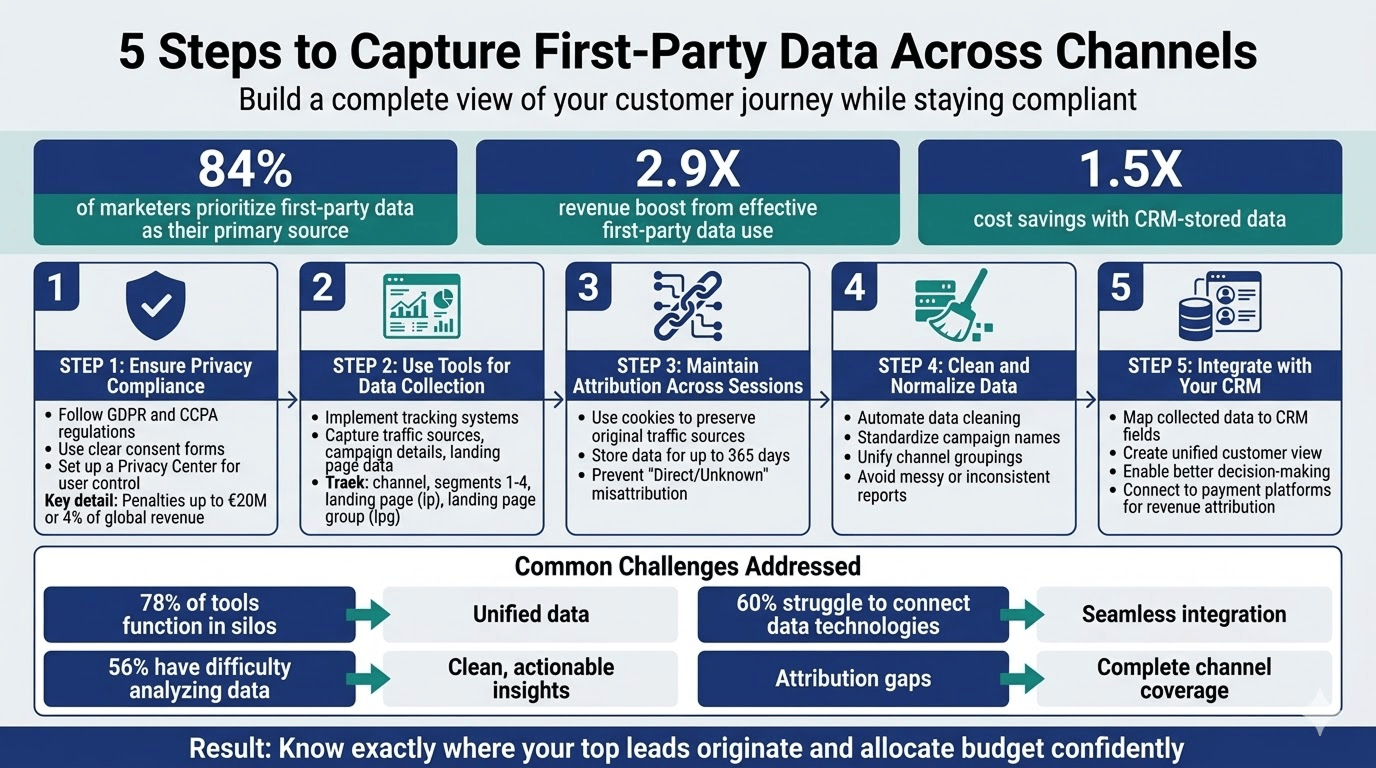
First-party data refers to the information you gather directly from your audience through your own platforms - whether that’s your website, mobile apps, or even physical stores. This can include details like website interactions (e.g., page views and clicks), form submissions with contact information, email engagement stats, and the landing pages visitors first interact with.
What makes this type of data so valuable is its precision and reliability. Since it comes straight from your audience, it’s less prone to errors or becoming outdated. To put this into perspective, 84% of marketers view first-party and transactional data as their go-to primary source. Additionally, in 2024, 80% of marketers prioritized first-party data as their top asset in response to the shift away from third-party cookies. This direct connection with your customers means they’re sharing their information with you - not through intermediaries. There’s also a related concept called zero-party data, where customers willingly provide details through things like surveys or preference forms.
However, while this data is accurate, collecting it seamlessly across multiple channels is far from simple.
Why is gathering first-party data across different channels so challenging? Let’s break it down.
One major issue stems from tracking tools like UTM parameters and click IDs (e.g., gclid, fbclid). These often get lost when users navigate between pages, return for a later session, or are redirected. Most standard form tools, including Jotform, only capture the data available on the page at the time it loads. For example, if someone clicks on a LinkedIn ad but ends up signing up on a different page later, that attribution can easily get lost.
This results in fragmented data and attribution gaps. High-quality traffic from sources like organic search, social media, or referrals often gets mislabeled as “Direct” or “Unknown” without proper classification. In fact, 78% of US B2C marketing executives admit their marketing and loyalty tools function in silos, and over 60% of brands struggle to effectively connect their various data technologies.
To address these gaps, teams often resort to manual fixes - spreadsheets or ad-hoc rules - which leads to inconsistent data and guesswork. Meanwhile, platforms like Google and Meta rely on their own internal attribution models, which can inflate their contributions. This often conflicts with the actual lead data stored in a company’s CRM. Unsurprisingly, 56% of marketers report difficulties in analyzing the data they collect.
The next section will explore how to tackle these challenges while staying compliant.
Before diving into first-party data collection, it’s essential to understand the privacy laws that apply to your operations. The General Data Protection Regulation (GDPR) governs how personal data is processed for residents of the EU and Switzerland. To comply, you need a valid legal basis for processing data, such as legitimate interests (Article 6(f)), legal obligations (Article 6(c)), or activities in the public interest (Article 6(e)). Non-compliance can lead to hefty penalties - up to €20 million or 4% of your global annual revenue.
In the United States, the California Consumer Privacy Act (CCPA) gives California residents the right to know how their personal data is shared with third parties for marketing purposes. Meanwhile, California Civil Code Section 1798.83, or the "Shine the Light" law, allows individuals to request details on how their information is shared for marketing. For organizations operating under UK GDPR, penalties can reach up to £18 million or 4% of global turnover.
Personal data should only be kept in an identifiable format for as long as it serves its original purpose. GDPR also grants users rights like data access, correction, portability, and even the ability to restrict or request the erasure of their data. As JD Supra Privacy Policy explains:
"You also have the right in certain circumstances to ask us to restrict processing of your personal information or to erase your personal information. Where you have consented to our use of your personal information, you can withdraw your consent at any time".
Once you’re familiar with these regulations, the next step is figuring out how to integrate them into your consent management process.
Managing user consent effectively means giving people clear, actionable choices about their data. A good starting point is creating a Privacy Center - a centralized hub where users can control how their information is collected, shared, and used. This could be a dashboard under "My Account" or a dedicated preferences page.
Transparency is key. Use clear cookie disclosures that explain the difference between session cookies, persistent cookies, and web beacons. When describing data use, avoid vague terms - be explicit, like "sending monthly newsletters" or "customizing product recommendations". Under GDPR, valid consent must be specific, freely given, and unambiguous. Pre-checked boxes or bundled consent options don’t meet the standard.
For added security, use opt-out mechanisms and consider double opt-in processes, where users confirm their consent via email. Provide links to tools like the Google Analytics opt-out browser add-on so users can manage cross-site tracking. Additionally, respect technical signals like Global Privacy Control (GPC), which allows users to set privacy preferences directly through their browser or app settings.
Make consent easy to manage by including checkboxes or privacy policy links on registration forms. Offer a dedicated email address for users to request access to or deletion of their data, and ensure you respond within 30 days. To prevent unauthorized access, verify the identity of anyone making data access or portability requests.
Finally, hold your third-party partners to the same high standards. Whether it’s analytics providers or CRM tools, ensure they’re contractually obligated to maintain strong data protection measures. Keep your privacy policies up to date, clearly display the date of the last update, and notify users of major changes via email.
After ensuring privacy compliance and consent systems are in place, the next step is to leverage tools that gather first-party data from all your traffic sources. These tools not only address gaps in your data collection but also integrate smoothly with your marketing channels.
One common challenge businesses face is incomplete attribution. Many tools focus solely on paid campaigns or immediate URL data, leaving out organic traffic, referrals, and direct visits - sources that often generate valuable conversions.
To achieve complete channel coverage, you need a system that tracks every visitor, no matter how they arrive. This typically involves adding a tracking snippet to your website's <head> or implementing it through Google Tag Manager. However, standard setups often fail to capture UTM parameters in Elementor and other form builders without additional configuration. This snippet collects data such as traffic sources, campaign parameters, click IDs (like gclid, fbclid, or msclkid), and the landing page from the initial pageview.
At Madlitics, this process is simplified with a single line of code that tracks all visitor traffic. Setup takes less than 10 minutes, and the data is captured during form submissions using seven hidden fields: channel, segment1, segment2, segment3, segment4, lp (landing page), and lpg (landing page group).
"We needed dependable channel categorization and UTM mapping without rewiring our stack. Madlitics delivered exactly that. It's now standard on every form we launch." – Sophie A., Head of Growth at a fintech company.
Beyond tracking, maintaining attribution across sessions ensures you retain the full context of delayed conversions.
Attribution often gets lost when conversions happen over multiple sessions. Imagine someone discovers your site through a LinkedIn post, leaves, and comes back days later via direct traffic before completing a form. Without persistent attribution, you'd only see "direct" as the source, losing the original LinkedIn connection.
Persistent attribution addresses this by storing the original traffic source in cookies with extended lifespans (usually up to 365 days). This ensures the source data carries over across sessions and pageviews.
Madlitics uses client-side storage to preserve attribution throughout the customer journey. Even if a lead converts months later, the original traffic source, campaign details, and landing page are retained and automatically populated into hidden form fields.
"We run dozens of forms across platforms. Madlitics keeps the attribution consistent everywhere and pushes the same fields into our CRM and email tool." – Marco D., Marketing Ops Manager at a telecom company.
Raw marketing data can be messy. Campaigns often get tagged inconsistently, leading to fragmented reports where a single channel appears under multiple names. Manually cleaning this data is not only time-consuming but also prone to mistakes, especially when dealing with high volumes.
Automated data normalization addresses this by standardizing inconsistencies with clean campaign URLs before they reach your CRM. Campaign names are unified, channels are grouped correctly, and formatting rules are applied consistently. This results in cleaner reports, better segmentation, and less time spent fixing errors.
Madlitics provides Auto-Cleaned Data by organizing and normalizing data at the point of capture. Instead of dealing with raw, inconsistent UTM parameters, your CRM receives standardized attribution data, ready for analysis. This streamlined process saves time and ensures teams can trust the data they rely on for decision-making.
Knowing that a lead came from "organic search" is helpful, but understanding they arrived through a specific blog post on pricing strategies is far more actionable. Landing page data provides deeper insights into which pages and content types drive conversions.
This involves recording the exact URL where a visitor first entered your site and persisting that information across their session. By grouping landing pages (e.g., /blog/, /case-studies/, /features/), you can analyze performance at both the individual page and category levels.
Madlitics automatically captures Landing Page Insights by populating the lp and lpg hidden fields with the visitor's original entry point. This connects each lead to the content that influenced their conversion, helping you identify what works and refine what doesn’t. Accurate landing page data strengthens your ability to make informed decisions across your marketing strategies.
"Attribution isn't just about where visitors came from - it's about what convinced them to convert".
Pulling first-party data from all your channels into your CRM can create a unified customer profile, giving you a clear picture of the entire customer journey. This way, you’re not just collecting data - you’re making it actionable.
By mapping hidden form fields like channel, source, campaign, and landing page directly to CRM lead records, you eliminate the need for manual data entry. Your sales team instantly knows where each lead originated. For example, when someone submits a form, the attribution details automatically populate in your CRM, saving time and reducing errors.
A study by Think With Google and Boston Consulting Group found that brands using first-party data effectively in their marketing see a 2.9X boost in revenue and 1.5X cost savings by leveraging CRM-stored data for predictive analytics and segmentation.
"It's the first solution my team actually uses every day because the data shows up where they already work. No training, no new dashboards." – Sam R., Growth Lead at a tech startup.
Madlitics makes this process seamless by integrating directly with top CRMs. It enriches form submissions with attribution data, automatically mapping seven hidden fields - channel, segment1, segment2, segment3, segment4, lp, and lpg - to your CRM. This gives your sales team full visibility into lead origins, no spreadsheets or guesswork required.
With this level of integration, you’re not just tracking leads - you’re setting the stage for smarter marketing decisions.
Centralized CRM data opens up opportunities to fine-tune your marketing strategy. By analyzing channel performance, you can take targeted actions that yield better results. For instance, segmenting leads by traffic source and conversion rate in your CRM might reveal that organic search converts 25% better than paid ads. Insights like these help you decide where to focus your budget.
You can also connect attribution data to payment platforms like Stripe or Chargebee to identify which campaigns bring in paying customers - not just leads. This approach ensures your investments are tied to revenue, not surface-level metrics.
Beyond analysis, use this data to power personalized workflows. For example:
These personalized touches not only improve engagement but also speed up the sales process.
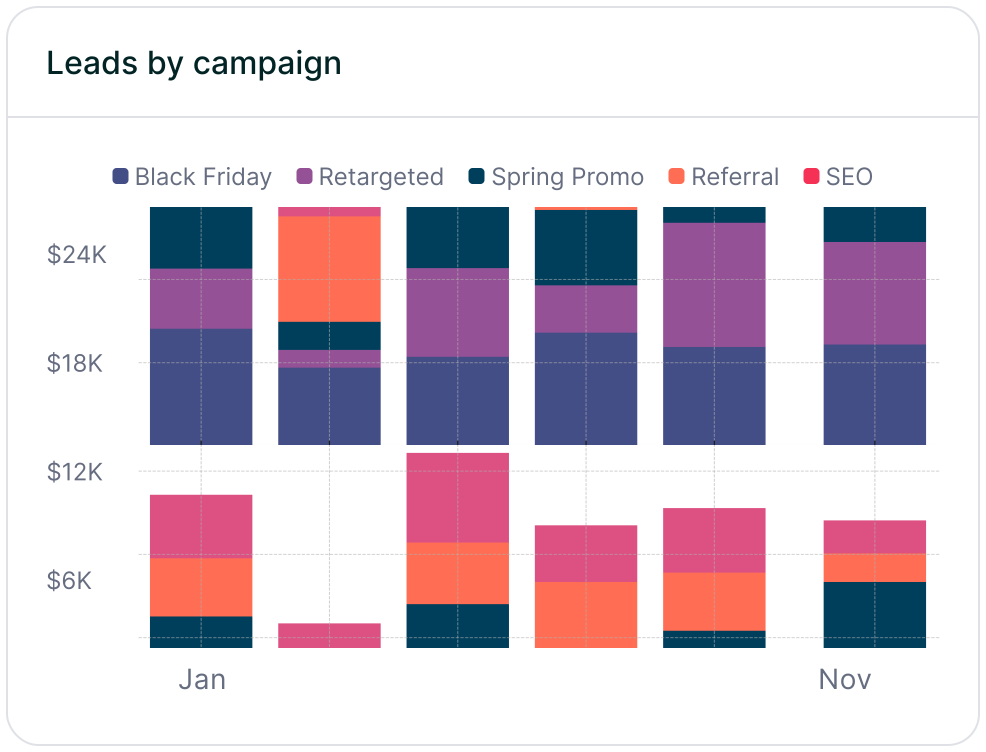
Lastly, keep an eye on "Leads by Channel" reports to spot trends or imbalances. If one channel consistently delivers better results, consider reallocating resources to maximize returns. The goal isn’t just to collect data - it’s to use it to fuel growth, cut waste, and increase revenue across your entire marketing stack.
Ensuring that every lead is properly attributed requires thorough testing and verification of data accuracy once your capture tools are in place.
Start by confirming that your tracking snippet is active on all pages. You can do this by inspecting the site’s source code or using tools like Google Tag Manager. Next, review your lead capture forms (including WPForms UTM tracking) to ensure all necessary hidden fields - such as channel, segments 1–4, landing page, and landing page group - are present, correctly configured, and include the right default values.
Perform live form submission tests to confirm that attribution fields sync seamlessly with your CRM. Compare submitted form data with CRM lead entries to verify that fields like "Channel" and "Campaign" are fully populated. If you see an unusual increase in "Direct/Unknown" traffic, it might mean that UTM parameters are being lost during multi-page journeys or redirects. To prevent this, ensure all inbound links - whether from ads, emails, or social posts - use properly structured UTM parameters, including source, medium, campaign, term, and content.
Check that client-side cookies are storing attribution data (such as gclid, fbclid, and msclkid) to maintain context across multiple sessions. For an additional layer of accuracy, link attribution data with payment processors like Stripe or Chargebee to confirm that leads from specific channels are converting into paying customers, not just generating clicks.
Once your setup passes these audits, move on to specialized tools to validate and standardize your data.
Use URL testing tools to ensure UTM parameters are correctly structured before launching campaigns. A/B testing on landing pages can also help verify that tracking pixels and form fields capture data consistently across different browsers and devices. This is especially important for embedded tools like Typeform UTM capture, which often require specific configurations to maintain attribution across sessions. Cross-check form submissions with CRM lead data to identify inconsistencies in channel classification or campaign naming. Watch for duplicate UTM entries or inconsistent naming (e.g., "Social" versus "social") that might disrupt reporting. Tools that automate data cleaning and normalization can help maintain a single, consistent source of truth.
For deeper insights, run cohort retention audits to track whether leads from specific channels remain active over time. If you notice a high churn rate within a particular cohort, it could signal a tracking issue or a problem with data quality.
"Manage dozens of forms across different stacks, Madlitics keeps attribution consistent and client reporting is faster; we've cut hours of clean-up from month-end." – Tiffany M., Campaign Manager at a non-profit.
The table below outlines the main steps for verifying data accuracy, from initial capture to revenue attribution.



Gathering first-party data across multiple channels doesn’t have to be complicated. Start by collecting data directly from your website and forms, keeping attribution consistent across sessions. Make sure to follow privacy laws like GDPR and CCPA, and centralize all your insights in a CRM for better organization.
Madlitics simplifies this process by providing complete channel insights and persistent attribution. With every form submission, you’ll uncover the full customer journey. This not only ensures compliance and data precision but also strengthens your marketing strategy. According to Think With Google and BCG, brands that effectively use first-party data see a 2.9X increase in revenue and 1.5X cost savings.
Perform regular accuracy checks to keep your data dependable. By unifying first-party data collection across channels, your team gains a clear, actionable perspective on marketing performance. You’ll instantly identify which channels contribute to actual revenue - beyond just clicks.
Use these insights to make smarter investments and achieve measurable growth. With Madlitics, you can access a 14-day free trial (no credit card required) to explore complete channel insights. When you know exactly where your top leads originate, you can confidently allocate your budget, reduce wasted spending, boost conversions, and fuel business growth.
Answers to your top questions















