Learn how persistent attribution preserves first-touch data for up to 365 days, closes lead source gaps across forms and CRMs, and gives you a trustworthy view of which channels actually drive pipeline and revenue.
When leads show up as "Direct" or "Unknown" in your CRM, even though they came from paid campaigns, you're losing key data. This happens because traditional tracking methods fail to link the first touchpoint with the final conversion - especially when users switch devices, clear cookies, or return after weeks.
The solution? Persistent attribution. It keeps the entire customer journey intact by storing first-touch data (like campaign, source, and landing page) for up to 365 days. This ensures accurate tracking across sessions and devices, so you know exactly which channels drive results.
Key Takeaways:
Why tracking fails: Cookies expire, privacy updates block tracking, and session-based models rely on last-click attribution.
Impact of lost data: Misallocated budgets, inflated ROI for paid channels, and missed insights into high-performing campaigns.
How persistent attribution works: A browser cookie stores UTM data from the first visit, auto-filling hidden form fields to preserve source details.
Benefits: Clearer ROI, smarter budget allocation, and consistent data across tools like Salesforce and HubSpot.
Madlitics simplifies this process with a quick setup, filling attribution gaps and providing actionable insights for better marketing decisions.
Why Lead Source Data Gets Lost
Session-based tracking has some serious weaknesses, mainly because it relies on cookies that don’t last long. Since cookies often expire well before a typical 92-day B2B sales cycle wraps up, returning visitors are frequently misclassified as "Direct" or "Organic" traffic. This short lifespan of cookies highlights deeper technical challenges that make accurate attribution even harder.
Technical Limits of Session-Based Tracking
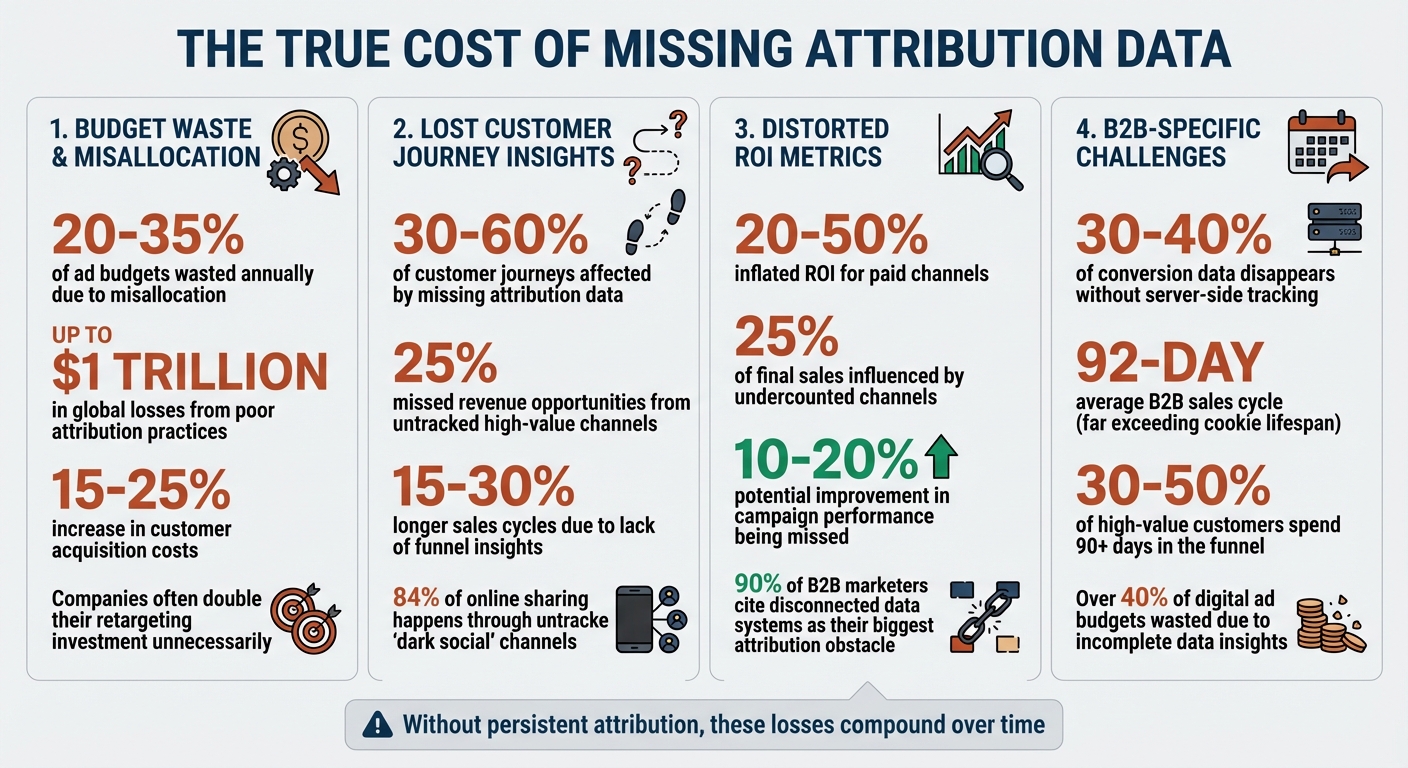
Browser privacy updates have added fuel to the fire. Features like Apple’s App Tracking Transparency and Intelligent Tracking Prevention limit the lifespan of tracking cookies. On top of that, if users clear cookies, browse in incognito mode, or switch devices, the link to their original touchpoint is completely lost. Studies show that 30–40% of conversion data typically disappears in stores that don’t use server-side tracking.
The "last-click" attribution model only makes things worse. Imagine someone first learns about your brand through a LinkedIn ad, spends weeks researching your product, and finally converts by typing your URL directly into their browser. Most analytics tools would credit "Direct" as the source, completely ignoring the LinkedIn ad that started the process. This kind of misattribution is costly - over 40% of digital ad budgets are wasted due to inefficient strategies and incomplete data insights.
And it’s not just technology causing problems. Manual processes also play a big role in losing valuable data.
Data Collection Gaps
Manual data entry and disconnected marketing tools create gaps that fragment attribution data. For example, when sales reps ask leads, “How did you hear about us?” during discovery calls, the answers are often unreliable. People forget, simplify, or misremember their journey. On top of that, one team member might log "Facebook", while another enters "Organic Social - Facebook", leading to inconsistent data and messy reporting.
This fragmentation is a widespread issue - 90% of B2B marketers say that disconnected data systems are their biggest obstacle to accurate attribution. When marketing, sales, and finance systems don’t communicate, the connection between the first web visit and the final CRM lead record often disappears. To complicate things further, 84% of online sharing happens through "dark social" channels that tracking software can’t see. For brands with high-value purchases, 30% to 50% of customers spend more than 90 days in the funnel before converting. That’s plenty of time for critical data to vanish.
Solving these technical and manual challenges is crucial to maintaining a clear picture of the entire lead journey. Without it, you’re left with blind spots that make accurate attribution nearly impossible.
The Business Impact of Missing Attribution Data
The Cost of Missing Attribution Data: Key Statistics on Budget Waste and Lost Revenue
Missing attribution data can have a serious impact on your business. When marketing teams work with incomplete information, they risk making poor decisions that waste budgets and miss out on growth opportunities. These gaps in data directly affect two crucial areas: how you allocate your marketing budget and your ability to identify what’s actually driving results.
Misallocated Budgets and Inefficient Spend
When attribution data is incomplete, budget decisions often go off course. Without a clear view of the customer journey, marketers are stuck relying on last-click attribution models, which give all the credit to the final touchpoint. This can lead to over-investing in lower-funnel channels while neglecting the upper-funnel efforts that are essential for nurturing leads in the first place.
For example, analytics might misattribute conversions to "Direct" traffic or paid ads, leading teams to cut spending on organic social campaigns - even if those were the channels that sparked initial interest. Studies reveal that this kind of misallocation can result in 20-35% of ad budgets being wasted annually, with some estimates suggesting global losses of up to $1 trillion due to poor attribution practices.
The financial toll doesn’t stop there. Without proper tracking, brands often overspend on retargeting - sometimes doubling their investment unnecessarily - and see customer acquisition costs rise by 15-25%.
"Identify top performers and under-performers so you can reallocate spend and double down on what's driving conversions, leads, and revenue - no more relying on instincts or incomplete reports." — Madlitics
Beyond wasted budgets, incomplete data clouds your understanding of which channels are actually delivering results.
Lost Insights into High-Performing Channels
Missing attribution data doesn’t just drain money - it also hides valuable opportunities. For instance, when a lead converts through a paid ad but first discovered your brand via organic search or a referral, those early touchpoints often go uncredited. This data gap affects 30-60% of customer journeys, making it nearly impossible to scale the strategies that are truly effective.
The long-term consequences can be severe. Imagine a SaaS company failing to notice that podcast sponsorships bring in leads with 3x higher lifetime value, resulting in 25% missed revenue opportunities. Sales cycles can also stretch 15-30% longer when teams lack the insights needed to optimize the funnel.
Incomplete attribution skews your ROI metrics, too. Paid channels often show 20-50% inflated ROI, while organic contributions are undervalued. This can lead to poor scaling decisions and misguided A/B testing, as channels influencing 25% of final sales are undercounted. This lack of visibility can prevent you from improving overall campaign performance by 10-20%.
Persistent attribution fixes these problems by capturing the entire customer journey, allowing every touchpoint to inform smarter budgeting and strategy decisions.
What Persistent Attribution Is and How It Works
Persistent attribution tracks a visitor's initial source and keeps that information intact throughout their journey, even if they take months to convert. Unlike session-based tracking - which loses data after about 30 minutes of inactivity or when a browser is closed - persistent attribution uses a browser cookie that can last up to 365 days. For example, if someone clicks on a paid ad today but doesn’t convert until three months later, you’ll still know the original source of that lead. This method provides a reliable way to understand where your leads truly come from.
How Persistent Attribution Captures and Maintains Data
Persistent attribution ensures that the first touchpoint remains intact, even as users return to your site through different channels. Here’s how it works: when a visitor lands on your site, a JavaScript snippet instantly captures UTM parameters and referral paths (whether from a paid ad, organic search, or social media). This data is stored in a browser cookie. Even if the visitor comes back through direct traffic later, their original source data remains preserved. When they eventually fill out a form, hidden fields automatically pull the stored attribution data from the cookie and attach it to the form submission.
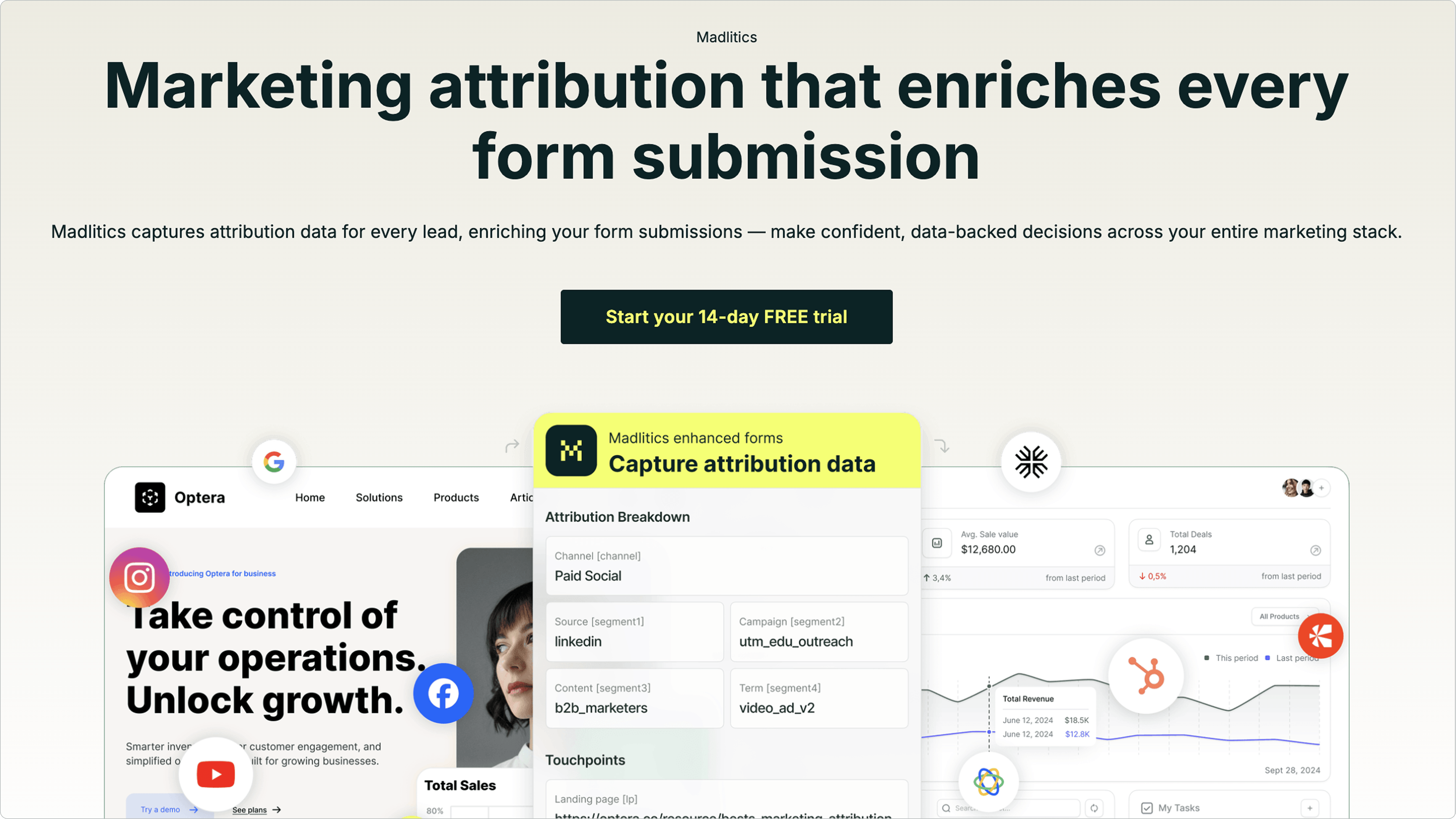
This system collects seven key data points for every lead: Marketing Channel, Source (Platform), Campaign, Term/Ad, Content/Creative, Landing Page, and Landing Page Group. It also standardizes this data automatically. For instance, it consolidates variations like "fb_cpc" and "Facebook Ads" under one consistent channel name. This ensures that your reports are accurate without needing manual cleanup. By addressing these data gaps, marketers can make better decisions about where to allocate their budgets.
Benefits for Marketing Teams
Persistent attribution provides a clear and reliable picture of every lead’s true origin, eliminating the guesswork caused by incomplete data.
Setting it up is simple: install a code snippet on your website, add seven hidden fields to your forms, and the data flows automatically. The system integrates seamlessly with tools like HubSpot, Salesforce, and Google Sheets, so your team can access attribution data directly in the platforms they already use.
"It's the first solution my team actually uses every day because the data shows up where they already work. No training, no new dashboards." — Sam R., Growth Lead, @Tech Startup
This streamlined process helps close attribution gaps, enabling smarter decisions about marketing budgets and campaigns.
Madlitics was designed to tackle a common marketing challenge: keeping lead attribution data intact throughout lengthy conversion journeys. Our platform captures the original source of a visitor's arrival, stores it in a cookie for up to 365 days, and enriches every form submission with detailed marketing context. This ensures that no matter how long the path to conversion, your attribution data stays complete. Here’s how easy it is to set up.
Setting Up Madlitics
Getting started with Madlitics is a quick, three-step process:
Install the code snippet: Add it to your website’s <head> section or use Google Tag Manager. This starts tracking visitor attribution across all traffic sources.
Add hidden fields to forms: Compatible with Salesforce Web-to-Lead, Ninja Forms, Gravity Forms, Typeform, or custom-built solutions.
Start collecting data: Once forms are submitted, attribution data flows directly into your CRM.
The setup takes less than 10 minutes, and from there, attribution data automatically integrates into your systems.
"We needed dependable channel categorization and UTM mapping without rewiring our stack. Madlitics delivered exactly that. It's now standard on every form we launch." — Sophie A., Head of Growth, Fintech
Capturing All Traffic Sources
Once installed, Madlitics begins tracking every visitor source immediately. It doesn’t just stop at paid campaigns - it covers organic search, social media, referrals, direct traffic, and more. All of this is automatically categorized into standardized channels like Paid Search, Organic Social, and Referral.
What sets Madlitics apart is its ability to fill in data gaps. Even if UTM parameters are missing, the platform identifies and classifies traffic sources, ensuring leads don’t get lost in the "Direct/Unknown" bucket. Additionally, Madlitics captures specific click IDs - such as gclid (Google), fbclid (Facebook), and msclkid (Microsoft) - and preserves Landing Page Insights. This way, you’ll know exactly which pages and content are driving conversions.
Using Madlitics for Data-Driven Optimization
Madlitics doesn’t just track data - it turns it into actionable insights. With detailed reports, teams can create dashboards that pinpoint which channels, campaigns, and landing pages are driving real results. The platform integrates seamlessly with tools like Salesforce, HubSpot, Google Sheets, Mailchimp, and Stripe, delivering insights directly into your existing workflow.
This level of data clarity allows for precise ROI calculations, smarter budget allocation, and content adjustments based on actual performance. The outcome? Higher conversion rates, minimized waste, and increased revenue, all supported by attribution data that stays consistent from the first click to the final conversion.
"We run dozens of forms across platforms. Madlitics keeps the attribution consistent everywhere and pushes the same fields into our CRM and email tool." — Marco D., Marketing Ops Manager, Telecom
Lead source gaps can lead to wasted budgets, missed insights, and decisions based on guesswork. When attribution data is lost during long conversion journeys, marketing teams struggle to pinpoint which channels truly perform. This often results in overspending on underperforming campaigns while cutting funding from those that actually drive revenue.
With persistent attribution, you maintain the full picture of your marketing efforts - tracking every interaction, no matter how many sessions or pages a visitor navigates. First-touch data, landing page details, and campaign insights are preserved across the entire customer journey.
Madlitics ensures that all traffic sources are captured and enriches every form submission with precise attribution data. Visitor information is stored for up to 365 days, keeping data consistent across platforms and forms. Plus, it integrates seamlessly with your existing CRM and marketing tools.
The result? Higher conversion rates, less wasted spending, and more revenue - all thanks to attribution data that remains intact from the first click to the final conversion. Your team gains the clarity to allocate budgets wisely, fine-tune campaigns based on real performance, and clearly showcase marketing’s impact on revenue. With a complete view of the customer journey, your marketing dollars work smarter to drive growth.
Getting started is quick and hassle-free - it takes less than 10 minutes. Madlitics even offers a 14-day free trial with no credit card required. If you're ready to close attribution gaps and make confident, data-driven decisions, the solution is ready and waiting.
Frequently asked questions
Answers to your top questions
What is persistent attribution and why does it matter?
Why do so many leads show up as “Direct” or “Unknown” in my CRM?
How does persistent attribution actually work under the hood?
How is persistent attribution different from last-click or session-based tracking?
How does a platform like Madlitics implement persistent attribution?
How does persistent attribution integrate with CRMs like Salesforce and HubSpot?
What do I need to add to my forms to capture persistent first-touch data?
What does setup and daily use look like for persistent attribution with Madlitics?
Have Questions?
Contact our support team and we'll work together to figure out a solution
Madlitics is trusted by marketers across industries to help reduce wasted spend and drive smarter growth.
Accurate, persistent, and automated tracking — so your campaigns perform at their best.
Outperforms basic UTM tracking Madlitics captures, categorizes, and persists attribution data across sessions, giving you a complete, structured view of what’s working in your marketing. Say goodbye to losing attribution when users navigate your site, struggling with formatting inconsistencies, and ingored non-UTM traffic.
Capture all traffic Madlitics categorizes all inbound leads — whether they have UTM parameters or not — so every conversion is accounted for, and you won't miss out on Organic Search, Organic Social, and Referral traffic.
Attribution across pages and sessions A LinkedIn ad click should be attributed correctly—even if the visitor signs up on a different page later. If someone clicks an ad, browses multiple pages, then submits a form later, Madlitics persists attribution data across sessions, ensuring your reports reflect true performance.
Cleaner, more reliable data Duplicate UTMs and inconsistent formatting break reports and mislead teams. Madlitics cleans and organizes attribution data before sending it to your CRM, giving you accurate insights.
See which content converts Attribution isn’t just about where visitors came from—it’s about what convinced them to convert. By capturing landing page data alongside UTM parameters, Madlitics shows you which blog posts, case studies, or pricing pages drive the most revenue, helping you scale content that works.
Transform form submissions into actionable insights Madlitics connects marketing touchpoints to lead generation, ensuring every form submission is fully attributed — optimize ad spend by identifying high-ROI channels, refine messaging based on what content drives engagement, make data-driven decisions with clean, structured reports, and more.
Trusted by marketing teams everywhere
Built for real teams. Backed by real results.
Madlitics is trusted by marketers across industries to help reduce wasted spend and drive smarter growth.