How to Fix Incomplete Lead Data in 5 Steps


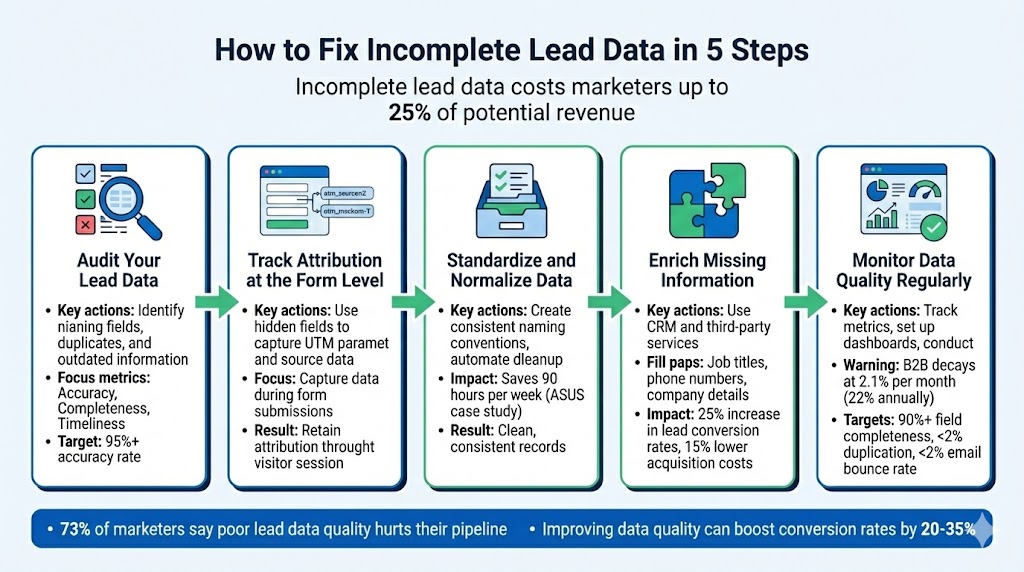
Incomplete lead data can cost marketers up to 25% of potential revenue and force sales teams to waste significant time on manual data entry. Here's how you can fix it in five steps:
These steps help reduce errors, improve lead scoring, and ensure better marketing and sales alignment. Start by auditing your data today to uncover areas for improvement.

In this interview with Chelsea Sisson, Marketing Operations Expert, learn about why clean data is important to sales and marketing, how to clean up bad data and how to keep your data clean.
To address incomplete lead data, start by figuring out what’s missing. Define your ideal lead profile - think about attributes like attribution source, company size, and job title. This clarity will help you focus during your CRM audit.
Your CRM might hold thousands of records, but not all of them are equally useful. Focus on five critical dimensions during your audit:
Leverage CRM tools to identify unpopulated or inactive fields. Look for formatting inconsistencies - like “USA” versus “United States” or “VP” versus “Vice President” - that can mess up your reports. Duplicate entries, such as identical names or abbreviated company names, are another red flag for low-quality data[8][9].
Once your audit is complete, focus on the most common gaps: contact details, firmographics, and attribution data. Missing fields often include direct phone numbers, LinkedIn URLs, company revenue, employee count, UTM parameters, and original marketing sources.
Data decays quickly, especially in B2B contexts. For example, job titles and phone numbers can become outdated at a rate of about 2.1% per month - or 22.5% annually. Email lists fare even worse, with up to 28% annual decay[10].
To verify your data, sample 100–200 records and cross-check them against external sources like LinkedIn or company websites. Confirm whether contacts are still employed at the listed companies and ensure phone numbers are functional. Aim for a 95%+ accuracy rate for reliable B2B operations[12]. Also, monitor your email bounce rate - anything over 2% signals that your data may be deteriorating[12].
Establish a baseline by calculating your completeness rate for critical fields like email, phone, job title, and company name. For example, if 6,000 out of 10,000 records have all key fields filled, your completeness rate is 60%[8][9].
Here’s a quick reference table to guide your benchmarks:
Track these metrics monthly to identify trends. For instance, if your email bounce rate rises from 1.5% to 3.2% over three months, it’s a clear sign that your data is aging faster than expected. Given that only 3% of enterprise data meets basic quality standards[12], there’s likely a lot of room for improvement. Once you’ve documented your baseline, you’ll be in a better position to implement form-level tracking in Step 2.
To make the most out of your lead data, you need to capture attribution details right at the form submission stage. Without this, you risk losing important source information before it even reaches your CRM. Relying solely on Google Analytics or manual UTM tagging won't cut it. The fix? Embed tracking directly into your forms using hidden fields and automation tools to retain attribution data throughout a visitor's session.
Hidden fields in your forms are essential for automatically collecting UTM parameters like utm_source, utm_medium, and utm_campaign. Why? Because standard URL tracking often fails when users navigate away before converting. For instance, imagine a visitor clicks on a Google Ad, browses several pages on your site, and eventually submits a demo request. Without cookie-based tracking, you'd lose that original Google Ads attribution.
To solve this, use a tool like Madlitics to capture UTM parameters as soon as the visitor arrives, ensuring the data sticks with them throughout their session. Additionally, track landing page data - the first page they visit - and group it into categories like /blog or /pricing. This helps pinpoint which content areas drive the most valuable leads. Beyond paid campaigns, specialized tools can also track other traffic sources, such as organic search, referrals, and direct visits, by analyzing referrer data.
This level of form tracking is crucial for uncovering gaps in channel performance. Without it, you won't know which campaigns are delivering high-quality leads versus those that just generate traffic volume.
Once tracking is set up, the next step is connecting these fields to your CRM.
To streamline your workflow, send the captured attribution data directly to your CRM using webhooks instead of manually exporting CSV files. Map your hidden form fields to custom fields in your CRM. For example, utm_source from the form could populate the "Lead Source" field in platforms like Salesforce or HubSpot.
"If you don't know what marketing campaigns and channels are generating your leads and customers, you don't know which ones to invest more in to grow your business."
Make sure your CRM is set up to handle duplicate submissions. If a lead fills out multiple forms, the new information should update their existing record rather than creating a duplicate profile. For high-value assets like demo requests, consider business email gating - rejecting personal email domains (e.g., Gmail, Yahoo) to improve lead quality and ensure better account matching. Before launching your forms, use the test submission feature in your integration settings to confirm that all fields are mapped correctly to your CRM.
Once your forms are connected to the CRM, it's time to test everything. Use your browser's developer tools and any available debugging features to confirm that tracking triggers fire correctly in real-time and that session cookies are created as expected.
Testing across multiple browsers and devices is essential, especially after site updates. Changes to form IDs or CSS classes can cause tracking tags to fail. Assign unique labels to each form (e.g., demo_form_submit, newsletter_signup) to prevent data from overlapping. Be cautious with forms embedded in iframes, pop-ups, or JavaScript-based widgets, as these often don't expose proper HTML <form> elements to your tracking scripts. If you're using server-side tracking, monitor webhook payloads to ensure they align with your CRM's data requirements before pushing to production.

Once you've gathered attribution data, the next step is to ensure it's standardized. Why? Because inconsistencies like one lead entering "IBM" and another entering "International Business Machines" can wreak havoc on your CRM. These discrepancies lead to fragmented account views, duplicate records, and redundant sales efforts[1][13].
The stakes are high: poor data quality costs companies an average of $12.9 million annually, and 70.3% of B2B data becomes outdated every year[24][6].
"One bad input (misspelled company name, invalid email domain, free-text job title, etc) can create duplicates, break routing logic, or pollute enrichment data." – Priyanshi Sharma, Content Strategist, Clearout[1]
To avoid these issues, focus on two key actions: establish clear naming conventions and automate the cleanup process. This approach ensures that data entering your CRM is already clean and consistent, reducing the need for tedious fixes later.
A solid starting point is developing a master taxonomy - a detailed guide listing approved field names, formats, and values. This ensures consistency across all record entries, from UTM parameters to job titles and company names. For example, decide whether you'll use "VP Marketing" or "Vice President of Marketing" and stick to that choice across all systems and campaigns[13].
To minimize variations, replace free-text fields with dropdown menus. This prevents entries like "VP of Mktg", "Marketing VP", and "Vice President, Marketing" from being treated as separate values in your CRM. Similarly, simplify company names by removing legal suffixes like "Inc.", "LLC", or "Ltd." - turning "Panamax Inc." into "Panamax." This small adjustment improves email personalization and reduces duplicate records[23][1].
For UTM parameters, enforce strict naming rules across all paid campaigns. Inconsistent entries like "FB_Ads_2024" and "facebook" can fragment your attribution data. Standardizing these values ensures every campaign source, medium, and ID follows the same format.
Manual cleanup isn't scalable, so automation is key. Use rule-based tools to fix common issues like extra spaces, inconsistent capitalization, and varying contact data formats. For UTM parameters specifically, Madlitics automatically normalizes values at the point of capture — ensuring that campaign sources, mediums, and other attribution fields are clean and consistent before they ever reach your CRM[11][23][24].
Implement real-time validation at the point of data capture. Tools like HubSpot allow you to set formatting rules for specific fields, so errors are corrected as they happen. For contact data like phone numbers, automation can standardize formatting consistently across all records before they're stored.
If you're working with an ETL (Extract, Transform, Load) process, make sure data cleansing happens during the "Transform" stage. This ensures that information is clean and standardized before reaching your data warehouse, preventing messy data from causing downstream issues[23][24].
"Improvado saves about 90 hours per week and allows us to focus on data analysis rather than routine data aggregation, normalization, and formatting." – Jeff Lee, Head of Community and Digital Strategy, ASUS
Even with clean and standardized data, gaps in lead information are inevitable. Missing phone numbers, job titles, or company details can hinder your efforts. Thankfully, modern CRM tools and automated workflows can help fill these gaps. Automated enrichment, for instance, has been shown to increase lead conversion rates by 25% and lower customer acquisition costs by 15%. Here's how you can use both CRM features and automated workflows to complete your lead profiles.
Start by exploring your CRM's built-in enrichment capabilities. For instance, HubSpot's Breeze Intelligence automatically enriches new records upon creation and updates existing ones on a monthly basis[27][29].
For more comprehensive results, consider "waterfall enrichment", which queries multiple data sources in sequence to verify and complete lead details. Unlike single-source tools, waterfall enrichment checks over 15 databases, achieving up to 98% accuracy and 20–30% higher fill rates[25][26].
"Waterfall enrichment queries multiple providers in sequence until it finds the best match... The result is a 'golden record' with verified emails, direct dial phone numbers, and complete firmographics." – Cleanlist.ai [25]
Different types of enrichment serve different needs. For example:
Sometimes, automated enrichment tools can't fill every gap. This is where automated follow-up workflows come into play. If enrichment tools fail to retrieve specific information, trigger a personalized email to the lead requesting the missing details.
Timing is key here. Following up with a lead within an hour makes you seven times more likely to engage in a meaningful conversation with a decision-maker. Additionally, up to 50% of prospects choose the vendor that responds first[5]. Use automation platforms to scan your CRM for incomplete records and trigger workflows that address these gaps. These tools can integrate through native CRM connections, low-code platforms, or browser extensions to ensure real-time enrichment.
To maximize your budget, consider testing partial enrichment first[25]. For example, validate emails and LinkedIn URLs on a large list before applying full enrichment to high-priority accounts. This ensures your most valuable leads get the attention they deserve without wasting resources.
Keeping lead data accurate and complete is a constant effort, especially with how quickly information becomes outdated. Did you know that B2B contact data deteriorates at a rate of 2.1% per month? That means over 22% of your records could be outdated in just one year [12][32].
To stay ahead, think of data quality as an ongoing process, not just a one-time fix. Build dashboards that monitor the six key dimensions of data quality: Accuracy, Completeness, Consistency, Timeliness, Validity, and Uniqueness [12]. High-performing teams aim for metrics like 90%+ field completeness, duplication rates under 2%, and email bounce rates below 2% [12]. As Johnny Grow aptly puts it:
"You can't manage what you can't measure" [32].
These metrics are the foundation for making smarter decisions about your data.
To get started, consolidate your data into a single source of truth, like your CRM or an analytics platform. Centralized data helps you spot trends and uncover actionable insights [4][13]. Use your dashboards to track key metrics like field fill rates, duplication levels, and validation scores for critical data points such as email addresses, phone numbers, and job titles [12][32].
Make sure your dashboards allow for drill-downs, so you can trace issues back to their source. For instance, if a field’s completeness drops significantly, you should be able to pinpoint whether a specific web form or integration caused the problem [32]. Some teams even use leaderboards to showcase compliance with data policies, motivating staff and identifying areas where training might help [32]. Don’t forget to set up automated alerts for things like sudden spikes in duplicate records [33].
Dashboards are great for daily monitoring, but regular audits dig deeper into systemic issues. Plan for full CRM audits at least twice a year, with smaller, targeted audits every quarter [1][34]. Full audits should cover everything from data standards to deduplication and integration health checks. Mini-audits, on the other hand, can focus on specific areas like form field usage, data completeness, and validation of recent records [1][34].
During these audits, run Data Completeness Reports to identify missing qualification data [34]. You can also filter records by their last activity to remove outdated or inactive entries [34]. Routine audits like these help you avoid costly data problems down the line.
Use your audit findings and dashboard alerts to refine how you collect data. Review your forms every three months to ensure each field serves a purpose, whether it’s for lead scoring, personalization, or sales qualification [1]. If a field doesn’t add value, consider removing it. After all, 73% of marketers say poor lead data quality hurts their pipeline [1].
Improve your forms with real-time validation to catch invalid entries - like fake phone numbers or duplicate names - before they enter your system. Use Madlitics to ensure GCLIDs and UTM parameters are consistently captured and normalized across all your campaigns, maintaining accurate attribution and avoiding misclassifications. You can also set up CRM workflows to standardize formatting, such as capitalizing names correctly or unifying country codes.
Lastly, establish data quality service-level agreements (SLAs) between Marketing and Sales Ops. These agreements should define standards, like what percentage of new leads must be enriched and which fields must never be left blank [7]. This shared accountability ensures data quality remains a priority, even as team goals evolve.

https://yoursite.com/?utm_source=linkedin&utm_medium=paidsocial&utm_campaign=q1_promo

Fixing incomplete lead data is key to protecting your revenue and making smarter marketing decisions. Did you know that nearly 73% of marketers say unreliable lead data actively harms their pipeline? That’s a huge issue [1]. By following these five steps - reviewing your current data, setting up form-level tracking, normalizing records, enriching missing details, and monitoring quality over time - you can achieve more accurate attribution, better forecasting, and stronger alignment between marketing and sales.
The benefits are clear and measurable. Improving data quality through enrichment and validation can boost conversion rates by 20-35% and increase email response rates by 15-25% [2]. These gains prove how critical clean lead data is to your success. By addressing this often-overlooked step, you’ll see improved metrics, better targeting of high-intent prospects, and smarter budget allocation using our marketing attribution guides for growth-driving strategies.
Here’s your starting point: Pick one action this week. Whether it’s auditing your current data, setting up tracking, or enriching missing information, focus on the step that will create the biggest immediate impact. Your sales team will notice the difference, your budget will go further, and you’ll finally have data you can trust to guide your marketing efforts. Every step toward better lead data is a step toward predictable pipelines and higher revenue.