Attribution Guide

Fluent Forms Marketing Attribution: Stop Losing Lead Source Data

Madlitics enriches every Fluent Forms submission with campaign, channel, and landing-page data, so you can see exactly which efforts drive results.
Start capturing attribution →
Attribution is broken
Automation icon indicating hands-free marketing attribution and data flow.
Analytics report icon, indicating data insights and reporting.
Impact measurement icon, symbolizing marketing effectiveness.
Personalization icon, representing customization features.

Madlitics automatically captures UTM parameters, click IDs (like gclid and fbclid), and referrer data when someone visits your site. This data flows through Fluent Forms into your CRM, analytics, and marketing tools — giving you consistent, first-touch attribution data that shows exactly which channels and campaigns drive leads, conversions, and revenue.

Why this matters

Fluent Forms has quickly become one of the most popular form builders for WordPress, known for being fast, lightweight, and easy to use—even in its free version. But while Fluent Forms captures what your visitors type in, it doesn’t tell you where those leads come from.

Without attribution data, you can’t connect form submissions to the marketing channels, campaigns, or ads that drove them. You might know that a lead came in—but not whether it came from paid search, social, or email. That makes it harder to evaluate performance or allocate budget effectively.

Madlitics solves this by automatically enriching your Fluent Forms submissions with complete marketing attribution data. It captures campaign and channel details for every visitor, then passes that data directly into your CRM or analytics tools—no coding, plugins, or premium features required.

How Madlitics solves it

Madlitics runs quietly in the background, capturing your visitors’ first-touch attribution data the moment they land on your site. It records UTM parameters, click IDs, referrer information, and landing-page URLs, then stores that data locally.

When a visitor submits a Fluent Form, Madlitics automatically populates the Madlitics Fields inside your form with that attribution data. Those values are included in the submission and flow into your connected systems—whether that’s your CRM, marketing automation platform, or reporting tools.

The result is clean, consistent, and reliable attribution data across all of your Fluent Forms—without changing how you build or manage them.

Madlitics multi-channel attribution visualization, showing marketing platforms like TikTok, Instagram, Google, and Facebook. The graphic highlights how different sources contribute to high-performing marketing channels.
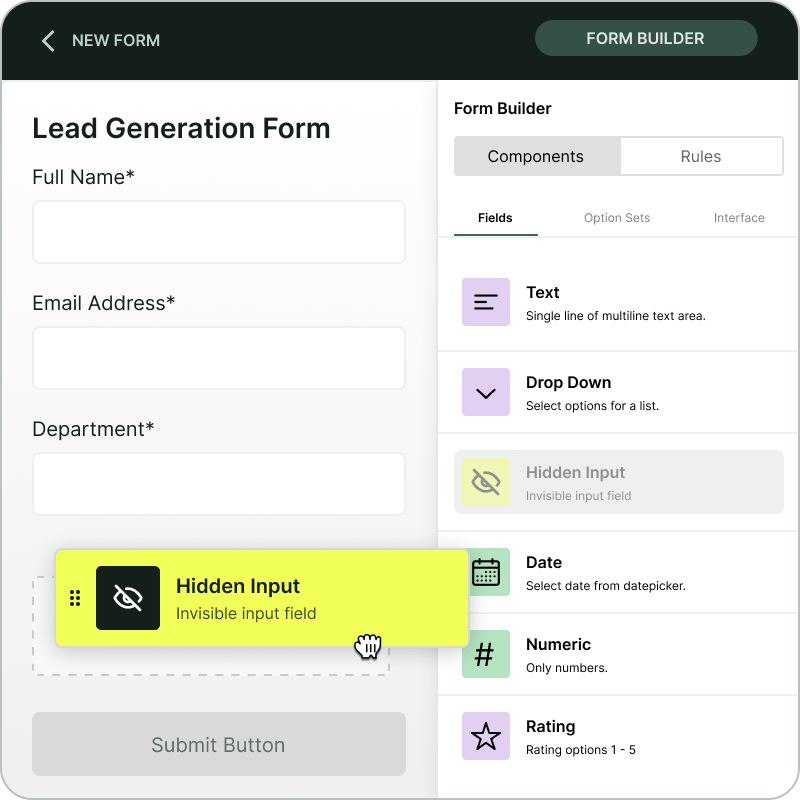
Screenshot of a form builder interface with a highlighted 'Hidden Input' field. Accompanied by text explaining how to install and set up Madlitics by adding hidden fields to capture marketing attribution data.
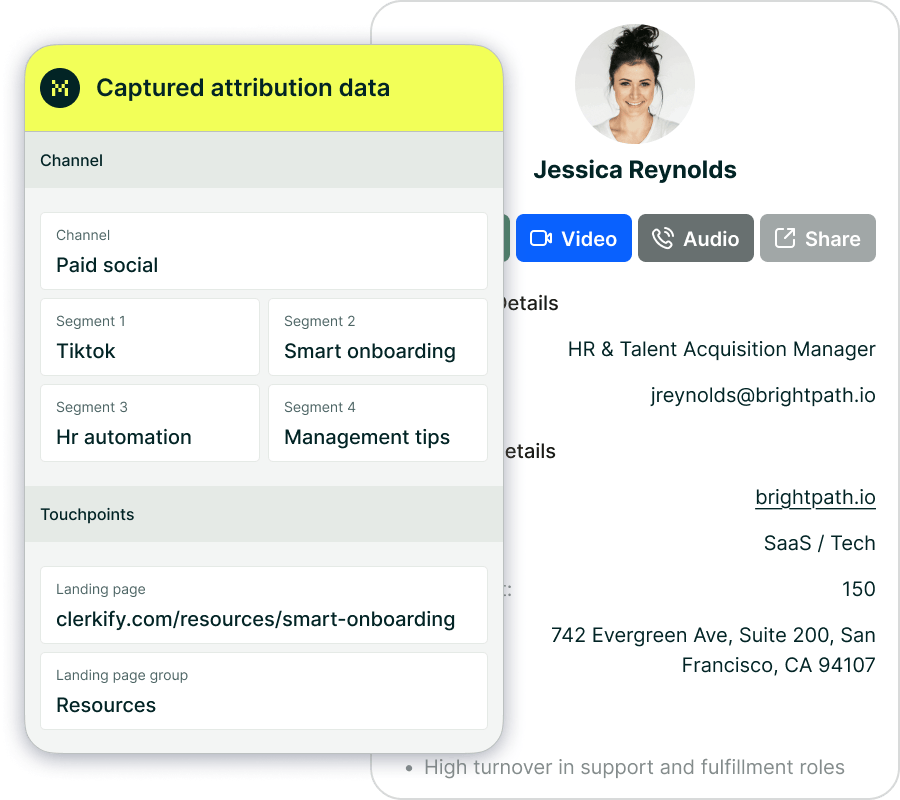
CRM interface showing a detailed view of captured attribution data, including marketing channels, segments, and landing pages. A business profile of a lead is displayed, highlighting how Madlitics enriches lead data for sales and marketing teams.
Graph showing new customer growth from TikTok, Instagram, Snapchat, and Google over time, with social media icons surrounding the chart and a callout for social revenue impact.

How to set up Madlitics with Fluent Forms

Setting up Madlitics with Fluent Forms takes just a few minutes.

Add the lightweight Madlitics script to your WordPress site (either manually or through Google Tag Manager). Then add seven Madlitics Fields to your Fluent Form—these fields automatically capture channel, campaign, and landing-page data for each submission.

Madlitics works with both the free and pro versions of Fluent Forms and automatically detects any form embedded on your site, whether it’s inserted through shortcodes, Gutenberg blocks, or widgets.

To verify your setup, fill out your form and check your submission details—you’ll see Channel and Landing Page fields populate automatically.

For a detailed walkthrough, visit the Fluent Forms integration guide.
To explore each field type, see the Madlitics Fields Value Pairs article.
And for validation best practices, review the Madlitics Testing Overview.

Common Questions

Does Madlitics work with the free version of Fluent Forms?
Yes. Madlitics works with both free and pro versions. Attribution data is captured and passed through your forms automatically—no paid upgrades or extensions required.

Can I capture Google Ads or Meta campaign data?
Absolutely. Madlitics captures click IDs (gclid, fbclid, msclkid) and UTM parameters from your paid campaigns, letting you see exactly which ads and channels are generating leads.

Can I add Madlitics through Google Tag Manager?
Yes. You can install Madlitics with GTM—just make sure your tag fires in the <head> so attribution data is collected before the form loads.

Does it work with multiple form types on the same site?
Yes. Madlitics supports all major WordPress form builders, including WPForms, NinjaForms, and Gravity Forms. It automatically detects and enriches each one independently, keeping your data consistent across tools.

How Madlitics Compares to Other Tools

Most analytics platforms, like GA4, can show you which campaigns drive traffic—but not how those visitors convert once they interact with your forms. Madlitics bridges that gap.

Rather than sending data to another dashboard, Madlitics embeds attribution directly into your Fluent Forms submissions and passes it through to your CRM or analytics tools. The result is reliable, first-touch attribution that’s immediately actionable inside your existing workflows.

Madlitics is form-first, not dashboard-first. It turns your existing Fluent Forms into a complete marketing attribution layer that works quietly behind the scenes—without slowing down your site or adding complexity.

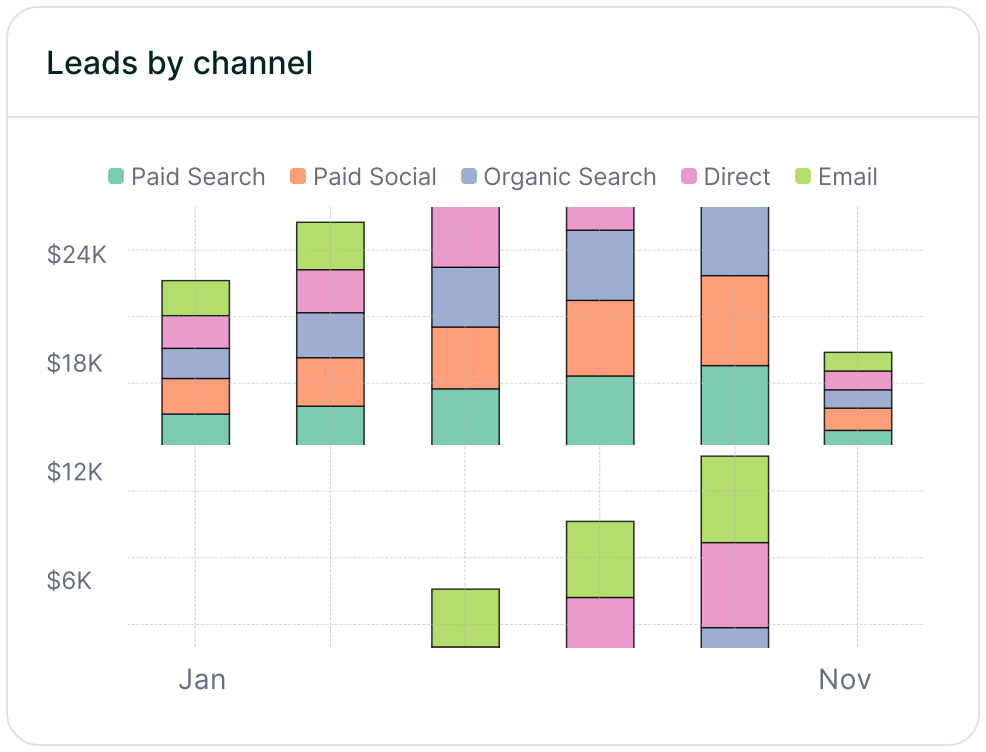
Stacked bar chart showing lead generation by marketing channel over time, comparing sources like Paid Search, Paid Social, Organic Search, Direct, and Email. Helps visualize which channels drive the most traffic.
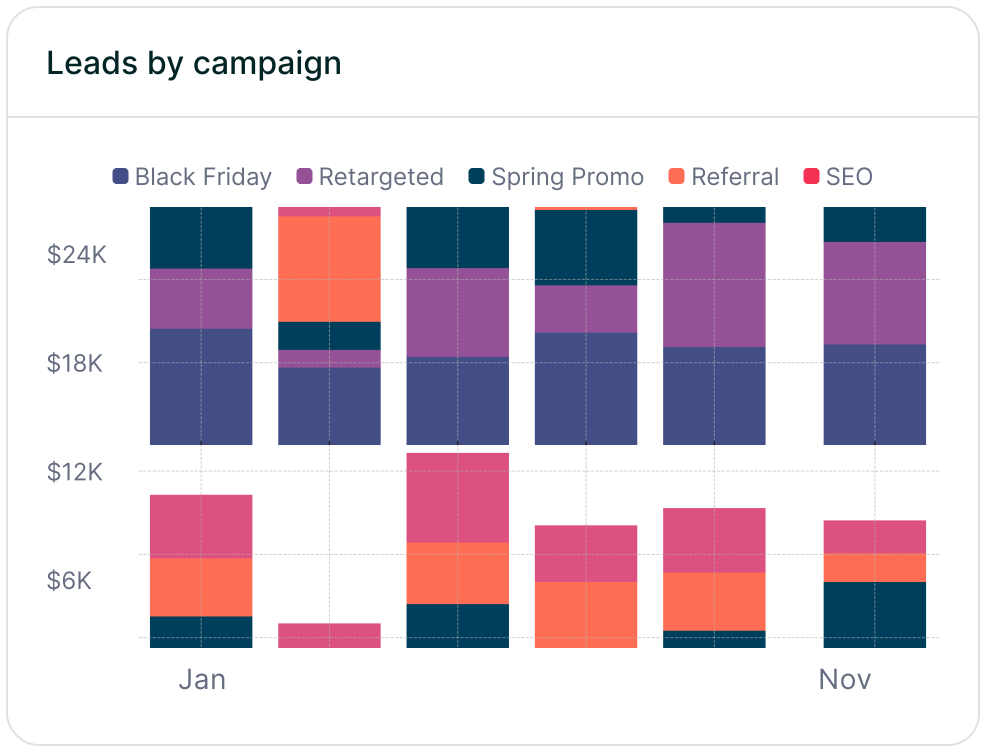
Stacked bar chart illustrating lead volume across different marketing campaigns, including Black Friday, Retargeted, Spring Promo, Referral, and SEO. Highlights trends in campaign effectiveness.
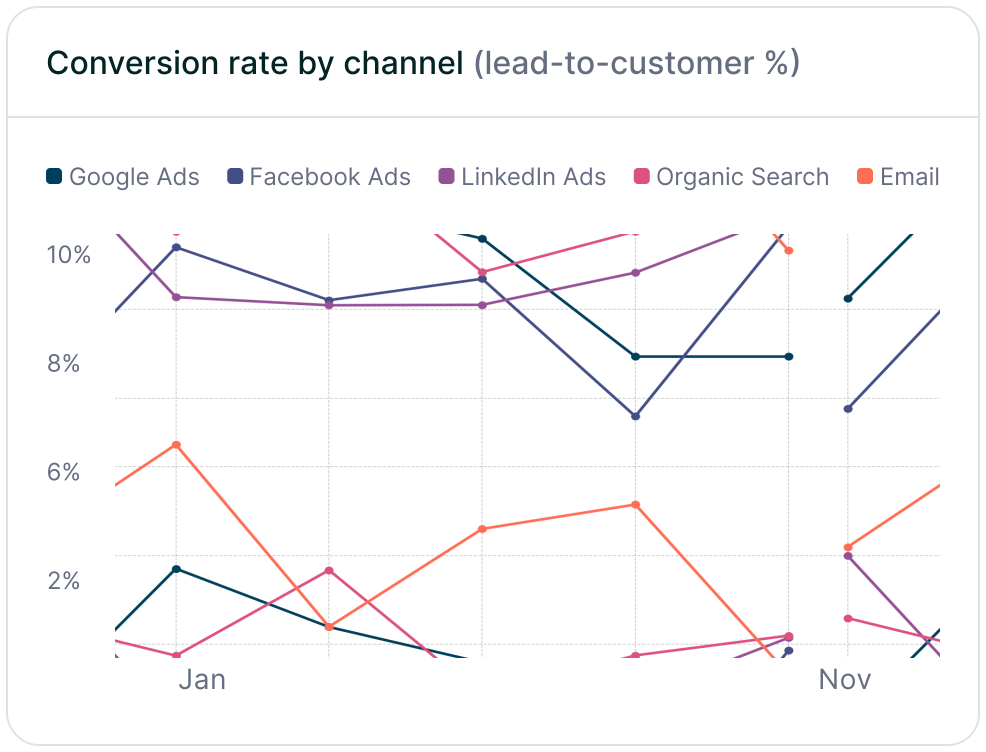
Line chart displaying lead-to-customer conversion rates by channel, comparing Google Ads, Facebook Ads, LinkedIn Ads, Organic Search, and Email. Shows how different sources drive qualified leads over time.
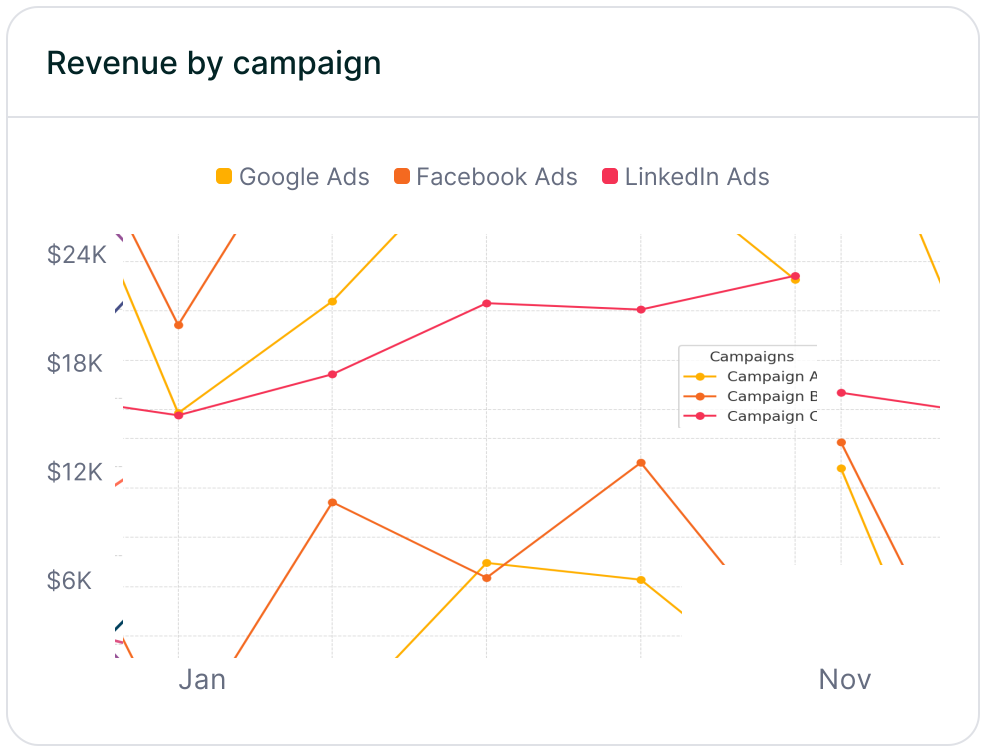
Line chart showing revenue performance by marketing campaign, comparing Google Ads, Facebook Ads, and LinkedIn Ads. Helps identify top-performing and underperforming campaigns.

What's next?

Start capturing complete attribution data in your Fluent Forms.
Follow our integration guide and see how Madlitics connects your marketing channels to real leads and conversions.

Madlitics installs in minutes, runs silently, and gives you clear visibility into which campaigns and channels are actually driving growth—without adding another plugin or analytics platform to manage.

Related articles to get you started with Madlitics

Frequently asked questions

Answers to your top questions about our UTM parameters
Everything you need for reliable lead attribution
Accurate, persistent, and automated tracking — so your campaigns perform at their best.
Performance icon symbolizing marketing campaign effectiveness and results tracking.
Outperforms basic UTM tracking
Madlitics captures, categorizes, and persists attribution data across sessions, giving you a complete, structured view of what’s working in your marketing. Say goodbye to losing attribution when users navigate your site, struggling with formatting inconsistencies, and ingored non-UTM traffic.
Capture icon indicating data collection from various marketing channels and sources.
Capture all traffic
Madlitics categorizes all inbound leads — whether they have UTM parameters or not — so every conversion is accounted for, and you won't miss out on Organic Search, Organic Social, and Referral traffic.
Routing icon representing the flow of marketing data and attribution pathways.
Attribution across pages and sessions
A LinkedIn ad click should be attributed correctly—even if the visitor signs up on a different page later. If someone clicks an ad, browses multiple pages, then submits a form later, Madlitics persists attribution data across sessions, ensuring your reports reflect true performance.
List icon representing structured marketing data, reports, or campaign breakdowns.
Cleaner, more reliable data
Duplicate UTMs and inconsistent formatting break reports and mislead teams. Madlitics cleans and organizes attribution data before sending it to your CRM, giving you accurate insights.
Target icon symbolizing precise audience targeting and marketing campaign focus
See which content converts
Attribution isn’t just about where visitors came from—it’s about what convinced them to convert. By capturing landing page data alongside UTM parameters, Madlitics shows you which blog posts, case studies, or pricing pages drive the most revenue, helping you scale content that works.
Action icon representing campaign execution, optimization, and engagement.
Transform form submissions into actionable insights
Madlitics connects marketing touchpoints to lead generation, ensuring every form submission is fully attributed — optimize ad spend by identifying high-ROI channels, refine messaging based on what content drives engagement, make data-driven decisions with clean, structured reports, and more.