
Digital Marketing
How to track organic traffic sources in forms
Stop Losing 60% of Your Organic Leads – Capture Sources, Landing Pages & Revenue with Simple Attribution
Start a free trial
When someone fills out a form on your website, do you know how they got there?
Tracking organic traffic sources in forms is essential for understanding which SEO and content efforts drive actual leads — not just visits. Without it, you're left guessing whether organic search, social media, or referrals are bringing your most valuable conversions.
Tracking organic traffic sources helps turn vague labels like "Direct" or "Unknown" into actionable insights about what drives conversions. Without this visibility, it's nearly impossible to determine if SEO is outperforming paid campaigns or which content is actually contributing to your bottom line. This clarity is key to refining your content strategy and boosting revenue.
Understanding which specific blog posts, case studies, or pricing pages are driving conversions can completely reshape your content strategy. Instead of relying on traffic volume alone, you can pinpoint high-converting content and replicate its success.
By grouping data by landing page directories - such as /blog or /features - you can see which types of content resonate most with your audience. For instance, you might notice that educational blog posts bring in casual readers, while product-focused pages convert visitors into paying customers. This kind of insight allows you to focus your resources on content that drives results, rather than creating more content that only attracts passive visitors.
But the benefits don’t stop at improving content performance. Tracking organic traffic sources also uncovers revenue opportunities.
Traffic numbers alone don’t mean much if they don’t lead to revenue. By integrating organic attribution data with tools like your CRM or Stripe, you can separate low-quality leads from high-value customers. For example, a blog post might generate dozens of form submissions that never convert, whereas a single case study could bring in fewer leads but ones with a much higher lifetime value.
This connection between organic traffic and revenue enables smarter budget decisions. If your data reveals that SEO consistently outperforms paid ads, you can reallocate budget from underperforming channels to those delivering the best ROI. Unlike ad platform reports, which often overstate their contributions, first-party tracking gives you an unbiased view of how organic channels stack up against paid ones across your entire marketing strategy.
Pinpointing where your organic traffic comes from is no easy task. Many teams face hurdles like broken tracking when users move between pages, missing attribution data during multi-step journeys, and analytics tools that simply can't keep up with how people behave online today.
Tracking tools like UTM parameters or click IDs (e.g., gclid or fbclid) only live in the URL of the landing page. Once a visitor clicks around your site or comes back later to fill out a form, those parameters often vanish. Andrew Page from Automation Strategy Group explains:
"If the cookie doesn't fire before the form submission (ad blockers, cookie consent banners, cross-domain setup, page load timing issues), HubSpot can't connect the dots and will fall back to 'Direct.'"
This disconnect creates major attribution gaps. If tracking scripts fail to link a form submission to the visitor's earlier session, analytics tools default to labeling the source as "Direct Traffic" - even if the person originally found you through organic search. Things get even trickier when users switch devices. For example, someone might discover your content on their phone during a morning commute but later fill out a form on their laptop, breaking the tracking chain entirely.
And then there's the challenge of multi-page navigation. If users explore several pages on your site, it’s easy for tracking data to get lost along the way.
The buying process isn’t linear - it involves multiple touchpoints. On average, consumers interact with three to six different channels before making a purchase. In B2B scenarios, that number can skyrocket to as many as 36 touchpoints.
Here's the problem: most form builders only capture URL parameters from the page where the form loads. Let’s say someone finds your site through organic search, reads a few blog posts, checks out your pricing page, and then submits a form days later. That multi-touch journey is hard to track, and the result is often misattribution.
Christian Rigg, Head of Operations at Eleven Writing, explains the bias this creates:
"Because direct contributions are easier to track, they often get more credit in attribution. This is one reason companies overinvest in paid media and underinvest in organic content."
The complexity of these journeys isn’t the only issue - native analytics tools themselves have built-in limitations.
Many analytics platforms fail to capture the full picture of organic attribution. For example, Google encrypts search terms, which means reports often show "Unknown keywords (SSL)". Social platforms like Instagram and LinkedIn add another layer of difficulty by keeping users within their apps, making external tracking harder. And unless cross-domain and subdomain tracking is set up perfectly, it’s prone to breaking.
Even though studies suggest that 95% of users can be identified with just four data points, these tools often fall short. Without a deliberate effort to store and pass through attribution data at the moment of form submission, many teams are left guessing where their best leads are coming from.
Tracking organic traffic without specialized attribution tools means manually piecing together fragmented techniques. Hidden form fields, Google Analytics 4 (GA4), and Google Tag Manager (GTM) can capture basic source data like referrers or UTM parameters, but each method demands significant custom setup, ongoing maintenance, and faces inherent data loss limitations that make reliable lead attribution nearly impossible at scale.
Hidden fields, or <input type="hidden"> elements, are embedded in forms to capture specific data during submissions. To track organic traffic, you can use JavaScript to identify the referring domain (like google.com or bing.com) and label it as "Organic Search."
One major challenge here is data persistence. UTM parameters vanish as soon as a visitor navigates to another page, which means manual UTM tracking often captures only 20–40% of leads. To address this, you can store the original source data in a browser cookie or local storage, ensuring it's available when the user submits a form - even if that happens several pages later.
Reality check: This requires custom JavaScript on every page, cookie management across sessions, and ongoing maintenance. Even when working, the data remains raw and unnormalized in your CRM — requiring manual cleanup for reporting.
GA4 can track form submissions as events and segment them by organic traffic source, but it requires careful configuration and delivers session-based analytics rather than persistent lead attribution. Start by enabling Form Variables in Google Tag Manager — navigate to Variables > Configure, and turn on form-related options like Form ID, Form Classes, and Form URL. Then create a GA4 Event Tag with a name like generate_lead or form_submission.
Your trigger choice depends on form behavior. The Form Submission Trigger with "Check Validation" ensures tags fire only on successful submissions. Use Page View Trigger for thank-you page redirects, filtered to URLs like /thank-you. The Element Visibility Trigger works best for inline success messages — enable "Observe DOM changes" to catch submissions without page reloads.
Once events fire reliably, build a Free Form Exploration report in GA4. Create an "Organic Search" User Segment where "First user medium" equals "organic," then add dimensions like Event name, First user source/medium, and Landing page alongside Conversions and Total users metrics. Connect Google Search Console for keyword insights. Test thoroughly to confirm only valid submissions trigger your tags.
Important limitation: GA4 excels at session analytics but doesn't automatically persist first-touch attribution into form fields or CRM records. The data stays siloed in GA4 reports, requiring manual export for revenue analysis. For more reliable attribution, GTM can further automate this process but also adds another layer of complexity.
GTM can capture first-touch data from the initial pageview and store it client-side in cookies, then inject that data into hidden form fields at submission time. This goes beyond basic UTM tracking by categorizing untagged traffic — like Google, LinkedIn, or Reddit referrers — into channels such as Organic Search, Organic Social, or Referrals.
As Joseph Deville, a GTM Engineer at Clay Works of Art, explains:
"Most B2B teams run experiments wrong... they're optimizing for clicks instead of revenue".
The reality: This GTM approach preserves first-touch attribution across sessions, but requires ongoing maintenance of custom tags, cookie consent handling, cross-domain fixes, and field mapping. Even when configured perfectly, the data arrives raw in your CRM — needing manual normalization for consistent reporting. GTM gets you close, but it's still a patchwork solution compared to purpose-built attribution.
While traditional tools like GA4 and GTM offer partial visibility, solutions like Madlitics automate full-funnel attribution directly through your forms — saving hours of setup and ensuring complete data accuracy. Manually tracking organic traffic using tools like hidden fields, GA4, or GTM can be a complex and time-consuming process. These methods often face challenges with data accuracy and consistency. Madlitics simplifies this process by automatically capturing organic traffic sources - including organic search, social media, referrals, and direct traffic - without requiring extensive technical setup.
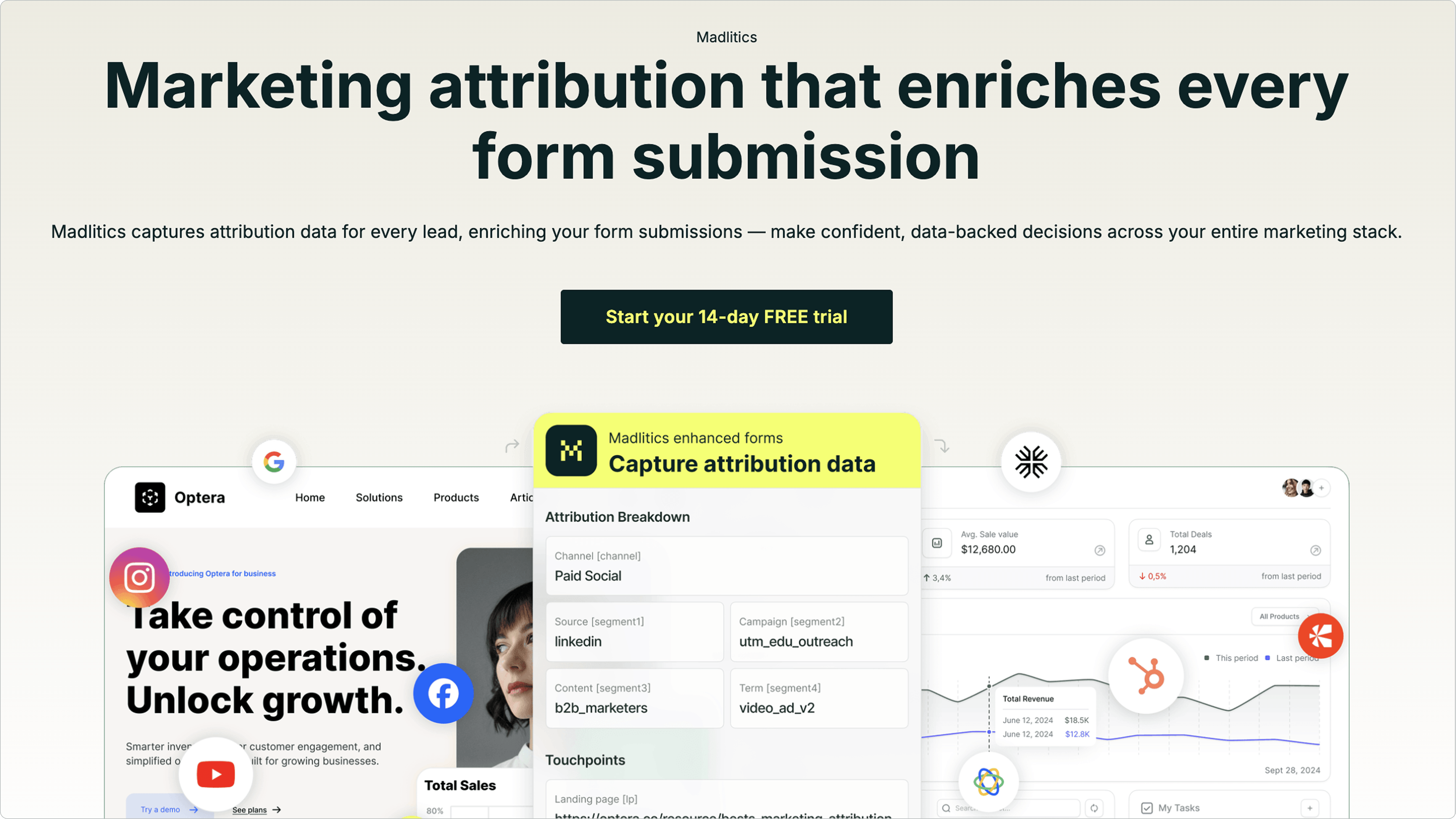
Madlitics removes the hassle of manual tracking with a simple, three-step setup:
<head> section. Alternatively, you can deploy it through GTM. This starts capturing attribution data instantly.channel, segment1, segment2, segment3, segment4, lp, and lpg - in your conversion forms. These fields should be set with default values matching their respective names, such as [channel] for the channel field or [lp] for the landing page field. This setup integrates smoothly with form builders like Gravity Forms, Ninja Forms, Webflow, or even custom HTML forms , as well as CRM lead forms like Hubspot and ActiveCampaign.Madlitics tackles the most common challenges of manual tracking with these standout features:
Madlitics also provides detailed insights into landing page performance. The lp field captures the exact URL where a visitor first entered your site, while the lpg field groups the page into logical categories, such as /blog/ or /features/.
This level of detail allows you to tie conversions back to specific content. For example, instead of just knowing that organic search led to a conversion, you can identify whether a particular blog post or resource page was responsible. Armed with this information, you can refine your content strategy to focus on pages that drive the most leads, turning granular data into actionable insights for optimization.
Madlitics makes it easier to analyze organic traffic data and tie it directly to revenue. With its detailed reports, you can pinpoint which organic channels are delivering measurable results and refine your strategy accordingly.
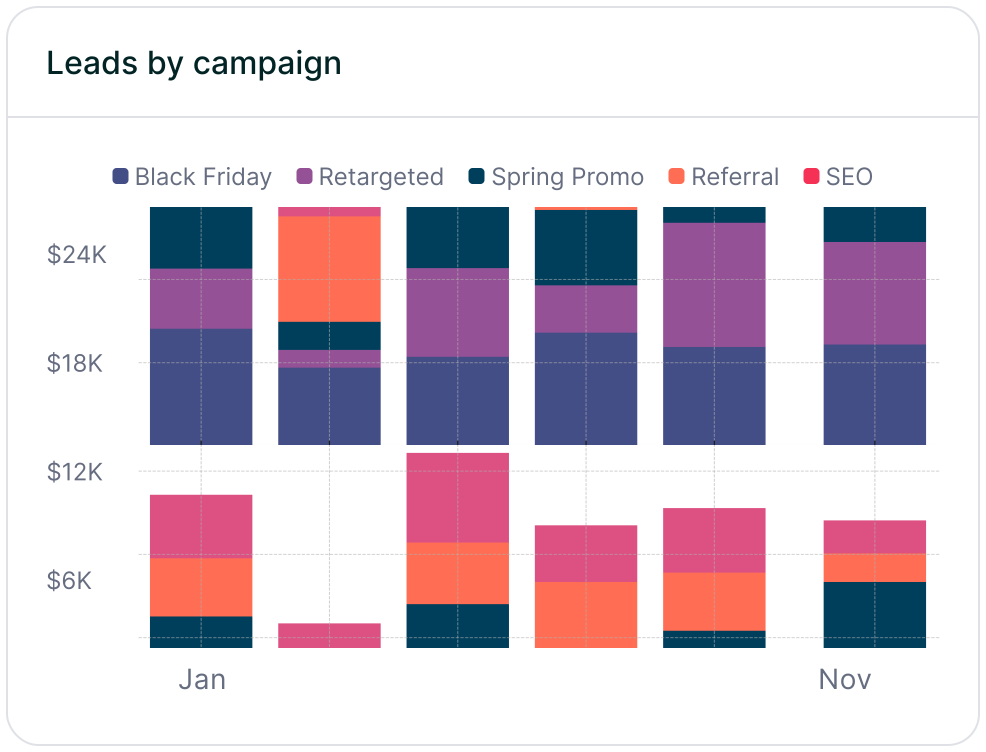
Start by diving into the Leads by Channel report. This report breaks down how Organic Search and Organic Social compare to paid campaigns. It helps you determine if your SEO efforts are outperforming paid ads and guides where to allocate resources more effectively. The Revenue by Campaign report adds another layer, showing which campaigns or organic sources are driving actual sales. This allows you to prioritize organic efforts that result in high-quality leads and conversions.
To dig deeper, analyze landing page performance for precise content attribution. Group reports by landing page or directory (such as /blog versus /features) to identify which pages are driving the most revenue. For example, if a case study or pricing page consistently converts, it’s a clear signal to focus SEO efforts on similar content.
The Conversion Rate by Channel metric is another critical tool. It reveals which channels are bringing in qualified buyers versus unqualified leads. Additionally, syncing Madlitics with your CRM provides even more granular insights, like tracking revenue generated by specific organic keywords or landing pages. Armed with this data, you can fine-tune your strategy to focus on what works.
Use these insights to refine your content and campaign strategies. Identify high-performing content - like blog posts or case studies with strong ROI - and use them as blueprints for future content creation. As Madlitics explains:
"By capturing landing page data alongside UTM parameters, Madlitics shows you which blog posts, case studies, or pricing pages drive the most revenue, helping you scale content that works".
Compare performance across organic networks to see which platforms deliver the best conversion rates. If organic SEO is outperforming paid ads, consider reallocating resources from underperforming campaigns to boost content production in areas that are driving results. This ensures you focus on the channels and campaigns that contribute the most to growth.



Understanding where your organic traffic comes from is key to knowing which SEO and content strategies are actually driving revenue. Without accurate attribution, you might misjudge the impact of your blog posts, case studies, or landing pages. The problem? Manual tracking methods don’t cut it - they only capture a small portion of leads and often fail to maintain session data.
These manual methods lose critical attribution details when visitors navigate away before completing forms, leaving you to depend on unreliable JavaScript solutions. That’s where Madlitics steps in to simplify the process.
For consistent and accurate attribution on every form submission, you need a dependable tool. Madlitics takes care of this by automatically tracking and categorizing all organic traffic - whether it’s from search engines, social media, shopping platforms, or video content. It ensures attribution data is preserved across multiple page visits and even return sessions. Setup is quick and straightforward: just add a code snippet, include seven hidden fields in your forms, and start gathering comprehensive marketing insights in under 10 minutes.
Madlitics provides a clear picture of which content generates high-value leads - not just traffic numbers. By integrating this data with your CRM, you can pinpoint when organic search outperforms paid campaigns and adjust your budget for better growth opportunities.
Try it out with a 14-day free trial - no credit card needed - and see exactly where your most valuable leads are coming from.
Answers to your top questions















