Digital Marketing

Multi-Channel Attribution: How to Measure What Actually Drives Leads and Revenue

Understand how modern buyers convert across multiple touchpoints—and how to capture clean, reliable attribution data that actually ties marketing to revenue.
Attribution is broken

Multi-channel attribution helps you understand which marketing efforts drive conversions by analyzing the entire customer journey, not just the last click. This is critical as buyers interact with multiple touchpoints before making decisions. With shrinking marketing budgets and limited performance data from ad platforms, it’s more important than ever to track and allocate resources effectively.

Here’s how to get started:

  • Audit your tracking setup: Identify and document all customer touchpoints (paid, organic, owned, offline) and ensure tracking tools like UTMs and pixels are functioning correctly.
  • Choose an attribution model: Options include first-touch, last-touch, linear, U-shaped, W-shaped, and data-driven models. The best choice depends on your sales cycle and goals.
  • Standardize your data: Use consistent UTM naming conventions and automate data cleaning to avoid fragmented reporting.
  • Act on insights: Use attribution data to reallocate budgets to high-performing channels and run tests to validate results.

Audit Your Current Tracking Setup

Reviewing your tracking setup is crucial to uncovering gaps and duplicates. Many marketing teams assume their tracking is working perfectly - until they dig into the data and discover issues that make reporting unreliable.

Map Customer Touchpoints

Begin by documenting every point where a potential customer might engage with your brand. These touchpoints include:

  • Paid channels: Google Ads, LinkedIn Sponsored Content, Facebook retargeting.
  • Organic sources: SEO blog posts, social media platforms.
  • Owned channels: Email newsletters, SMS campaigns.
  • Offline interactions: Conferences, trade shows, direct mail.

Modern buyers often interact with brands in non-linear ways, using multiple devices. For example, someone might see a LinkedIn ad on their phone during lunch, search for your brand on their laptop later that evening, and then submit a demo request days later after clicking an email. In fact, over 60% of online transactions involve multiple devices. However, cookie-based tracking often splits these multi-device journeys into fragmented visits.

Create a spreadsheet to document each channel, its tracking method (e.g., UTMs, pixels, QR codes), and how data flows into your systems. For offline events, consider using QR codes that link to unique landing pages or adding a "How did you hear about us?" field to your forms. This can help capture word-of-mouth referrals and partner leads that might otherwise show up as "Direct" traffic.

Once your touchpoints are mapped, the next step is to ensure your tracking data accurately reflects customer interactions.

Validate Tracking Accuracy

After mapping out your touchpoints, confirm that your tracking is accurate across all channels. Start by verifying that data flows correctly into your CRM. Common challenges include identity resolution - where multi-device visits are counted as separate users - and inconsistent UTM naming conventions. For instance, using "Paid-Social" in one campaign and "paid_social" in another will fragment your data, making it harder to analyze overall performance.

A great example of the impact of improved tracking is ClickUp. Between 2021 and 2024, the company transitioned from basic UTM tracking to a more comprehensive attribution system that connected the entire user journey. This change helped them grow from $4 million to $150 million in Annual Recurring Revenue (ARR).

Also, check for duplicate attribution by comparing ad platform reports to your actual revenue. Standardizing lookback windows and eliminating duplicate attributions ensures vendors don’t take credit for overlapping conversions.

Accurate tracking is essential for reliable multi-channel attribution and smarter budget decisions. At Madlitics, we tackle these challenges by capturing attribution data at the point of form submission and automatically normalizing it. Our Persistent Attribution system preserves the full marketing context, even when users navigate across multiple pages before converting. This ensures that every form submission includes clean, normalized data that flows seamlessly into your CRM - avoiding the data loss that can happen when tracking tags misfire.


Choose the Right Attribution Model

Once you've nailed down accurate tracking, the next step is picking an attribution model that aligns with how your customers actually behave. The right model should reflect your sales cycle, the complexity of your customer journey, and your specific optimization goals.

Multi-Channel Attribution Models Comparison Guide

Attribution Model Options

Attribution models vary in how they assign credit to different touchpoints in the customer journey. Here's a breakdown:

  • First-touch attribution: This model gives 100% of the credit to the very first interaction. It's great for understanding how customers discover your brand but doesn't account for the rest of the journey.
  • Last-touch attribution: All credit goes to the final touchpoint before conversion. While this is useful for measuring bottom-of-funnel channels like branded search or retargeting, it often overlooks earlier interactions that sparked interest.
  • Linear attribution: Credit is evenly distributed across every touchpoint. It provides a balanced view but doesn’t highlight which interactions are most influential.
  • Time-decay attribution: This model assigns more weight to touchpoints closer to the conversion, reflecting rising customer intent. However, it can undervalue earlier discovery phases.
  • U-shaped (position-based) attribution: This approach gives 40% credit to both the first and last touchpoints, with the remaining 20% spread across middle interactions. It’s especially useful for lead generation because it rewards both initial discovery and final conversion.
  • W-shaped attribution: Building on the U-shaped model, it assigns 30% credit to the lead creation stage and 10% to other touchpoints. This makes it ideal for complex B2B sales cycles.
  • Data-driven attribution: This model uses machine learning to analyze historical data and assign credit based on the statistical impact of each touchpoint. While it’s considered the most precise, it requires a large volume of data - at least 300 conversions per month - to deliver reliable insights.

These options let you tailor your measurement approach to different customer journeys, making it easier to align your attribution model with your business goals.

Match Models to Business Goals

Your choice of attribution model should reflect your sales cycle and marketing priorities. For example:

  • Short e-commerce cycles: Models like last-touch or time-decay work well since the customer journey is brief and recent interactions carry the most weight.
  • Medium SaaS cycles (2–8 weeks): U-shaped models are a good fit, balancing the importance of early discovery with final conversions.
  • Long enterprise cycles (3–12 months): Data-driven or W-shaped models are better suited to capture the complexity of these extended B2B journeys.

Running multiple models side-by-side can help uncover undervalued channels. For instance, comparing U-shaped and last-touch models might reveal which top-of-funnel efforts are being overlooked. Also, ensure your attribution window matches your sales cycle. If your cycle averages 60 days but your attribution window is only 30 days, you risk missing critical early-stage interactions.

At Madlitics, we track attribution data at the point of form submission, ensuring a complete view of every lead's journey. This clean data lets you apply various attribution models without worrying about missing touchpoints or fragmented paths. With Complete Channel Coverage, we capture all visitor traffic - whether it’s from organic search, social media, referrals, or direct visits - giving you the clarity needed to fine-tune your strategy and reallocate budgets based on actionable insights.

Standardize and Clean Your Marketing Data

Disorganized data throws attribution models off track. When platforms like "Facebook", "facebook", and "FB" are treated as separate entities, your ROI calculations become unreliable, splitting insights across multiple sources and creating confusion.

Create Unified UTM Naming Conventions

A standardized UTM framework is the first step to avoiding fragmented data. Stick to lowercase for all parameters, replace spaces and underscores with dashes, and adopt a consistent structure that conveys context clearly. For example, a campaign tag like utm_campaign=us-social-hoodie-q1 instantly communicates geography, channel, product, and timeframe.

Be specific and avoid redundancy. Instead of utm_source=email&utm_medium=email, opt for utm_source=mailchimp&utm_medium=email to differentiate platform from channel type. Labels like utm_source=social are too vague - use detailed tags like utm_source=instagram-dms or utm_source=linkedin-sponsored to provide clarity. Replace generic campaign names with descriptive ones, such as utm_campaign=lead-gen-webinar-mar26.

Regular audits are essential to catch typos and maintain consistency. A centralized link governance tool can help your team stick to the same rules when creating links. However, even the best naming conventions won’t work if your systems don’t align. Automate data integration across platforms to ensure uniformity.

Connect Systems and Automate Data Cleaning

Once your UTM setup is standardized, automation is key to maintaining clean data. Reliable attribution depends on consistent reporting, and this starts by mapping UTM parameters directly to CRM fields - like HubSpot’s "Original Source" property or custom picklists in Salesforce. This approach creates a unified view of your data and prevents ad platforms from claiming duplicate credit for the same conversion.

Hidden form fields can automatically capture UTM data (such as Channel, Platform, Campaign, Ad Group, and Creative) when visitors fill out forms. This ensures every lead carries attribution details with it. Automated normalization then consolidates variations like "Paid-Social" and "paid_social" into a single category before they enter your CRM, eliminating reporting errors caused by inconsistencies.

At Madlitics, we’ve streamlined this process. Auto-Cleaned Data ensures every form submission is organized and normalized, keeping your marketing channels and campaigns accurate. Plus, our Persistent Attribution feature retains the original source information, even when visitors click around multiple pages before converting. This way, your team never loses sight of the full journey, no matter how complex the path to conversion might be.

Turn Attribution Data Into Action

Data only becomes useful when it influences how budgets are allocated. With tighter budgets, every dollar needs to deliver more, and attribution data pinpoints exactly where those dollars should go. These insights can help shape review schedules and guide how you reallocate spending.

Set Up Regular Review Schedules

Schedule monthly performance reviews to spot trends and address underperforming channels early. Additionally, plan for quarterly strategic audits to reassess your attribution approach. This includes evaluating lookback windows, refining model assumptions, and ensuring your data remains clean and reliable. Be prepared to review your data whenever major changes occur - like launching new channels or noticing shifts in your sales cycle.

Once you've identified trends or anomalies, act on those insights to refine your spending strategy.

Reallocate Budgets Based on Data

Consider shifting 10–15% of your budget from underperforming channels to those that are delivering strong results, and then measure the impact. Attribution data often uncovers a "halo effect", where top-of-funnel efforts, like content marketing, amplify the success of bottom-funnel activities. For instance, one case study revealed that 70% of branded search conversions began with content marketing. This highlights how cutting back on content could disrupt the entire sales pipeline.

Test and Validate Attribution Data

Attribution models are only as reliable as the data behind them. To make sure your ad spend decisions are based on real performance and not misleading artifacts, testing is a must.

Run Incrementality Tests

Incrementality tests help you figure out if a channel is truly driving new conversions or just taking credit for customers who would have converted anyway. How? By pausing the channel and watching what happens to conversions. This method isolates the channel’s real impact. Using holdout groups - audiences deliberately excluded from seeing an ad - can help measure the actual lift compared to organic behavior.

Here’s a practical tip: reallocate about 10–15% of your budget based on the insights from these tests, then track the results. This lets you fine-tune spending without cutting out top-of-funnel channels that might not shine in last-click models but still play a crucial role in building awareness. Brands using advanced attribution and testing techniques have reported a 28% boost in conversion rates.

Conduct Controlled Experiments

Take your testing further by running controlled experiments to compare different attribution models. For example, run a last-touch model alongside a U-shaped model and see how their results differ. These comparisons can expose which channels are being undervalued or overvalued. If one model attributes 5% of revenue to a channel while another attributes 22%, that gap tells you something important: the channel might be contributing more than you thought.

"The differences between model outputs are where the real insights live. Use those gaps to identify systematically undervalued channels." - KISSmetrics Editorial

To round out your analysis, collect offline data too. Add "Where did you hear about us?" fields to your CRM to capture offline interactions. And don’t forget to regularly audit for conversion overlaps when multiple vendors claim full credit. This ensures your data stays clean and trustworthy.

Madlitics multi-channel attribution visualization, showing marketing platforms like TikTok, Instagram, Google, and Facebook. The graphic highlights how different sources contribute to high-performing marketing channels.
1. Add UTM parameters to all inbound links
Any marketing effort that drives traffic — whether it’s a paid ad, an email campaign, or an organic post — should have properly structured URLs that clearly define the visitor’s origin. Setting it up is a straightforward process that starts with ensuring all inbound links include UTM parameters.

A LinkedIn campaign, for example, might link to:
https://yoursite.com/?utm_source=linkedin&utm_medium=paidsocial&utm_campaign=q1_promo
Screenshot of a form builder interface with a highlighted 'Hidden Input' field. Accompanied by text explaining how to install and set up Madlitics by adding hidden fields to capture marketing attribution data.
2. Add hidden fields
Once you’ve added UTM tracking to your inbound links, the next step is to install Madlitics on your site and update your Framer Forms to include hidden fields that will store attribution data when a visitor submits a form automatically. Hidden fields to include:
• Channel (e.g., Paid Search, Organic Social, Direct)
• Segment 1 (Platform name: Google, LinkedIn, Twitter)
• Segment 2 (Campaign name)
• Segment 3 (Ad group, offer name, or post type)
• Segment 4 (Creative type or ad variation)
• Landing page/group (Tracking & first-touch attribution)
CRM interface showing a detailed view of captured attribution data, including marketing channels, segments, and landing pages. A business profile of a lead is displayed, highlighting how Madlitics enriches lead data for sales and marketing teams.
3. Utilize attribution data
With the setup complete, every form submission in Framer now carries full attribution data, ensuring accurate insights into where leads originate. Pass this data to your CRM, analytics tools, or marketing automation platforms to track performance, refine campaigns, and optimize marketing efforts with precision.

Conclusion

Multi-channel attribution helps you allocate your marketing budget more effectively by identifying which efforts truly drive conversions. The strategies outlined - auditing tracking systems, selecting the right attribution model, standardizing data, acting on insights, and validating results - work together to remove the uncertainty that often leads to wasted spending.

A solid attribution strategy turns raw data into actionable insights. When buyers engage with multiple touchpoints before converting, relying solely on last-click models can leave you blind to the early-stage efforts that spark these journeys.

The key is having clean, consistent attribution data. Tools like Madlitics simplify this process by automatically normalizing your marketing data and maintaining attribution across pages and sessions. This means that even if a lead converts days after their initial visit, you’ll know exactly how they found you. With this level of clarity, you can confidently tie your marketing spend to revenue and focus on channels that deliver measurable growth.

To get there, standardize your UTM parameters, use hidden form fields, sync attribution data with your CRM, and integrate testing to fine-tune your strategy. These steps create a unified approach that enhances campaign performance. The payoff? Higher conversions, reduced wasted spend, and more revenue - all backed by reliable data.

Related articles to get you started with Madlitics

Frequently asked questions

Answers to your top questions about our UTM parameters
Put attribution data to work
Sync, analyze, and automate — turn insights into action.
Automation icon indicating hands-free marketing attribution and data flow.
Sync with your CRM
Pass UTM parameters into Salesforce, HubSpot, or ActiveCampaign so your sales team knows exactly where every lead came from — no more guessing.
Analytics report icon, indicating data insights and reporting.
Built smarter reports
Use Google Sheets, Looker Studio, or Airtable to create data-driven reports that reveal which campaigns drive real revenue — helping you make informed budget decisions.
Impact measurement icon, symbolizing marketing effectiveness.
Track revenue impact
Sync UTM data with Stripe, PayPal, or Chargebee to see which campaigns generate paying customers, not just leads — so you can scale what works.
Personalization icon, representing customization features.
Personalize email campaigns
Trigger personalized email flows in Klaviyo, Mailchimp, or ConvertKit based on a lead’s original source — ensuring the right message reaches the right audience.
Visualizing your marketing impact
See how attribution data translates into actionable insights.
Stacked bar chart showing lead generation by marketing channel over time, comparing sources like Paid Search, Paid Social, Organic Search, Direct, and Email. Helps visualize which channels drive the most traffic.
Leads by channel
See how different marketing channels contribute to lead generation over time. Understand which ones drive the most traffic and whether your marketing mix is balanced. Shift your budget toward the highest-performing channels to maximize results.
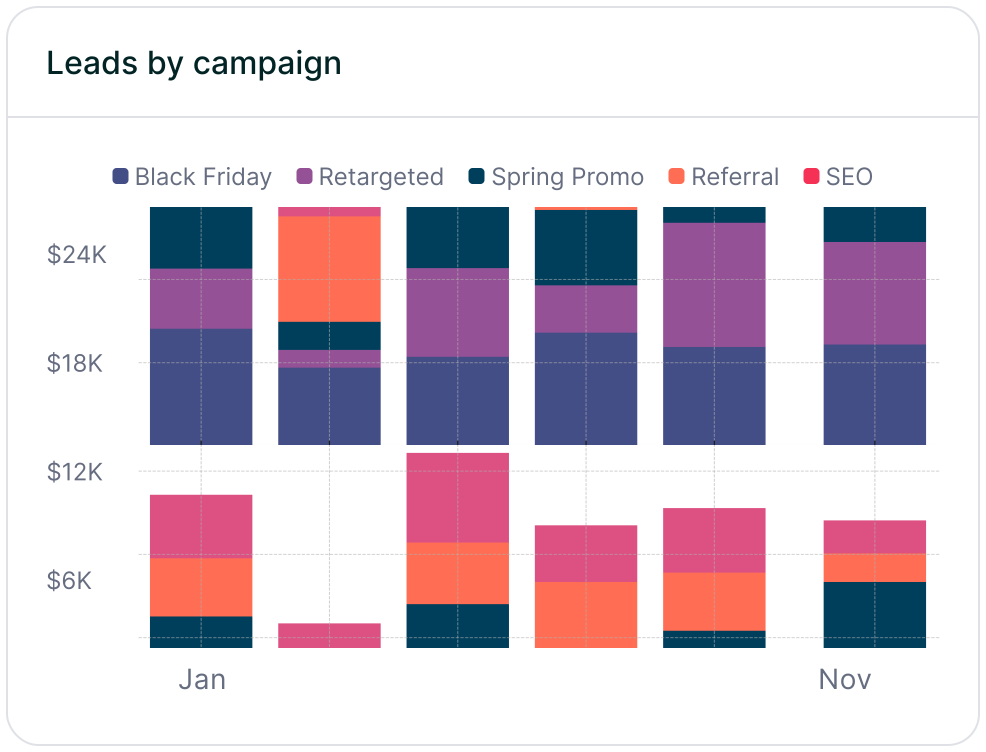
Stacked bar chart illustrating lead volume across different marketing campaigns, including Black Friday, Retargeted, Spring Promo, Referral, and SEO. Highlights trends in campaign effectiveness.
Leads by campaign
Track inbound leads across all campaigns, whether or not they have UTM parameters. Ensure every lead is categorized correctly, including Organic and Referral traffic. Use this insight to refine messaging, targeting, and budget allocation for better performance.
Line chart displaying lead-to-customer conversion rates by channel, comparing Google Ads, Facebook Ads, LinkedIn Ads, Organic Search, and Email. Shows how different sources drive qualified leads over time.
Conversion rate by channel
See which channels convert leads into paying customers. Some bring buyers, while others generate unqualified leads. Focus your budget on what drives revenue.
Line chart showing revenue performance by marketing campaign, comparing Google Ads, Facebook Ads, and LinkedIn Ads. Helps identify top-performing and underperforming campaigns.
Revenue by campaign
Focus your budget on campaigns that drive revenue, not just leads. Identify top performers and optimize underperforming efforts to maximize profitability.
Everything you need for reliable lead attribution
Accurate, persistent, and automated tracking — so your campaigns perform at their best.
Performance icon symbolizing marketing campaign effectiveness and results tracking.
Outperforms basic UTM tracking
Madlitics captures, categorizes, and persists attribution data across sessions, giving you a complete, structured view of what’s working in your marketing. Say goodbye to losing attribution when users navigate your site, struggling with formatting inconsistencies, and ingored non-UTM traffic.
Capture icon indicating data collection from various marketing channels and sources.
Capture all traffic
Madlitics categorizes all inbound leads — whether they have UTM parameters or not — so every conversion is accounted for, and you won't miss out on Organic Search, Organic Social, and Referral traffic.
Routing icon representing the flow of marketing data and attribution pathways.
Attribution across pages and sessions
A LinkedIn ad click should be attributed correctly—even if the visitor signs up on a different page later. If someone clicks an ad, browses multiple pages, then submits a form later, Madlitics persists attribution data across sessions, ensuring your reports reflect true performance.
List icon representing structured marketing data, reports, or campaign breakdowns.
Cleaner, more reliable data
Duplicate UTMs and inconsistent formatting break reports and mislead teams. Madlitics cleans and organizes attribution data before sending it to your CRM, giving you accurate insights.
Target icon symbolizing precise audience targeting and marketing campaign focus
See which content converts
Attribution isn’t just about where visitors came from—it’s about what convinced them to convert. By capturing landing page data alongside UTM parameters, Madlitics shows you which blog posts, case studies, or pricing pages drive the most revenue, helping you scale content that works.
Action icon representing campaign execution, optimization, and engagement.
Transform form submissions into actionable insights
Madlitics connects marketing touchpoints to lead generation, ensuring every form submission is fully attributed — optimize ad spend by identifying high-ROI channels, refine messaging based on what content drives engagement, make data-driven decisions with clean, structured reports, and more.