See Exactly Which Channels Drive Real Revenue


The core challenge is that not all leads turn into paying customers. Revenue attribution shows which channels bring in profitable customers, helping you allocate your budget with confidence instead of guesswork. The goal isn't to count clicks — it's to connect marketing activity to money in the bank.
Most analytics tools are built around sessions and pageviews, not revenue. That gap between "a user visited from a Facebook ad" and "that user became a $4,000 customer three months later" is where attribution breaks down for most teams.
The common culprits:
Solving these problems requires a combination of disciplined tagging, the right tooling, and CRM integration.
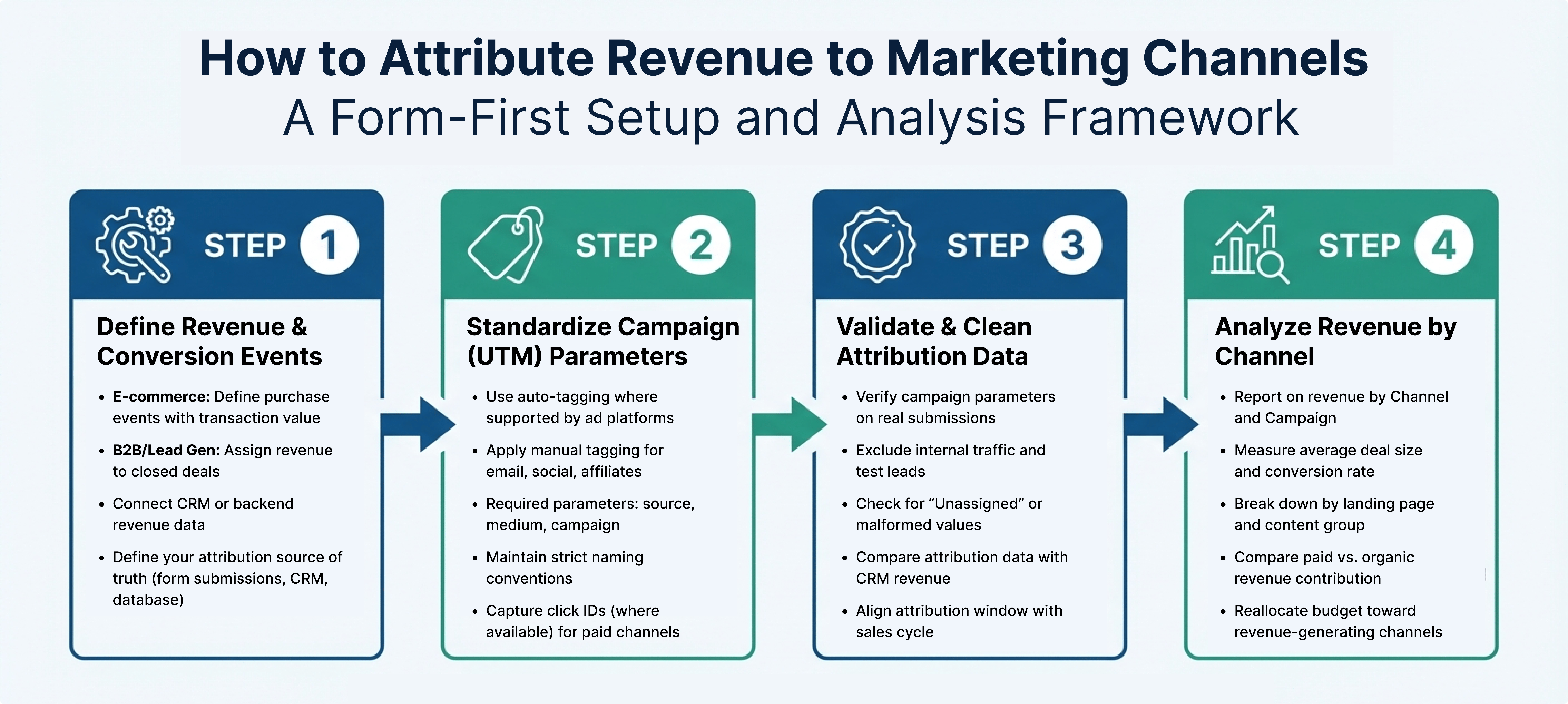
The process in simple terms:

Every paid, social, and email link you share should include UTM parameters so you know exactly where visitors came from. The three essentials are:
utm_source — the platform (e.g., linkedin, facebook, newsletter)utm_medium — the channel type (e.g., cpc, email, organic)utm_campaign — the specific campaign (e.g., q2_launch, spring_sale)For example, a Facebook ad promoting a spring sale might use:utm_source=facebook, utm_medium=cpc, utm_campaign=spring_sale
Consistency matters more than you'd think. Facebook and facebook will appear as two separate sources in your reports. Establish a naming convention and document it somewhere your whole team can reference.
For Google Ads, auto-tagging handles this automatically via GCLID identifiers. For everything else — social posts, email campaigns, partner referrals — manual UTM tagging is the standard.
Pro tip: When a visitor fills out a form, their UTM parameters should be captured and stored alongside their contact record in your CRM. Without this, you lose the thread between the click and the eventual deal. Madlitics handles this automatically at the point of form submission, so attribution data travels with the lead through your entire sales process.
For e-commerce, this is straightforward — you track completed purchases with transaction values attached.
For B2B and lead generation, it's more nuanced. You need to decide which events carry revenue weight:
The key is feeding real revenue data back into your analytics — not just tracking form fills and calling them conversions. This is where CRM integration becomes essential. When your CRM knows which campaigns sourced which deals, you can calculate true revenue by channel rather than rely on proxy metrics.
For businesses with long or complex customer journeys, persistent attribution is what separates useful data from misleading data. The average B2B buyer takes over 100 days to close a deal — meaning that if a lead is sourced in January and converts in April, a standard analytics setup will often lose the original attribution entirely.
Session-based tracking creates gaps that skew revenue data. When a visitor returns to your site after days or weeks, their session is frequently labeled as "Direct" or "(not set)" — because the tool can't maintain the connection between the original traffic source and the final conversion, especially across multiple sessions or devices.
As Sagar Rabadiya from SR Analytics puts it: "Your CRM is a goldmine of post-click data that GA4 can't see — unless you connect them."
Standard tools also tend to assign the same static value to all conversions regardless of actual deal size, which distorts revenue reporting for anyone with variable deal sizes.
Persistent attribution tracks visitors across multiple sessions using first-party cookies, click IDs, and UTM parameters. Platforms like Madlitics retain this information throughout the entire customer journey — even if the conversion happens weeks or months later.
When a lead fills out a form, their attribution data is stored alongside their contact record in your CRM. Later, when that lead becomes a paying customer, you can trace the revenue back to the original marketing touchpoint. This approach also ensures upper-funnel channels — like display ads or social media — get the credit they deserve, even when they don't drive the final click.
In practice, the results can be significant. One mid-sized B2B SaaS company discovered that campaigns with fewer leads were actually driving higher revenue once they connected their CRM data to their attribution. Adjusting their budget based on those insights led to a 25% increase in total revenue.
Persistent attribution works best when paired with clean, normalized data. Labels like "Unassigned", "(not set)", or inconsistent campaign names make it nearly impossible to compare performance across channels — and they're more common than most teams realize.
Ryan Koonce, CEO of Attribution, puts it plainly: "The primary problem that most marketers run into is they've actually never seen attribution that works."
Data normalization ensures every form submission captures consistent, accurate attribution details — eliminating the need for manual cleanup. Madlitics handles this automatically at the point of form submission, which is especially valuable for teams managing long sales cycles where connecting early touchpoints to downstream revenue requires ongoing data integrity.

Once tracking is in place, the analysis is where the real value shows up. You're looking for:
Linking traffic source data with landing page performance gives a clear picture of which pages generate the most revenue for each channel. You might find, for instance, that a paid search campaign converts significantly better when visitors land on a dedicated page rather than a general content page.
If you're in B2B, storing UTM parameters in your CRM alongside contact records allows you to link closed deals back to their originating landing pages — giving you a complete view from first click to closed deal.
Don't just look at total revenue — dig into the quality of each channel's performance. A channel with lots of transactions but low average order values might be a candidate for upselling. Channels with high ad spend but low revenue could indicate inefficient budget allocation worth revisiting.
Some channels won't drive the final click but play a crucial role in assisting conversions. Comparing last-click against data-driven attribution models can reveal channels that are being systematically undervalued.
As Gavin Hall from Magnet puts it: "Attribution models aren't neutral. They are value judgments, dressed up as math."
For B2B businesses with an average lead-to-close time over 90 days, extending your attribution window is important to capture those early touchpoints accurately. And if you're still seeing "(not set)" or "Unassigned" in your reports, treat it as a signal — tracking gaps that need fixing before drawing any conclusions.
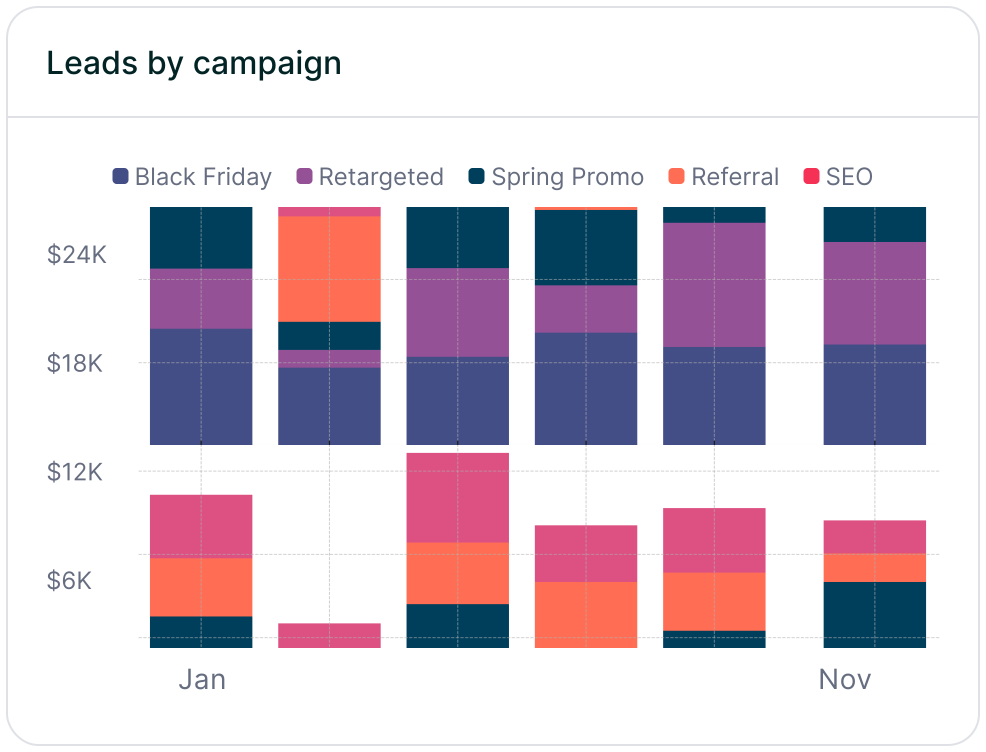
Understanding where your revenue comes from changes how you allocate your budget. The channels generating the most leads are often not the ones closing the most deals. Shifting focus from lead volume to actual revenue can reveal those gaps — and reshape your priorities.
The case for this approach is straightforward: reallocating budget based on revenue-focused data, rather than lead volume, can materially improve overall marketing ROI. The channels that look less exciting on a leads dashboard sometimes turn out to be your most valuable.
Effective revenue attribution comes down to three things working together: persistent attribution, clean data, and CRM integration. Persistent attribution keeps the original source connected across long sales cycles. Clean data eliminates the "(not set)" noise. And CRM integration connects online behaviors to offline revenue — closing the loop.
Without these elements, budget decisions are based on incomplete or misleading data.
Madlitics is built to bridge these gaps. It ensures every form submission carries full marketing context — original source, landing page, campaign details — and connects that data to revenue through your CRM. Upper-funnel channels get the credit they deserve, even when they don't deliver the final click.

https://yoursite.com/?utm_source=linkedin&utm_medium=paidsocial&utm_campaign=q1_promo

To improve your revenue attribution, start by implementing a few key strategies:
Additionally, configure your attribution model to data-driven attribution. This method distributes credit based on each channel’s actual contribution, rather than relying on arbitrary rules. For businesses with longer sales cycles, using systems with persistent attribution is crucial, as GA4’s default window of 30 to 90 days may not be sufficient.
Madlitics offers a 14-day free trial (no credit card required) to help you gain insights into where your best leads come from and which campaigns drive real growth. With a simple code snippet and seamless CRM integration, you’ll have access to detailed reports that can guide smarter marketing investments.