Referral Traffic Attribution Best Practices


Referral traffic is any visit to your website from an external link (excluding search engines or direct entries). Marketing attribution is critical for understanding which sources drive results, optimizing your marketing budget, and improving ROI. Here’s what you need to know:
utm_source, utm_medium, etc.) to track links and maintain consistency. Tools like URL builders and capturing attribution data in form submissions can help minimize data loss.Accurate referral attribution connects your marketing efforts to measurable results. By following these practices, you can identify top-performing channels, reduce wasted spend, and drive growth with confidence.
Getting started with referral tracking means using UTM parameters on your URLs. These parameters help you identify where your traffic is coming from and include:
utm_source: Identifies the platform or tool (e.g., "facebook" or "partner-site").utm_medium: Specifies the type of channel (e.g., "referral", "email", or "cpc").utm_campaign: Tracks the specific promotion (e.g., "spring_sale_2026").utm_content: Differentiates between links or A/B test variants.utm_term: Used for paid keywords or specific calls-to-action (CTAs).Keep in mind that both utm_source and utm_medium are required. If utm_medium is missing, analytics tools might ignore utm_source altogether. To ensure clean and accurate data, standardize your UTM naming conventions across all campaigns.
Why is standardization so important? Analytic platforms are case-sensitive, meaning "Facebook" and "facebook" will show up as two separate sources in your reports. Proper UTM tagging can improve attribution accuracy by 47% and reduce wasted ad spend by 35%. To avoid issues, stick to lowercase letters, replace spaces with dashes or underscores, and skip special characters. As Juuso Lyytikkä, VP of Growth at Funnel, explains:
"Having a good analytics setup (with proper UTM parameters) is the cornerstone of a successful marketing program".
To avoid mistakes and maintain consistency, use a URL builder tool like the Madlitics Campaign URL Builder. These tools minimize human error and guarantee proper formatting for all your campaigns. However, avoid adding UTM parameters to internal links, such as homepage banners or navigation menus. Doing so ends the current session and starts a new one, which can overwrite the original referral source. If you're using server-side redirects, ensure they preserve query parameters to avoid losing UTM data.
Another key step is to implement a few form fields, hidden from your customers, on your website. These fields can capture UTM data, referrer URLs, and landing page details when someone submits a form. With browser privacy restrictions causing 40–60% of attribution data loss, hidden fields that collect nine or more data points can help fill the gaps. Use a tool like Madlitics to automatically populate these fields when the page loads, ensuring the original source information stays intact.
Consistency is critical for accurate tracking. Keep a shared document to log all UTM combinations, campaign launch dates, landing pages, and team responsibilities. This prevents duplication and ensures everyone is on the same page. Regularly audit your analytics reports - weekly or monthly - to catch errors like misspelled parameters or inconsistent naming conventions. As CloudKettle advises:
"Monitor your UTMs consistently. Schedule monthly or weekly reviews of your Analytics and Salesforce reports. This makes it easier to spot and quickly fix any misspelled or incorrectly tagged UTMs".
Finally, validate your CRM integration. Map hidden form fields to specific CRM custom fields, like Salesforce picklists or HubSpot properties, so that attribution data flows seamlessly throughout the sales process. Skipping this step can corrupt 30–40% of your attribution workflows. Regularly test form submissions to confirm that UTM parameters are being captured and transferred correctly, ensuring no data is lost along the way. Reliable data collection is the foundation of accurate attribution and effective marketing.
Once you've set up UTM parameters and consistent tracking, the next step is making sure your data stays actionable. Browser privacy rules like Intelligent Tracking Prevention (ITP) and Enhanced Tracking Protection (ETP) can wipe out referrer data within 24 to 48 hours. If you're not capturing attribution data at the exact moment someone submits a form, you could lose 40% to 60% of it before it ever reaches your CRM. Here's how you can ensure your referral data remains intact at the critical point of form submission.
Hidden fields in forms are a game-changer. These fields automatically store UTM parameters, referrer URLs, and landing page details when someone submits a form. This approach ensures you're capturing data right at the moment of conversion, reinforcing your tracking efforts.
At Madlitics, they use Complete Channel Coverage to categorize all traffic sources - whether it's organic search, social media, referrals, or direct traffic - even when UTM parameters are missing. This ensures no conversion gets left out.
Madlitics also employs Persistent Attribution, which holds onto referral data across multiple browsing sessions. For example, if someone clicks a referral link but takes a detour through several pages before submitting a form, the original referral source still gets the credit. As they explain:
"Madlitics captures, categorizes, and persists attribution data across sessions, giving you a complete, structured view of what's working in your marketing".
This method addresses a common issue where a lead's original source is replaced by "direct" or "none" simply because their journey to conversion was longer than usual.
Raw referral data can be messy and inconsistent. You might see typos like "paidsoical" instead of "paid-social", inconsistent capitalization like "Facebook" versus "facebook", or duplicate UTMs cluttering your reports. This kind of fragmentation makes it tough to get a clear view of your marketing efforts.
Madlitics solves this with Auto-Cleaned Data. They standardize referral information before it even hits your CRM. This eliminates the need for tedious manual cleanup and ensures your channels and campaigns are accurately represented in your reports. Faye Thomassen, Head of Marketing at Mediahawk, emphasizes the importance of this:
"Strategically managing your referral channels is all about building a clearer picture of the leads coming from each source. With the right data, you can see what's generating genuine engagements, what's not performing, and where you can spend your marketing budget more effectively".
By cleaning and organizing referral data, you lay the groundwork for detailed insights into landing page performance.
Accurate data capture and cleanup pave the way for preserving landing page details, which adds another layer of clarity to your attribution efforts. Knowing a lead came from a referral is helpful, but understanding which specific page convinced them to convert is even more valuable. This connects your lead generation efforts directly to the content that works - whether it’s a blog post, a case study, or a pricing page.
Madlitics ensures this connection by preserving Landing Page Insights for every submission. Instead of relying on surface metrics like page views, you can link conversions back to the exact pages and paths that drove them. This is especially critical given that hidden fields capturing 9 or more attribution data points (like landing page and referrer) can prevent 40% to 60% of data loss caused by browser privacy restrictions.
As Madlitics puts it:
"Attribution isn't just about where visitors came from - it's about what convinced them to convert".

Once you've gathered clean referral data at the point of form submission, the next step is deciding how to assign credit for conversions. Your choice of attribution model plays a big role in shaping how you evaluate campaign effectiveness, allocate budgets, and identify what’s driving growth. Below, we’ll break down some common models to help you make the best decision.
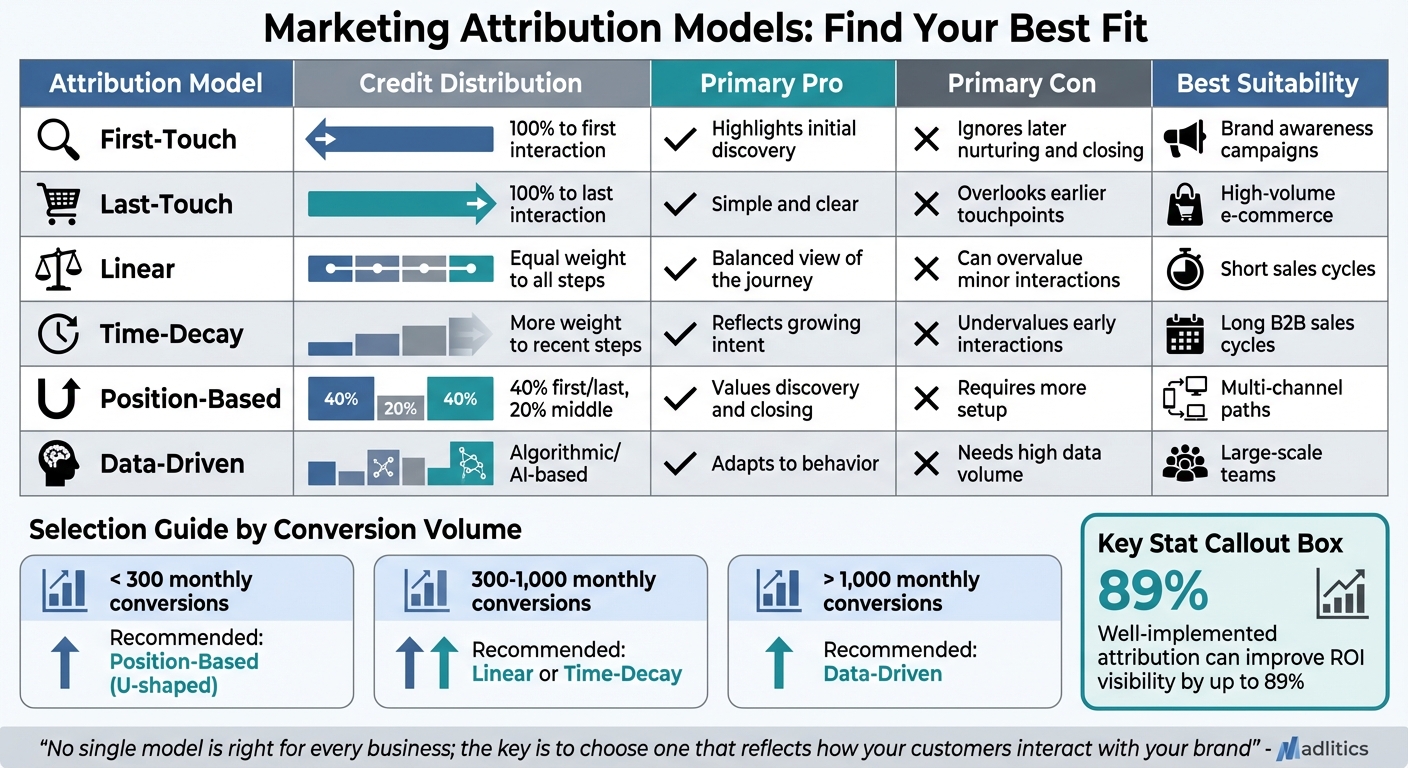
Attribution models differ in how they distribute credit across customer touchpoints. For example, first-touch attribution gives 100% of the credit to the very first interaction. This is perfect for measuring how referrals initially discover your business, making it a good fit for brand awareness efforts. On the other hand, last-touch attribution assigns all the credit to the final interaction before a conversion. While this approach is simple and aligns neatly with performance metrics, it tends to ignore earlier interactions that helped build intent.
Linear attribution spreads credit equally across all touchpoints in the customer journey, offering a more balanced perspective. However, it may overemphasize less impactful interactions in longer referral paths. Time-decay attribution, by contrast, gives more weight to touchpoints closer to the conversion event, making it especially useful for long or complex sales cycles often seen in B2B settings.
Another model, position-based (U-shaped) attribution, assigns 40% of the credit to the first and last interactions, with the remaining 20% split among middle touchpoints. This approach recognizes the importance of both the "introducer" and the "closer". Finally, data-driven attribution uses machine learning to assign credit based on actual user behavior, rather than predefined rules. This model is the default in Google Analytics 4 (GA4).
Choosing the right model starts with clean, accurate data. With this foundation, you can align your model selection with your business goals.
The best attribution model for your business depends on factors like conversion volume, the length of your sales cycle, and your overall objectives. For businesses with fewer than 300 monthly conversions, position-based (U-shaped) models work well by capturing both discovery and closing touchpoints. If you’re seeing between 300 and 1,000 conversions per month, linear or time-decay models provide a broader view. For businesses with over 1,000 conversions monthly, a data-driven model becomes viable.
For B2B companies with long sales cycles and multiple decision-makers, time-decay or custom-weighted models are ideal. E-commerce businesses often benefit from position-based models, as these highlight both the initial attraction point and the final step before purchase. Meanwhile, product-led growth (PLG) companies should lean on multi-touch models that incorporate in-product usage data alongside acquisition metrics.
Take Fatty15 as an example. When scaling, they encountered issues with "Direct Traffic" misattribution and overlapping conversion claims from ad vendors. This led to inflated revenue reports. By centralizing their data and standardizing their lookback windows, they doubled their marketing budget while maintaining positive cash flow.
As Madlitics wisely notes:
"No single model is 'right' for every business; the key is to choose one that reflects how your customers interact with your brand".
A well-implemented attribution system can improve ROI visibility by up to 89%. To achieve this, it’s crucial to standardize lookback windows across tools. This prevents multiple vendors from claiming credit for the same sale, a common issue in attribution. In GA4, the default lookback window is 90 days, though you can adjust it to 30 or 60 days. By combining technical accuracy with thoughtful model selection, you’ll maximize your ROI and make smarter decisions.
Once you've chosen the right attribution model, the next step is refining your setup to gather more precise data over time. Tweaking tracking windows, testing campaigns, and enhancing data collection methods can significantly boost the accuracy of your referral insights.
Short attribution windows often miss conversions that happen later in the customer journey. For example, retail advertisers may lose out on 35% of conversions when using a seven-day window instead of a 30-day one. Similarly, only 53% of app installs occur within the first seven days for on-device campaigns.
The ideal window length depends on your sales cycle. Fast-paced e-commerce businesses might opt for a 7–14 day window, while B2B companies or products with longer consideration periods may need 30 to 90 days. For financial services, a 6–12 week window might be more appropriate.
Dor Birnboim, US VP of Strategic Partnerships at ironSource, explains:
"A 30-day or longer attribution window is recommended for on-device channels because it allows advertisers to attribute all their installs per campaign and understand true performance".
To determine the best window for your business, analyze your CRM data to identify the average time from the first referral to a closed deal. Set your attribution window accordingly. You can also run side-by-side reports with different window lengths - like seven days versus 30 days - to compare how attributed conversions and return on ad spend (ROAS) shift.
Once you've set the optimal window, fine-tune your campaigns with targeted testing to further improve tracking performance.
Accurate and clean data is essential. Regularly audit your tracking setup to ensure UTM parameters, pixels, and server-side integrations are functioning as intended.
Use A/B testing to evaluate changes in ad copy, landing pages, and campaign configurations. This helps pinpoint the variations that yield the highest conversion rates. Additionally, monitor conversion lag - the time it takes for referral clicks to generate revenue. For high-value brands, 30–50% of customers may remain in the funnel for over 90 days before converting.
Pay attention to assisted conversions, which highlight channels serving as critical touchpoints in the customer journey. A high rate of assisted conversions suggests that some referral sources play a significant role mid-funnel but might be undervalued by last-click models. Use this information to identify your top advocates - those who consistently bring in high-quality, long-term customers rather than just high volumes.
Jack Browning from Northbeam emphasizes:
"Attribution is only valuable if the insights inform real actions. Some teams treat it as a reporting metric instead of a strategic tool, which means the data never drives smarter budgeting".
With reliable tracking, you can reallocate budgets from underperforming referral partners to those driving meaningful results. Studies show that over 40% of digital ad spend is wasted due to inefficient strategies and limited data insights.
For situations where client-side tracking falls short, consider server-side tracking.
Browser restrictions and ad blockers can lead to significant data loss in client-side tracking. With around 43% of internet users globally using ad blockers, traditional client-side pixels can lose 10–30% of conversion data. Server-side tracking (SST) shifts data collection to a dedicated server, bypassing these blockers.
While browsers like Safari limit third-party cookies to seven days or less, SST enables the use of first-party cookies that can last 180 days to two years, ensuring more complete referral attribution. Businesses that adopt SST often experience a 20–40% increase in tracked conversions and user interactions. For Shopify stores, the boost is typically around 25–35%.
SST also enhances website performance by reducing browser-side JavaScript load by 60–80%, which results in faster page loads and improved Core Web Vitals. Even a 100-millisecond improvement in page load time can increase e-commerce conversion rates by 1–3%.
To implement SST effectively, ensure every referral click generates a unique identifier (click_id) stored on the server. This allows future conversions to be tied back to the original referrer. Route tracking requests through a first-party subdomain (e.g., tracking.yourdomain.com) to ensure browsers treat cookies as first-party, maintaining session continuity across devices and platforms.
Alistair Pike, Growth Strategist at Tracklution, highlights:
"Server-side tracking is no longer just a technical upgrade. It's a marketing advantage".
Madlitics offers an approach that captures attribution data at the point of form submission, maintaining attribution across sessions. By combining server-side reliability with form-based tracking simplicity, it provides a complete view of referral traffic without requiring overly complex technical setups. This method helps recover lost conversion data while ensuring the entire referral journey is captured.


https://yoursite.com/?utm_source=linkedin&utm_medium=paidsocial&utm_campaign=q1_promo

Referral attribution done right connects every marketing effort to revenue, helping you allocate budgets with precision. Yet, 73% of marketers face challenges in analyzing referral source performance, which leads to an average annual loss of $42,000 on traffic that doesn’t deliver results.
The key practices outlined here - standardizing UTM tags, gathering consistent data, selecting the right attribution model, and refining your approach - take the guesswork out of marketing. In fact, focusing on strategic UTM analysis can boost attribution accuracy by 47% and cut wasted marketing spend by 35%. Tools like Madlitics, which capture attribution data during form submissions and maintain it across sessions, can further fill gaps caused by browser restrictions and privacy settings. This kind of integration ensures your marketing decisions are rooted in solid data.
As Peter Drucker famously said:
"Unless you can measure the impact of your marketing, you can neither improve it nor use it as proof of your work".
Accurate attribution transforms marketing from reactive spending to proactive growth. It allows you to pinpoint top-performing channels, fine-tune campaigns based on what drives conversions, and invest in areas that directly impact revenue.
Clear referral attribution doesn’t just improve your marketing - it can also triple your chances of securing more budget and executive buy-in. No matter your industry or sales cycle, the right attribution setup gives you the confidence to experiment, scale, and make decisions grounded in verified insights - not guesswork.
Stick to the basics: use clean UTM parameters, leverage hidden form fields to track attribution data, and perform regular audits to ensure consistency. With these practices, you’ll gain a dependable view of referral traffic, empowering you to make smarter, data-driven decisions across your marketing efforts.